
Flight Training exercises (Closed Beta for one or 2 weeks)
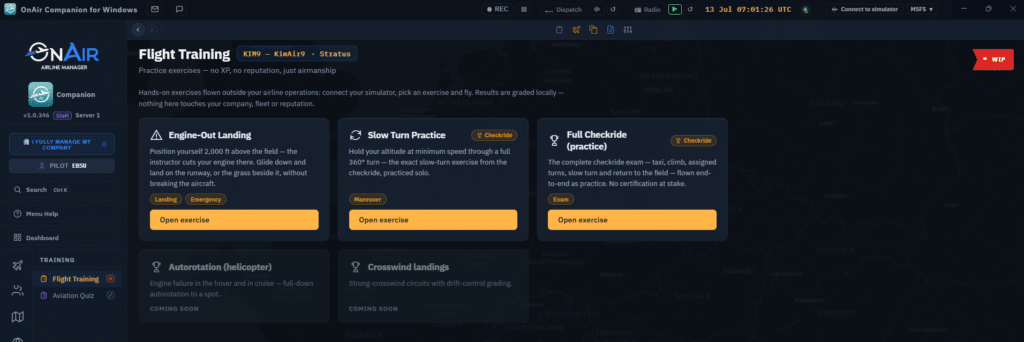
There’s a new Flight Training page, with practice exercises with no XP and no reputation on the line, just airmanship:
- Engine-Out Landing: the instructor cuts your engine 2,000 ft over the field; glide down and put it on the runway (or the grass beside it) without breaking anything.
- Slow Turn Practice: hold your altitude at minimum speed through a full 360°, the exact slow-turn from the checkride, flown solo.
- Full Checkride (practice): the complete exam, taxi to landing, end-to-end, with nothing at stake.
It’s live for Closed Beta testers now, with more on the way (autorotation, crosswind landings…). If testing goes smoothly, we expect it to reach Open Beta (everyone) in a few weeks.
Also new in Closed Beta
- Controller bindings: a new Controls tab to map Companion actions (spoken weather, briefings, radio…) straight to your joystick buttons.
- X-Plane now gets in-sim 3D scenery injection (rescue, sightseeing & world objects), just like MSFS.
Just opened up to everyone (Open Beta)
A few features graduated out of testing, no access code needed anymore:
- Checkride: sit your class-rating exams in-flight, certificate granted on a pass.
- In-flight medical emergencies: opt-in, off by default (switch it on in Settings).
- FBO logistics jobs: generated from your own FBOs, now a full source in Company Jobs.
Companion vs WPF: see exactly what’s where
Wondering whether a feature lives in the Companion yet, or still only in the classic WPF client? We put together a one-page overview: every feature, and whether it’s available in Open Beta, Closed Beta and/or WPF, including where the Companion already goes beyond WPF, and the handful of things WPF still does best.
Companion ↔ WPF Feature Availability
Remember: both clients share the same account and company. Fly WPF in the morning, the Companion in the afternoon, nothing to migrate. And WPF stays fully supported for as long as you’re using it.