For pilots and managers who want the exact rules — why an airport is Size 3, what an FBO really costs, how your score and your pay are calculated. Open it whenever a number surprises you.
New to OnAir? Start with the OnAir Academy. Looking for a screen or a button? See the OnAir Reference.
Chapter 01
Airports
Why is this airport Size 3 and that one Size 5? Why does one airport open at 06:30 and another at 04:00? Why did two nearby airports merge into one in OnAir?
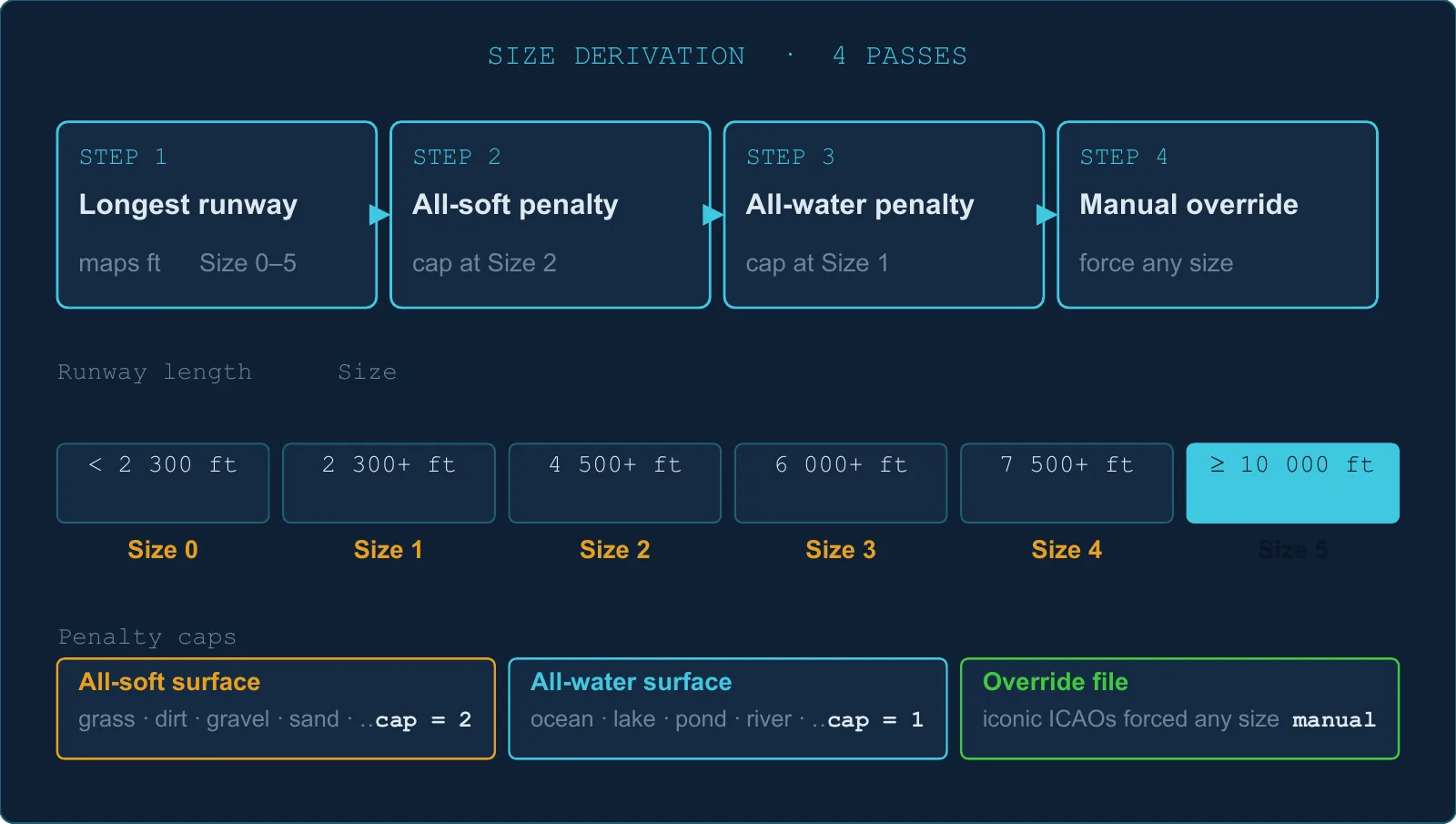
Size is determined by the longest runway, with two possible caps on top.
Step 1 — Longest runway decides the base size
Longest runway
Base Size
≥ 10 000 ft
5
≥ 7 500 ft
4
≥ 6 000 ft
3
≥ 4 500 ft
2
≥ 2 300 ft
1
< 2 300 ft, or no runway
0
Step 2 — All-grass cap (max Size 2)
If every single runway at the airport is a soft surface (grass, dirt, gravel, sand, etc.), the size is capped at 2 — no matter how long the runway is.
Example: a 12 000 ft grass strip would be Size 5 by length, but is capped to Size 2.
Step 3 — All-water cap (max Size 1)
If every single runway is a water surface, the size is capped at 1. Pure seaplane bases ultimately land at Size 0.
Step 4 — Manual overrides
A handful of iconic airports are force-set to a specific size by the development team, overriding the formula.
Heliports
An airport with only helipads and no runway gets Size 0 and is treated separately from regular airports (it is excluded from merge rules).
1.2 Where your airports are synchronized from
OnAir supports MSFS 2024 and 2020, X-Plane 12 and 11, Prepar3D v4 to v6, and FSX. Airport synchronization uses the source datasets below; this table is not a list of supported simulator versions. When multiple source datasets contain the same airport, MSFS 2020 takes priority.
Source
Priority
MSFS 2020
Highest
Prepar3D v4
2nd
FSX
3rd
X-Plane 11
4th
"Addon required" flags
Every airport carries four independent flags, one per simulator, indicating whether it exists in that simulator's standard install:
Flag
What it means
Not in standard MSFS 2020
You need a scenery addon to see this airport in MSFS
Not in standard P3D
Missing from Prepar3D v4 stock
Not in standard FSX
Missing from FSX stock
Not in standard X-Plane
Missing from X-Plane 11 stock
If you fly MSFS and your destination is marked "not in standard MSFS", you will need the matching scenery addon to land there.
1.3 Runway surface types
Surfaces that trigger the all-soft cap (max Size 2): coral, dirt, grass, gravel, planks, bumpy grass, short grass, long grass, hard turf, forest, sand, shale, and any unknown/undefined surface.
Surfaces that trigger the all-water cap (max Size 1): ocean, lake, pond, river, waste water, and water variants.
Standard hard surfaces (concrete, asphalt, tarmac, macadam, etc.) have no cap.
1.4 Parking & ramp types
Type
Category
General Aviation ramps (small / medium / large / extra)
GA
Cargo ramp
Cargo / commercial
Military cargo / combat ramp
Military
Airline gates (small / medium / heavy / extra)
Airline
Seaplane dock
Seaplane
Fuel point
Fuel
The "extra" GA and airline gate types only appear at airports imported from MSFS 2020.
1.5 Military airports
An airport is flagged as military if:
Its name ends in "AB", "MIL", "AIR BASE", or contains "AFB", or
Its ICAO code is on a hardcoded list of ~80+ bases (NATO fields, US Army/USAF, several Dutch, Japanese, and Italian military fields).
1.6 The airport data version
The game client caches airport data locally. Every time airport data is updated on the server, the version number increments by 1. When the client detects a new version, it downloads the updated data. You do not need to manage this manually.
1.7 Basecamp airports
Airports flagged as basecamps are permanent community fixtures:
Never modified by any import cycle.
Not subject to the proximity merge rules.
Cannot be overridden by simulator addons.
1.8 How your arrival airport is recorded
When you file a flight you enter up to three airports. OnAir keeps all three, but it does not blindly trust your filed destination when it closes the flight — it checks where you actually shut the engines down and records the arrival from that position.
Field
What it is
How it is used
Planned destination (intended)
The airport you filed as your destination at dispatch.
Compared against your shutdown position to decide your arrival.
Alternate
The fallback airport you filed at dispatch.
Informational only — recorded for your planning, never selected automatically as your arrival.
Actual arrival
The airport OnAir logs once the flight is registered.
This is what appears in your logbook.
The selection runs at registration, in this order:
OnAir measures the distance between your engine-shutdown position and your planned destination.
If that distance is under 5 NM, your planned destination is logged as the arrival.
Otherwise, OnAir finds the nearest suitable open airport: valid, not closed, and meeting the aircraft's minimum airport Size. Heliport-only fields are excluded for fixed-wing aircraft; helicopters may use them.
If that suitable open airport is more than 5 NM away, the search also considers closed airports, with the same aircraft-compatibility filters.
Only if no suitable airport can be found does the server fall back to the nearest airport without those compatibility filters, so registration can complete.
Diversions: if you land somewhere other than your filed destination, your logbook shows where you really stopped, not where you intended to go. In the Companion, the flight log marks this with a small DIV badge and shows your planned destination alongside the actual arrival; the alternate is shown too, with an info tip explaining this exact rule.
Two things worth remembering: the 5 NM radius is measured from where you stop, not from a runway threshold, and the alternate is never chosen for you — it is stored purely as planning information.
1.9 TL;DR
0–5Airport size range
4 passesSize derivation
5 NMArrival snap radius
Size is based on the longest runway length, but all-grass → cap 2, all-water → cap 1.
MSFS 2020 airport data always takes priority over other simulators.
If your destination doesn't appear in OnAir, check whether it requires a simulator addon.
Military airports are identified by name suffix or a hardcoded list of ICAO codes.
Basecamp airports are permanent fixtures — never merged, never overridden.
Your arrival is logged as your planned destination only if you stop within 5 NM of it; otherwise OnAir searches for the nearest suitable airport, with the fallback rules in §1.8. The alternate is informational and never auto-selected.
Chapter 02
FBO & Hangar
How much does it cost to build an FBO at a Size 4 airport? Who pays the hangar storage fees? How much does the weekly ownership fee bite? Everything about FBO economics and hangar storage — excluding fuel pricing (→ Fuel chapter) and maintenance operations (→ Maintenance chapter).
Every airport in every world has exactly one system FBO (owned by no one). It is always there — you cannot buy it.
A player can build their own FBO from scratch at any open airport.
A player-owned FBO coexists with the system FBO at the same airport. Multiple players can each have their own FBO there.
One FBO per airport per company — you cannot build two at the same airport.
Minimum skill required: FBO Main Agreement, level 1 (see the Skills chapter).
2.2 The golden rule — everything scales with airport Size
Every construction cost is multiplied by an airport size ratio:
Airport Size
Multiplier
0
0.10
1
0.20
2
0.40
3
0.60
4
0.90
5
1.00
The same hangar slot costs 10× more at Size 5 than at Size 0.
Reading rule for every table in this chapter: all prices shown are at Size 5 (multiplier 1.0). Multiply by the ratio above for your actual cost at a smaller airport.
2.3 What an FBO costs to build
Foundation (one-time, required)
Item
Base cost (at Size 5)
Paperwork & project management
1 500 Cr
FBO Exploitation Licence
30 000 Cr
Example at Size 3 (multiplier 0.6): opening a minimum FBO = (1 500 + 30 000) × 0.6 ≈ 18 900 Cr before any extension.
Storage & comfort extensions
The quote adds one paperwork fee × the airport multiplier, then each extension. For cargo, fuel tanks, rooms and hangar slots, the extension price is max(unit cost × quantity, 1 000 Cr) × multiplier: the minimum applies before the airport ratio. Tie-downs use their own linear price.
Item
Unit cost (Size 5)
What you buy
Cargo storage
60 Cr / lbs
1 lbs of cargo capacity
100LL fuel tank
35 Cr / gal
1 gallon of avgas capacity
Jet fuel tank
35 Cr / gal
1 gallon of jet fuel capacity
Crew rooms
2 000 Cr / room
1 sleeping room
Tie-down spot
500 Cr / spot
1 outdoor aircraft parking spot
Aircraft hangar slot
11 000 Cr / slot
1 indoor aircraft storage slot
Workshop build cost
Aircraft class
Build cost at Size 5
Single-Engine Piston (SEP)
140 000 Cr
Multi-Engine Piston (MEP)
154 000 Cr
TurboProp
238 000 Cr
Jet
294 000 Cr
Heavy Jet
448 000 Cr
Helicopter
448 000 Cr
Workshop upgrade cost (Level 1 → Level 2)
Aircraft class
Upgrade cost at Size 5
SEP
70 000 Cr
MEP
77 000 Cr
TurboProp
119 000 Cr
Jet
147 000 Cr
Heavy Jet
224 000 Cr
Helicopter
224 000 Cr
Level 1 = repairs & scheduled inspections. Level 2 = annual checkups & full replacements. See the Maintenance chapter for details on what each level unlocks.
All workshop costs are also multiplied by the airport size ratio.
2.4 Construction timers
Different construction categories run in parallel. A new order for a category already under construction is added after its existing finish date. The quote shows the work in the new batch; check the resulting finish date for an already queued category.
Per-operation cap: 15 days. Each quoted extension is capped, but successive orders in the same category can leave more than 15 days of work queued.
Item
Build time
Paperwork
30 min
FBO Licence
~2 days
Cargo storage
~42 h for 10 000 lbs
Fuel tank
~42 h for 10 000 gal
Sleeping room
~1 day per room
Tie-down spot
~1.5 h for 1 spot
Aircraft hangar slot
~3 days for 1 slot; 5 slots = 15 days (cap)
Workshop Level 1 (SEP)
~2 days
Workshop Level 1 (Heavy Jet)
~6.4 days
Workshop Level 1 → 2 (SEP)
~1 day
Workshop Level 1 → 2 (Heavy Jet)
~3.2 days
Construction runs on the server, independent of whether you are online.
The capacity goes live once per minute after the build date has passed.
No skill reduces construction timers.
2.5 What the system FBO already has
System FBOs are pre-seeded with randomized capacities depending on airport Size. This is what you compete against.
Fuel capacities (system FBOs)
Capacity is seeded randomly. At Size 0, 100LL is present with 50% probability and Jet fuel with 20%; at Size 1, the probabilities are 70% and 50%. At Size 2, 100LL is seeded and Jet fuel has an 80% chance. Larger airports seed both types.
The capacity bands grow with airport Size. Jet capacity receives an additional random multiplier between 1.2 and 2.2 and is truncated to hundreds of gallons, so it does not share the simple 100LL ranges. Read the FBO's actual capacity and current stock before planning a purchase; seeded values are not a guaranteed present-day supply.
Workshop availability (system FBOs)
Size
SEP
MEP
TurboProp
Jet
Heavy Jet
Helicopter
0–1
—
—
—
—
—
—
2
✅
—
—
—
—
—
3
✅
✅
—
—
—
—
4
✅
✅
✅
✅
—
✅
5
✅
✅
✅
✅
✅
✅
Heavy Jet Level 1 is seeded at Size 5. Its Level 2 upgrade has only a 30 % chance of being seeded. These are creation rules; check the current FBO services.
Level 2 is standard from Size ≥ 4 for SEP/MEP/TurboProp/Helicopter, and Size 5 for Jet.
Workshop markup (system FBOs)
System FBOs charge a random markup of +10 % to +110 % over the base maintenance price. A nearby player-owned FBO is almost always cheaper.
2.6 Cargo storage fees
When you store cargo at an airport, you pay an hourly fee — unless the cargo fits inside your own FBO's cargo capacity there.
The formula
0.06 Credits per lbs per hour (= Daily charge: weight × 24 × 0.06 Cr)
Your situation at the airport
What you pay
You own an FBO with enough cargo capacity
0 Cr (free)
You own an FBO but cargo exceeds your capacity
Fee on the overflow weight only
You don't own an FBO there
Fee on the full cargo weight
Your company is paused
Exempt — no billing
The cargo is Food Rations
Exempt — always free
Important: the cargo storage fee is paid by the cargo owner — the FBO owner does not collect it as revenue. See §2.8 for what FBO owners actually earn.
Grace period: 3 hours free after the cargo is unloaded.
Fee is charged once per 24 h per airport.
2.7 Aircraft parking fees
Parking is an airport fee, calculated at an hourly rate. Your own FBO exempts aircraft up to its combined tie-down and hangar capacity, covering the aircraft with the highest parking charges first. Overflow aircraft remain chargeable. Basecamps and paused companies are exempt. Billing also checks that the aircraft is idle and the elapsed parking time; it is not an unconditional debit every hour.
The formula
Fixed part:8.75 × (0.5 + Size / 10) Cr/h Heavy part:0.125 × (0.5 + Size / 10) Cr per 1 000 lbs / h, for aircraft MTOW above 200 000 lbs only
Fees by airport Size
Size
Fixed / h
Per 1 000 lbs above 200 k lbs / h
0
4.375 Cr
0.0625 Cr
1
5.250 Cr
0.0750 Cr
2
6.125 Cr
0.0875 Cr
3
7.000 Cr
0.1000 Cr
4
7.875 Cr
0.1125 Cr
5
8.750 Cr
0.1250 Cr
Example: without an exemption, skill discount or custom owner tariff, a 500 000 lbs aircraft parked 24 h at Size 5 costs 24 × [8.75 + (500 − 200) × 0.125] = 1 110 Cr/day.
Hangar slots and tie-downs both count towards your FBO's free-parking capacity.
Airport owners can set a lower custom parking tariff. The Parking Fee Reduction skill also reduces the amount charged.
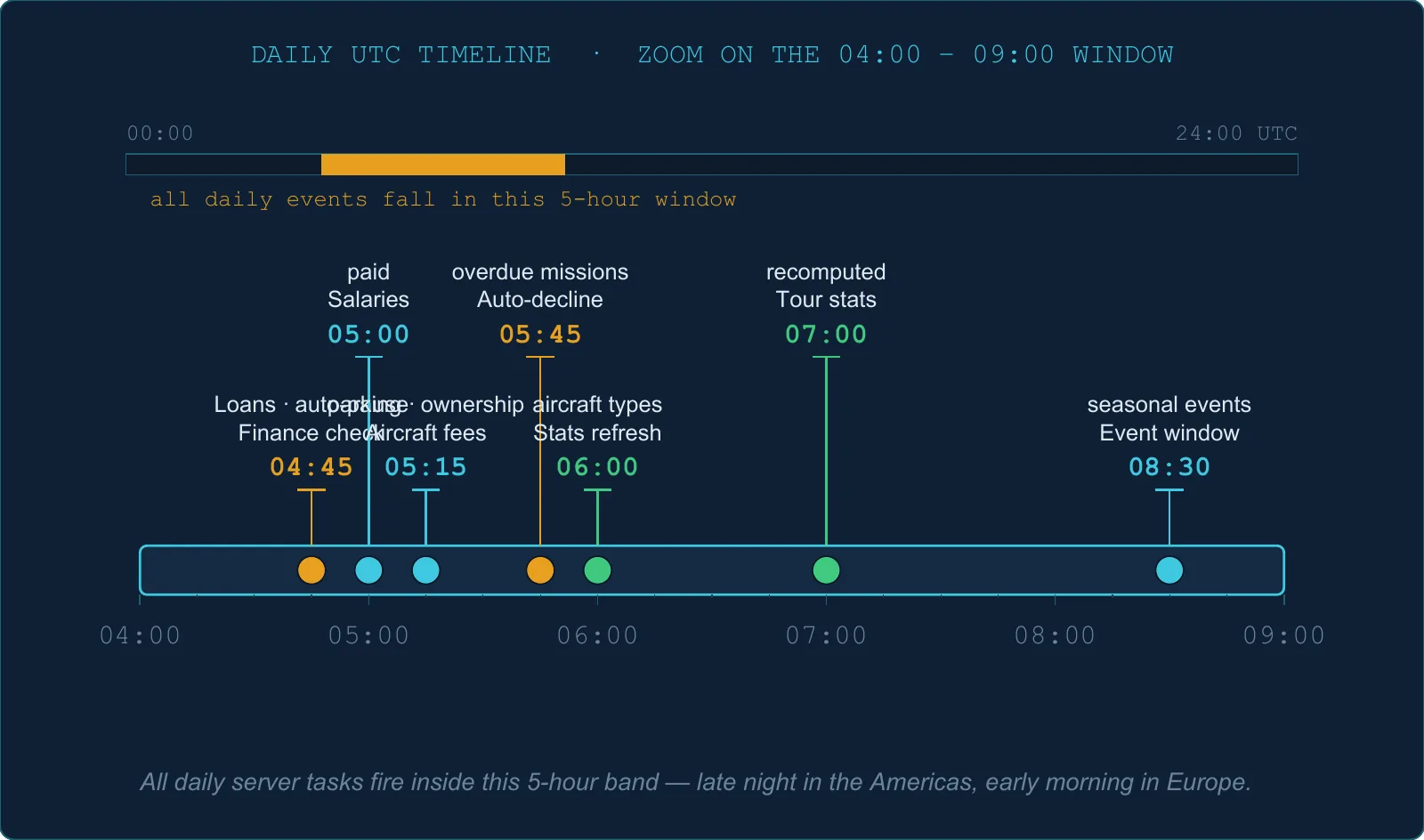
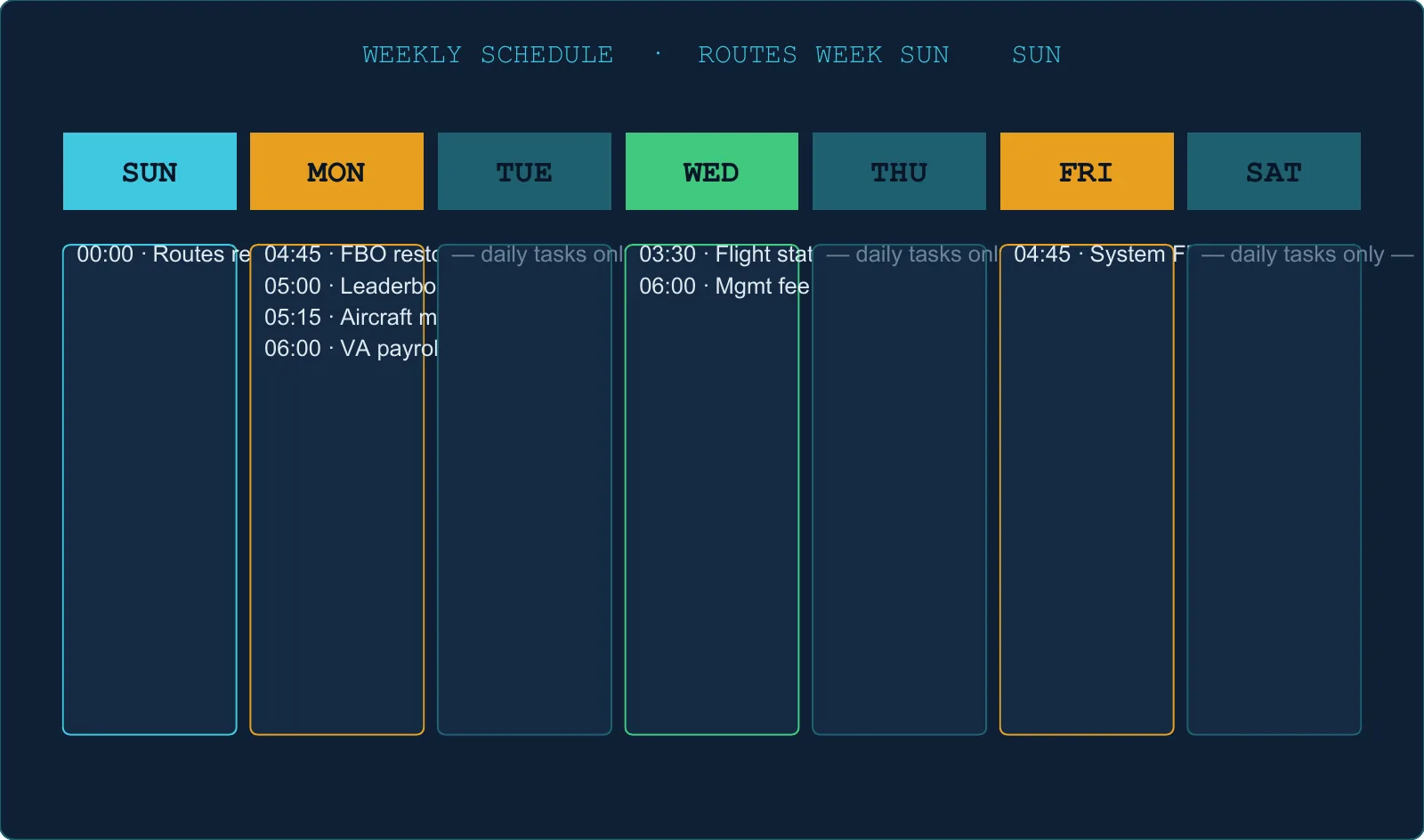
2.8 The weekly ownership fee (Monday 04:45 UTC)
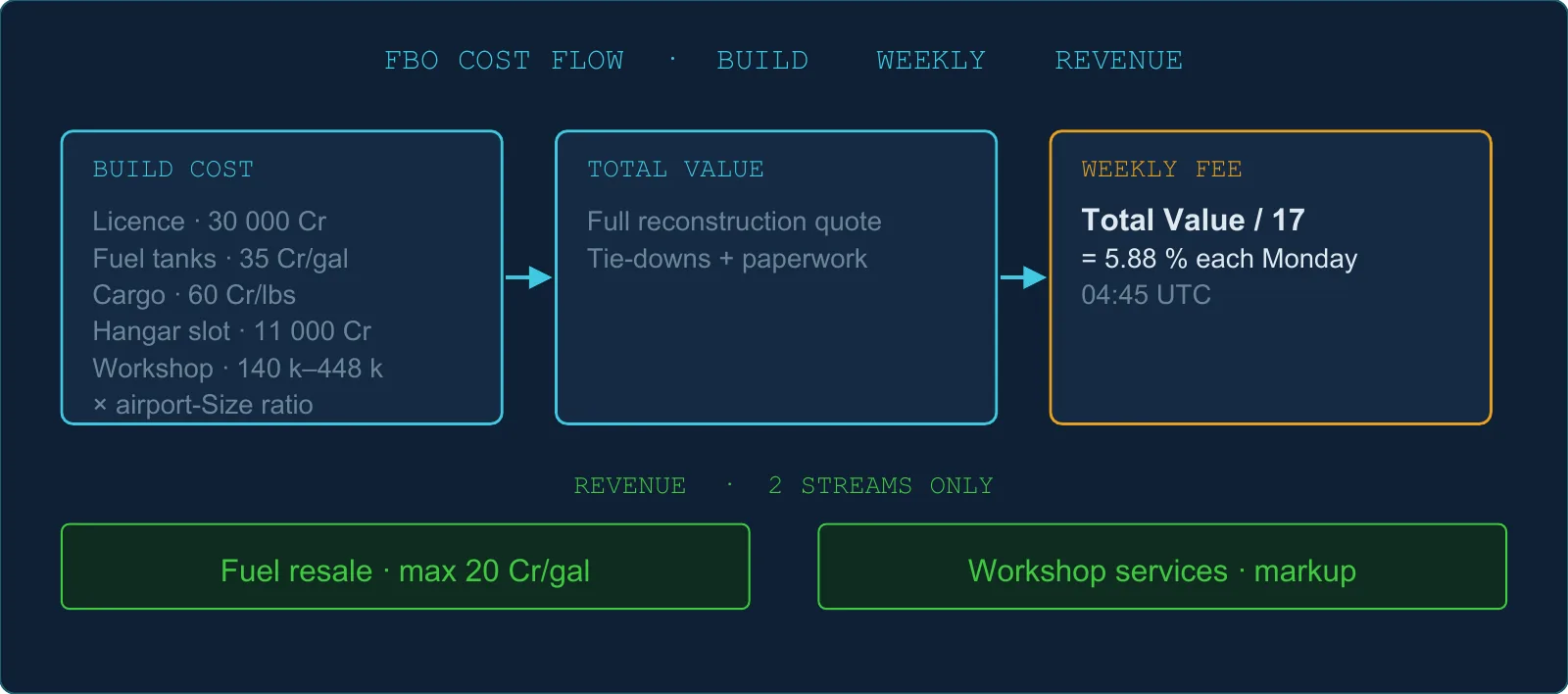
Weekly fee = the server's full reconstruction quote ÷ 17
The quote rebuilds the FBO's current capacities and workshops at that airport's Size ratio. It includes the licence, fuel tanks, cargo storage, rooms, hangars, workshops, tie-downs and one paperwork fee. It is not simply the sum of your historical spending, nor just the asset-only portion of the quote.
The weekly pass charges a fee when no previous payment exists or at least 6.5 days have passed. That eligibility test does not schedule a separate Sunday payment.
A paused company's fee is skipped.
FBO at Size 5
Reconstruction quote
Weekly fee
Licence only
31 500 Cr
1 852.94 Cr
Licence + 10 000 gal jet tank
381 500 Cr
22 441.18 Cr
Licence + jet tank + SEP workshop L1
521 500 Cr
30 676.47 Cr
The recurring fee is about 5.88% of that quote. Use the live quotation when planning an extension.
2.9 What an FBO owner actually earns
Revenue comes from only two streams — and both require you to enable them and have the right skill:
Revenue stream
Skill required
How to enable
Fuel resale to other players
Fuel Resale skill (level 1)
Enable "Allow fuel selling" in your FBO settings
Workshop services to other players
Workshop Resale skill (level 1)
Enable "Allow workshop services" in your FBO settings
These are NOT revenue streams for FBO owners (common misconceptions):
❌ Cargo storage fees — paid by cargo owners, not collected by the FBO.
❌ Aircraft parking fees — go to the airport, not to you.
❌ Logistic queries — these generate missions for your company to fly, not payments from others.
Workshop markup
You set a markup multiplier (e.g., 1.5 = +50 %). The minimum is 1.0 (no discount). Your earnings when another player's aircraft is serviced:
Your revenue = total price − (total price ÷ markup)
Example: a 1 000 Cr repair at markup 1.5 → your revenue = 333 Cr.
Fuel resale constraint
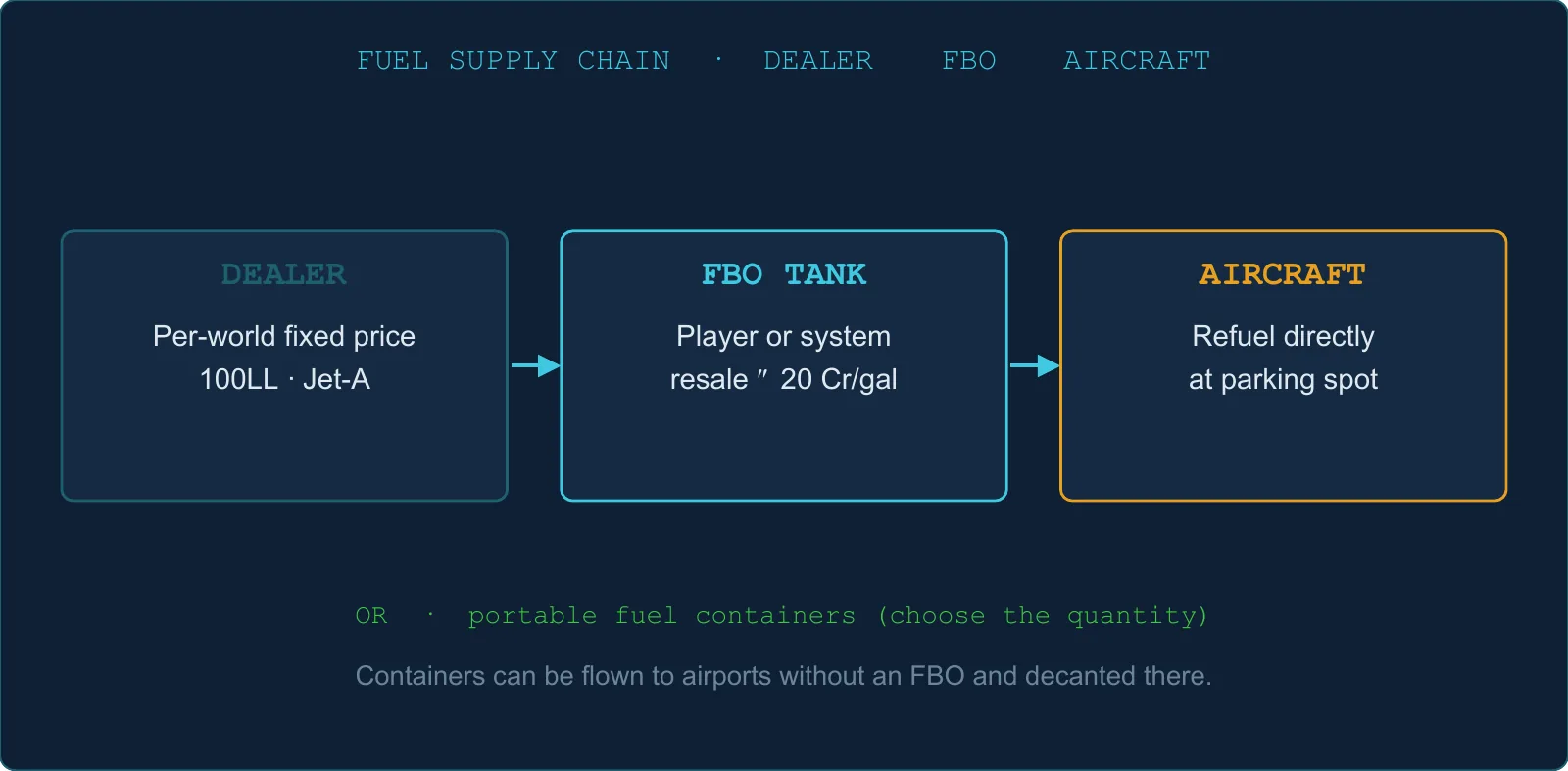
Maximum sell price: 20 Cr/gal (hard cap, both fuel types).
Minimum sell price: cannot go below the world's dealer price.
2.10 Logistic queries — the mission generator
A logistic query is a filter you attach to your FBO: range, heading, cargo weight limits, passenger limits, airport size filter. Triggering a query generates a batch of cargo/passenger missions from your FBO — for your company to fly.
Queries available by skill level
Skill level
Total queries available
1
1
2
3
3
5
4
8
5
10
Cooldown per query slot
Each query has its own independent cooldown:
Slot
Cooldown
1st query
~5 days
2nd query
~2 days
3rd–10th queries
23 hours each
There is no global weekly reset. Each query's cooldown starts from the last time you triggered it. Stagger your triggers to keep a steady flow of missions.
Bonus missions per query — Enhanced Queries skill
Enhanced Queries expands the random generation range. Outside Challenge Mode, level 3 allows 4 to 11 random generation attempts, instead of 1 to 2 without the skill. Favourites, generation failures and Challenge Mode affect the result; see §5.5. This is not a guarantee of 11 delivered missions.
2.11 Skills that gate FBO features
Full skill tree details are in the Skills chapter. Here is the FBO skill summary:
Listed as a speed skill; its advertised speed bonus is not applied by the current server calculation (§5.5)
Fuel Resale
1
2 pts
Enable selling fuel to other players
Workshop Resale
1
2 pts
Workshop accepts other players' aircraft
Enhanced Queries
3
2 pts
More missions per logistic query trigger
2.12 Auto-stop, auto-pause, deletion
Situation
What happens
Company paused
Weekly fee skipped. FBO hidden from other players. Not deleted.
Insufficient funds
No auto-shutdown. The fee is still debited.
Airport closed after you built there
Your FBO is not deleted. You simply cannot build a new FBO at a closed airport.
Manual deletion
Only allowed if no maintenance is currently active (or with force). All logistic queries and pending missions are deleted. Aircraft in your hangar stay parked at the airport.
2.13 TL;DR
You build an FBO — you never buy one. System FBOs are permanent fixtures you compete against.
Every construction cost is multiplied by the airport Size ratio (0.10 → 1.00).
A Heavy Jet workshop at Size 5 costs 448 000 Cr to build and 224 000 Cr to upgrade to Level 2.
Cargo storage: 0.06 Cr / lbs / hour after a 3 h grace period. Free inside your own FBO's capacity.
Aircraft parking at Size 5: 8.75 Cr/h + 0.125 Cr per 1 000 lbs above 200 k lbs before exemptions and discounts. Your FBO covers aircraft within its parking capacity.
Weekly ownership fee = reconstruction quote ÷ 17, including tie-downs and paperwork.
FBO owners earn nothing from storage fees or parking fees — only from fuel resale and workshop services.
Logistic queries: 1 → 10 slots by skill level, with 5-day / 2-day / 23-hour cooldowns from slot 1 onward.
What does a gallon really cost? How long until my order is delivered? What's the cheapest way to fuel a Heavy Jet? Everything fuel-related — pricing, ordering, delivery, refueling, and weight.
There is no MOGAS, no Diesel, no SAF in OnAir. Every aircraft type uses one or the other.
3.2 Two prices that matter
Every FBO has two prices per fuel type:
Price
Who pays it
Who sets it
Dealer price
The FBO owner (when ordering fuel for their stock)
The server — configured per world
Sell price
Any pilot refueling at the FBO
The FBO owner (you, for your own FBO)
The difference is the FBO owner's margin.
3.3 Dealer price — one number per world
The dealer price is the same at every airport within a given world. It never varies by location.
Seed values at world creation
World mode
100LL dealer price
Jet-A dealer price
Classic
3.30 Cr/gal
2.98 Cr/gal
Survival
3.72 Cr/gal
3.36 Cr/gal
What never changes the dealer price
The dealer price is a world setting, shared by its airports. Normal purchases do not make it fluctuate, but an administrative change to that setting can change it.
No seasonal modifier ever changes fuel prices.
100LLAvgas (6.0 lb/gal)
Jet-AJet fuel (6.7 lb/gal)
20 CrMax FBO resale
No country tax affects in-game fuel.
3.4 Sell price — rules and caps
Hard limits
Constraint
Value
Maximum sell price
20 Cr/gal (hard cap, both fuel types)
Minimum sell price
Must be ≥ the world's dealer price
System FBO sell prices
System FBO prices are randomised when seeded and can be randomised again during a server data-maintenance operation. They are not reset by the Monday/Friday stock top-ups.
The randomisation uses reference prices 4.13 Cr/gal for 100LL and 3.73 Cr/gal for Jet, multiplied by 1.4, an airport factor from 0.7 to 1.3, a fuel-specific factor from 0.9 to 1.1 and the Size ratio below:
Airport Size
Price ratio
0
1.00
1
1.05
2
1.10
3
1.20
4
1.30
5
1.40
These are generation inputs, not a promise of the price currently available at an airport. Dealer-floor corrections may also apply. Use the current FBO sell price for a flight budget.
3.5 Ordering fuel for your FBO
Rule
Value
Price
Dealer price × gallons ordered
Delivery fee
None
Bulk discount
None — linear pricing
Lead time
+1 day from order time
Additional order while delivery is pending
Added to the same delivery; its existing due date moves +2 h
Minimum order
None
Maximum order
Limited by your remaining tank capacity
Payment timing
Debited immediately at order time
How delivery works
You place the order and are charged immediately.
The ordered quantity is held in a "pending delivery" state.
At the due date, the periodic server pass moves the pending fuel into live stock. The first order sets that date to +24 h; every addition to a pending delivery pushes the existing date back two hours for the whole lot. A late addition therefore need not wait a new 24 h from its own purchase.
The overflow guard
You cannot over-order: the server ensures that your current stock + already pending + new order does not exceed your tank capacity.
No cancellation
There is no way to cancel a fuel order once placed. You will wait for delivery.
3.6 Weekly resupply of system FBOs
Two scheduled events restock system FBOs:
Monday ~04:45 UTC
Friday ~04:45 UTC — the same restock again
The refuel formula
For each system FBO, per fuel type:
Current stock
What happens
Below 50 % of capacity
Refilled to a random level between 50 % and 100 % of capacity
At or above 50 % of capacity
Nothing — the stock is left as it is
Sell prices are not reset by these restocks.
Only system FBOs are restocked. An FBO run by a player holds what its owner puts in it (§3.5).
Planning tip: the next restock is whichever pass comes first, Monday or Friday, and it only refills an FBO that has fallen below half its capacity by then. A busy system FBO can run low in between. Where your operations depend on fuel, your own FBO or a fuel container is the supply you control.
3.7 Refueling an aircraft at an FBO
Rule
Value
Price
FBO sell price × gallons
Handling fee
None
Per visit limit
Limited by aircraft tank capacity and FBO remaining stock
Out of stock
Fails immediately — no queue
Loading time
Approximately 0.02 min per gallon, capped at 2 minutes total
Refueling at your own FBO
When you refuel your own aircraft at your own FBO, the server charges you dealer price × gallons — not your marked-up sell price. Your markup is only a cost to other players, not to yourself.
Third-party refueling
When another player refuels at your FBO, they pay your sell price. You receive the difference between sell price and dealer price as profit.
Automatic fuel purchases for regular routes and work orders
When a regular route flight is flown by your AI crew (not "Fly in Simulator"), or a work order leg starts, the server buys the fuel automatically at the departure airport:
It only buys from an FBO that holds the whole amount in one go. An empty or short FBO is skipped.
It picks your own FBO first, then your VA's, otherwise the cheapest of the FBOs that can supply it.
If no FBO can supply the whole amount:
- Regular route: nothing is bought. If the fuel already on board can't reach the destination, then the alternate, plus 30 minutes of cruise, the flight doesn't start: it shows as Not started, and the flight's journal gives the reason ("Not enough fuel for this flight…"). - Work order: the leg doesn't start ("No FBO with enough fuel available at …"). The leg option No fuel operation at leg departure lets it start without buying fuel.
For regular routes, fuel purchases are charged to the company operating the aircraft. With Fly in Simulator, prepare the fuel yourself through dispatch.
3.8 Fuel weight (for Weight & Balance)
Fuel weight is a fixed constant per type — no temperature or altitude correction:
Fuel type
Weight
100LL (Avgas)
6.0 lbs/gal
Jet-A
6.7 lbs/gal
3.9 Fuel containers — portable fuel storage
A fuel container is a cargo item that lets you transport gallons between airports.
Buying a container
Price = gallons × FBO sell price (same as refueling).
Weight = gallons × fuel density.
Revenue goes to the FBO owner as a normal fuel sale.
You specify the number of gallons — there is no fixed container size.
Using a container on an aircraft
Container must be at the same airport as the aircraft.
Pumps as much fuel as the aircraft can accept.
The container is destroyed if fully used; kept (with reduced weight) if partial.
Pouring a container into your FBO tank
Must be at an airport where you own an FBO.
Fills your tank up to remaining capacity.
If the container has more fuel than your tank can hold, the excess stays in the container — nothing is wasted.
Supplying an airport that sells no fuel — no FBO required
Remote strips (a fishing-camp factory site, a bush field, a tiny island runway) often sell no fuel at all. You do not have to build an FBO there to keep flying:
Buy a container at any FBO that sells your fuel type — your own, or a third-party FBO with fuel resale enabled.
Haul it to the strip like any other cargo.
Refuel on the ramp straight from the container — works at any airport, even one with no FBO. Leftover gallons stay in the container for the next visit.
⚠️ Parked containers pay storage. A container sitting on the ground is ordinary cargo: after the 3 h grace period it is billed the cargo storage fee (§2.6) — 0.06 Cr/lbs/h, ≈ 1.44 Cr/lbs/day — unless it fits inside your own FBO's cargo capacity there. Example: a 100-gal avgas container (600 lbs) at an airport with no FBO ≈ 864 Cr/day. A container riding in an aircraft's cargo hold is never billed — it costs payload instead. Unneeded containers can be deleted from the Airport page (My Assets tab); the fuel is lost, no refund.
Rule of thumb: containers are perfect for bring-your-own-fuel trips and short stays. For a permanent base, build an FBO — any open airport qualifies, whatever its Size — with a fuel tank: dealer delivery in +1 day (§3.5), refueling at dealer price (§3.7), and free cargo storage up to your capacity.
3.10 Industrial fuel supply (background system)
Behind the scenes, fuel factories get paid when fuel is supplied to an FBO near them:
When you order fuel for your FBO (§3.5), and whenever a system FBO is restocked (§3.6), the server buys fuel tanks from player factories within 250 NM of that FBO whose fuel output is set to Local Dealer, nearest first, and pays their owners the local dealer price. It buys up to the quantity supplied: for a restock, the amount refilled, or 10 % of capacity when the FBO was already at or above half. It works in whole tanks of 5,500 gal.
Factories farther than 250 NM are not used for this.
None of this changes your order or its price.
The per-NM transport cost (10 Cr per tank for every NM beyond 250 NM) belongs to a different mechanic: a factory whose fuel output is set to FBO Refueling and pipes fuel into an FBO. That cost is paid by the factory owner (see the Industry chapter).
This is an industry economy mechanic; it does not affect what you pay at the pump.
3.11 Skills that affect fuel
Skill
Effect
FBO Main Agreement (≥ 1)
Required to build an FBO and own a fuel tank
Fuel Resale (level 1)
Required to enable fuel selling to other players
AI Fuel Efficiency (levels 1–3)
Reduces fuel burn of AI-flown aircraft by −1 / −2 / −4 % (no effect on flights you fly yourself)
No skill changes dealer price, sell price range, ordering lead time, refueling speed, or fuel weight for W&B.
3.12 Edge cases
Scenario
What happens
Tank already full — order excess
Blocked at order time
FBO stock empty — pilot tries to refuel
Fails immediately with an error
Container at airport with no FBO — pour into tank
Blocked — you need an FBO to accept the pour
Container at a non-home airport — use on aircraft
Works — containers are pumpable anywhere on the ground
3.13 TL;DR
Dealer price is flat per world — no regional variation, no fluctuation.
- Classic: 3.30 Cr (100LL) / 2.98 Cr (Jet-A) per gal - Survival: 3.72 / 3.36 per gal
Your sell price caps at 20 Cr/gal and must be ≥ dealer price.
Fuel delivery = +1 day, no fee, no bulk discount.
System FBOs are checked every Monday + Friday at ~04:45 UTC: only stock below half capacity is refilled; player FBOs are not included.
Refueling at your own FBO only costs you dealer price — your markup is not self-charged.
Containers pump anywhere — no FBO needed to refuel at a remote strip; a parked container pays cargo storage fees (§2.6), a container in an aircraft's hold doesn't.
Only the AI Fuel Efficiency skill affects fuel consumption — and only for AI-flown aircraft.
Chapter 04
Maintenance & Workshop
When is my engine due for inspection? How much does a 100 h check cost? Why did my aircraft condition drop sharply in just a few flights? Everything about how aircraft wear out and get repaired.
If the FBO has no workshop for the required level and class, the job is still accepted but a truck-call surcharge applies (see §4.11).
4.2 How maintenance is priced
All costs derive from a single base:
Maintenance cost = 70 % of the aircraft's hourly operating cost
So a Citation costs more to service than a Cessna 152 because its operating cost is higher.
Every quote starts with a 500 Cr paperwork & handling fee (10 min). If paperwork is the only line item, the fee collapses to zero.
FBO markup
When your aircraft is repaired at a player-owned FBO that isn't yours, the owner's markup multiplier is applied to the total price. System FBOs charge a random markup of +10 % to +110 %. Your own aircraft at your own FBO: no markup applied.
The markup portion is credited to the FBO owner immediately when the job starts.
4.3 Price breakdown
Operation
Pricing formula (simplified)
Scheduled inspection
Hourly cost × inspection interval in hours × 0.02
Annual checkup
Hourly cost × average annual flight hours × 0.007
Engine repair
Hourly cost × condition loss % × a per-engine ratio
Engine replacement
Same as full repair (100 % condition loss), split across engine count
Airframe repair
Hourly cost × condition loss % × an airframe ratio
Airframe replacement
Calculated as a fixed 50 % delta — not a full rebuild
Failure repair (serious)
Equal to a full scheduled inspection cost
Failure repair (minor)
20 % of a scheduled inspection cost
Seat change
50 Cr per seat changed
Inspection intervals by aircraft class
Class
Interval
SEP, MEP, TurboProp, Helicopter
100 h
Jet
400 h
Heavy Jet
600 h
The inspection interval depends on the aircraft class. The price scales with the interval — a Heavy Jet inspection is expensive because it covers 600 hours of operation.
4.4 How long does maintenance take?
Operation
Duration
Paperwork
10 min
Scheduled inspection
10 h
Annual checkup
30 h
Engine replacement (per engine)
10 h per engine
Engine repair (Δ%)
Δ × 100 × 12 min (e.g., 40 % repair = 480 min = 8 h)
Airframe repair (Δ%)
Δ × 100 × 12 min
Airframe replacement
10 h
Failure repair — serious (condition ≤ 5 %)
30 h
Failure repair — intermediate (condition 5–50 %)
30 h
Failure repair — minor (condition > 50 %)
2 h
Seat reconfiguration
1 min per seat, max 30 min
Example: repairing an engine from 60 % to 100 % (Δ = 40 %) → 480 min = 8 hours.
Assignment is automatic. You do not pick which mechanic works on which aircraft.
Mechanic speed
Mechanic speed is governed by their Comfort and Punctuality personal stats (each from 0 to 1):
Mechanic quality
Work speed
Poor stats (all at 0)
0.90 work-hours per real hour
Average stats (all at 0.5)
1.00 work-hours per real hour
Excellent stats (all at 1.0)
1.10 work-hours per real hour
How many mechanics can work at once
Airport Size
Max working mechanics
Max simultaneous aircraft
0
2
1
1
4
2
2
6
3
3
8
4
4
10
5
5
12
6
Additional aircraft queue up and wait.
Mechanics must be: assigned as Mechanic category, from your company, currently at the FBO's airport, and not busy transporting, training or relocating.
"Currently at" means physically there, and only Transport moves a mechanic.
Change base rewrites the home airport and nothing else — it does not move the employee, so it alone will never make a mechanic count for a workshop. Use
Transport to send him to the FBO's airport; he is in transit, and therefore not counted, until the trip ends.
Pooling your mechanics
All available mechanics' work power is pooled and split evenly across the aircraft currently being worked on. Assigning two mechanics to one aircraft cuts the clock time roughly in half.
System FBOs
No mechanics needed. Maintenance time at a system FBO runs in real time (1 h real = 1 work-hour, no speedup from extra mechanics).
4.6 The full maintenance flow
Get a quote — your aircraft must be idle. If using a player FBO, at least one mechanic must be on-site.
Start the job — cash check. If balance is sufficient, cargo and passengers on the aircraft are automatically unloaded. Aircraft status changes to Maintenance. The full amount is charged immediately.
Maintenance progresses — driven by the scheduler every 15 minutes. Idle mechanics are assigned. Remaining work hours decrease based on pooled mechanic power.
Job completes automatically — all changes (condition resets, etc.) are applied. Aircraft returns to Idle. You receive a notification.
Cancel — you get back the base repair cost, but the markup already paid to the FBO owner is not refunded.
4.7 The scheduled inspection
Countdown: decremented by actual flight hours at the end of every registered flight.
Due: when the countdown hits 0, your aircraft is blocked until the inspection is done.
Warning: shown when ≤ 5 hours remain.
Intervals: 100 h (GA/TurboProp/Helicopter) · 400 h (Jet) · 600 h (Heavy Jet).
4.8 The annual checkup
Calendar-based, not flight-hours. Due one year after the last checkup.
Warning appears 15 days before the due date.
Always requires Level 2 workshop for the aircraft's class.
The annual operation does not restore condition or maximum condition. It resets the annual date. The Companion also selects the separate periodic inspection, which resets its own countdown. Neither is an airframe replacement.
The annual line item is 30 work-hours before modifiers. In the Companion, selecting it also selects the periodic inspection, adding its separate work and cost to the quote; the full order is therefore not always 30 hours.
4.9 Damage model — how condition drops
Condition wears down on two parts separately: the airframe (the whole airframe) and each engine individually.
Base wear per flight
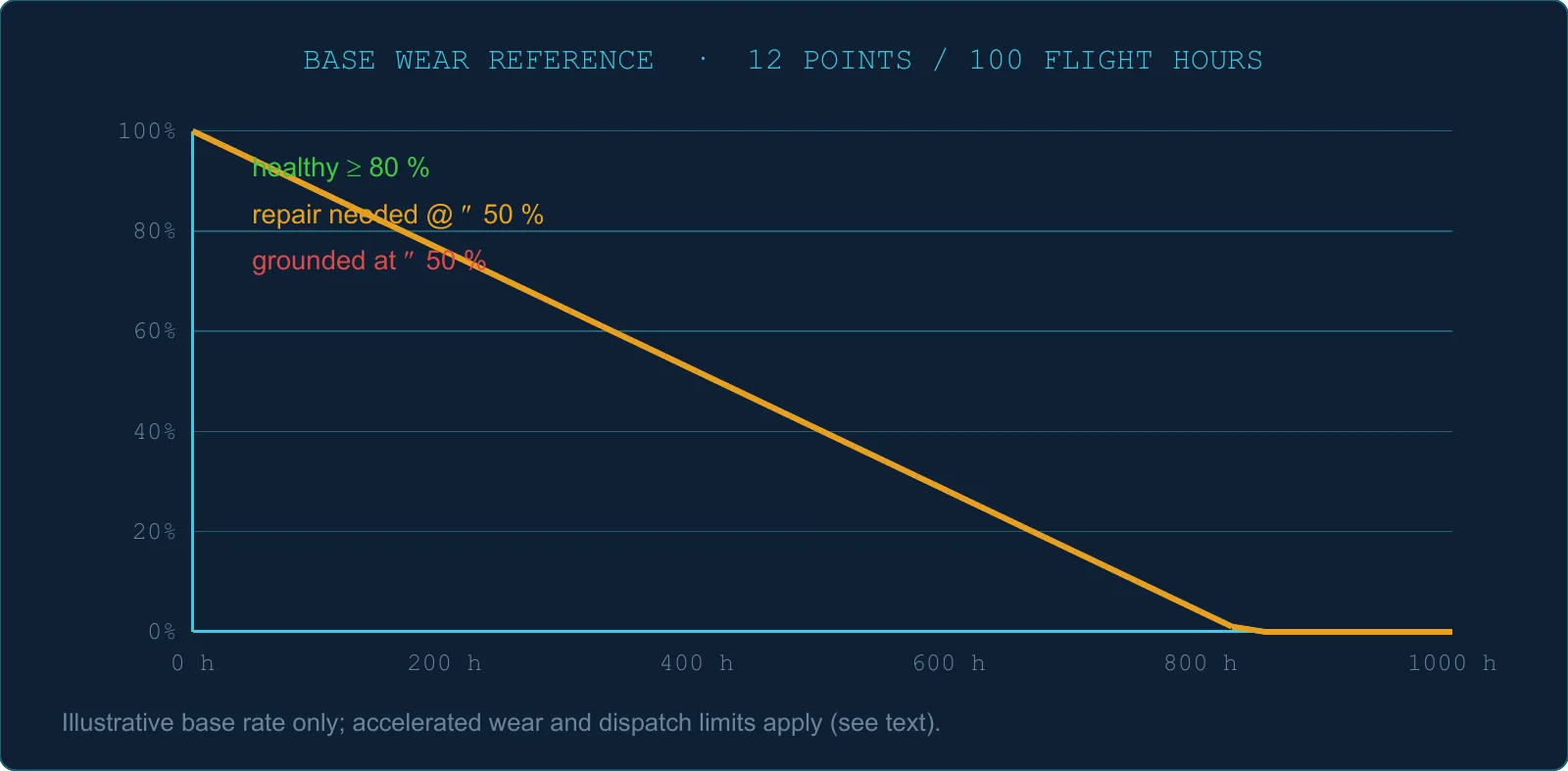
−12 % condition per 100 flight hours (both airframe and engine, under normal operation)
Below 80 % condition — wear accelerates
Condition
Wear multiplier
80 %
×1.0 (normal)
70 %
×1.17
60 %
×1.33
50 %
×1.50
40 %
×1.67
Practical meaning: below 80 %, the wear multiplier increases linearly as airframe condition falls; there is no new acceleration threshold at 50 %. At 50 % condition or below, the aircraft is blocked from flying until repaired.
The multiplier is set by the airframe's condition, and it applies to the engines' wear as well: an engine wears faster on a tired airframe, whatever its own condition.
Past hightime — wear accelerates further
Each aircraft type has a "hightime" threshold (total airframe hours). Past it, wear is multiplied by 1 + (hours past hightime ÷ hightime) — ×1.5 at one and a half times the hightime, ×2 at twice it — on top of the below-80 % factor. Because engine wear is derived from the airframe's, the engines wear faster too.
Maximum condition slowly decreases
Each flight also lowers the maximum possible condition slightly. Only a Replace restores a ceiling: an Airframe Replace for the airframe, an Engine Replace for that engine. See §4.10.
Engine TBO (Time Between Overhaul)
Once an engine's hours exceed the aircraft type's Time Between Overhaul:
That engine wears 3× faster — its condition AND its maximum condition.
Per engine, base rate
Below TBO
Past TBO
Condition loss
12 points / 100 h
36 points / 100 h
Maximum-condition loss
0.4 points / 100 h
1.2 points / 100 h
The price of a repair point does not change past TBO — it depends on the aircraft type and on the workshop's markup, never on the engine's hours. What triples is the amount of repair each flight hour costs you.
Only an Engine Replace resets the engine hours, and with them the TBO counter. A repair restores condition and leaves the hours where they are.
At the same workshop, an Engine Replace costs exactly what repairing 100 condition points costs. Past TBO you spend at least 24 extra points per 100 h, so after at most about 420 flight hours past TBO the extra repairs have cost a new engine.
These are base rates: a tired airframe, hard landings and G-force excursions all make them worse (see below).
Flight events that cause extra damage
Event
Extra damage
Hard landing
+0.2 % — airframe and each engine
Excessive G-force
Up to +0.25 % per event — airframe and each engine
Poor AI pilot stats
Up to +0.05 % per flight — airframe and each engine
Engine failure (sim event)
That engine's condition → random 0–50 %
On an engine past TBO, its share of these losses is tripled like the rest of its wear.
Floor
Airframe condition cannot go below 0 %. An aircraft can reach 0 % and still exist — it just cannot fly until major repairs are completed.
4.10 Maximum condition — the slow, permanent ceiling
Why does my A350 only show 93 % maximum airframe condition with just 2 500 flying hours, when hightime starts at 52 000 h? Because maximum condition wears independently from current condition — and a Repair never fixes it.
Two conditions, not one
Each part of your aircraft (the airframe, and each engine separately) tracks two values:
Current condition (0–100 %) — what your repair work touches. A new aircraft starts at 100 %; routine flying drops it; an Airframe Repair or Engine Repair brings it back.
Maximum condition (0–100 %) — the ceiling the current condition can be repaired to. A new aircraft starts at 100 %; it slowly erodes over the aircraft's life; an Airframe Repair does not lift it, only an Airframe Replace can.
If your max airframe is 93 %, your repaired airframe condition can never exceed 93 % until you replace the airframe.
How the maximum drops
Every completed flight damages the current condition; the maximum drops by about 1/30th of that same damage. In practice this means the max wears roughly 30 times slower than the current condition.
What feeds the per-flight wear is identical to current-condition wear:
Flight hours — the baseline driver.
Hard landings — each one adds a chunk of extra wear that also bleeds into the maximum.
Hightime airframe — once the airframe crosses its hightime threshold, every subsequent flight inflicts more wear than a fresh airframe; the maximum drops faster too. This is continuous, not a one-shot drop at the threshold. Because engine wear is derived from the airframe's, a hightime airframe also makes its engines' maximum drop faster.
Engine past Time-Between-Overhaul — when an engine exceeds its TBO/SMOH limit, its maximum erodes about three times faster than under TBO. This is an engine-specific malus and does not affect the airframe's maximum.
Practical heuristic. A long-lived, well-flown aircraft will gradually drift to the 80–95 % max range from normal wear alone, with no hightime in sight. That's expected. The real maximum-eaters are hard landings and flying engines past TBO.
What restores the maximum
Only Replace operations bring the maximum back to 100 %:
Operation
Effect on current
Effect on maximum
Airframe Repair
Sets to your chosen target
No effect
Engine Repair
Sets to your chosen target
No effect
Airframe Replace
→ 100 %
→ 100 %, hours reset to 0
Engine Replace
→ 100 %
→ 100 %, engine hours reset to 0
There is no other automatic restoration: nothing scheduled, no daily drift fix, no skill, no airport service that lifts a maximum without a Replace work order.
Per-engine independence
The airframe maximum lives on the aircraft. Each engine has its own maximum. Replacing one engine does not touch the others, and does not touch the airframe. A 4-engine aircraft can easily end up with four different engine maxima depending on history.
Aircraft swap (admin / moderation)
When the moderation team performs an aircraft-type swap, the new engines inherit the average maximum of the engines they replace (default 80 % if there were none). This is a one-shot administrative operation, not a player tool.
4.11 No workshop at the FBO — the truck call
If the FBO has no workshop for the required level and aircraft class, the job is still possible but with a surcharge:
Truck call cost = (sum of other repair items) × 0.5 + 2 000 CrTruck call time = 60 min extra
Anything done without a proper workshop is 50 % more expensive. Always check for a properly equipped FBO nearby before scheduling maintenance.
There is no parts shortage system. Parts are always available. No shipping delays or stock-outs. The surcharge is purely monetary.
4.12 Condition thresholds — when your aircraft is blocked
Your aircraft is blocked from flying when:
Trigger
Threshold
Engine or airframe condition
≤ 50 %
Scheduled inspection overdue
Countdown hits 0
Annual checkup overdue
Calendar date passed
Any recorded failure
At least 1 failure on file
A warning (not a block) appears when:
Trigger
Threshold
Engine or airframe condition
50 % < condition ≤ 60 %
Scheduled inspection
≤ 5 hours remaining
Annual checkup
Within 15 days
Engine hours
Past Time Between Overhaul
Airframe hours
Past hightime threshold
4.13 What does NOT exist
❌ No propeller maintenance — the model covers airframe + each engine only.
❌ No parts sourcing delays — parts are always available.
❌ No airport-size price modifier on maintenance cost itself (only the truck-call surcharge depends on having a workshop).
❌ Cancelling maintenance does not refund the markup paid to the FBO owner.
4.14 TL;DR
Base price = 70 % of hourly operating cost for the aircraft type.
Scheduled inspection: 100/400/600 h intervals depending on class. Price scales with the interval.
Annual checkup: once a year, requires Level 2 workshop. Does not repair — compliance reset only.
Condition drops 12 % per 100 flight hours, accelerating below 80 % and past hightime/TBO.
Maximum condition wears 30× slower than current condition. Only an Airframe Replace or Engine Replace restores it to 100 % — repairs never lift the ceiling.
Cancel refunds the repair cost but not the markup already paid to the FBO owner.
No workshop at the FBO = +50 % and +2 000 Cr truck-call surcharge.
Aircraft is blocked at condition ≤ 50 % or when inspection/checkup is overdue.
Mechanic speed range: 0.90–1.10 work-hours per clock-hour (driven by Comfort & Punctuality stats).
Chapter 05
Company Skills
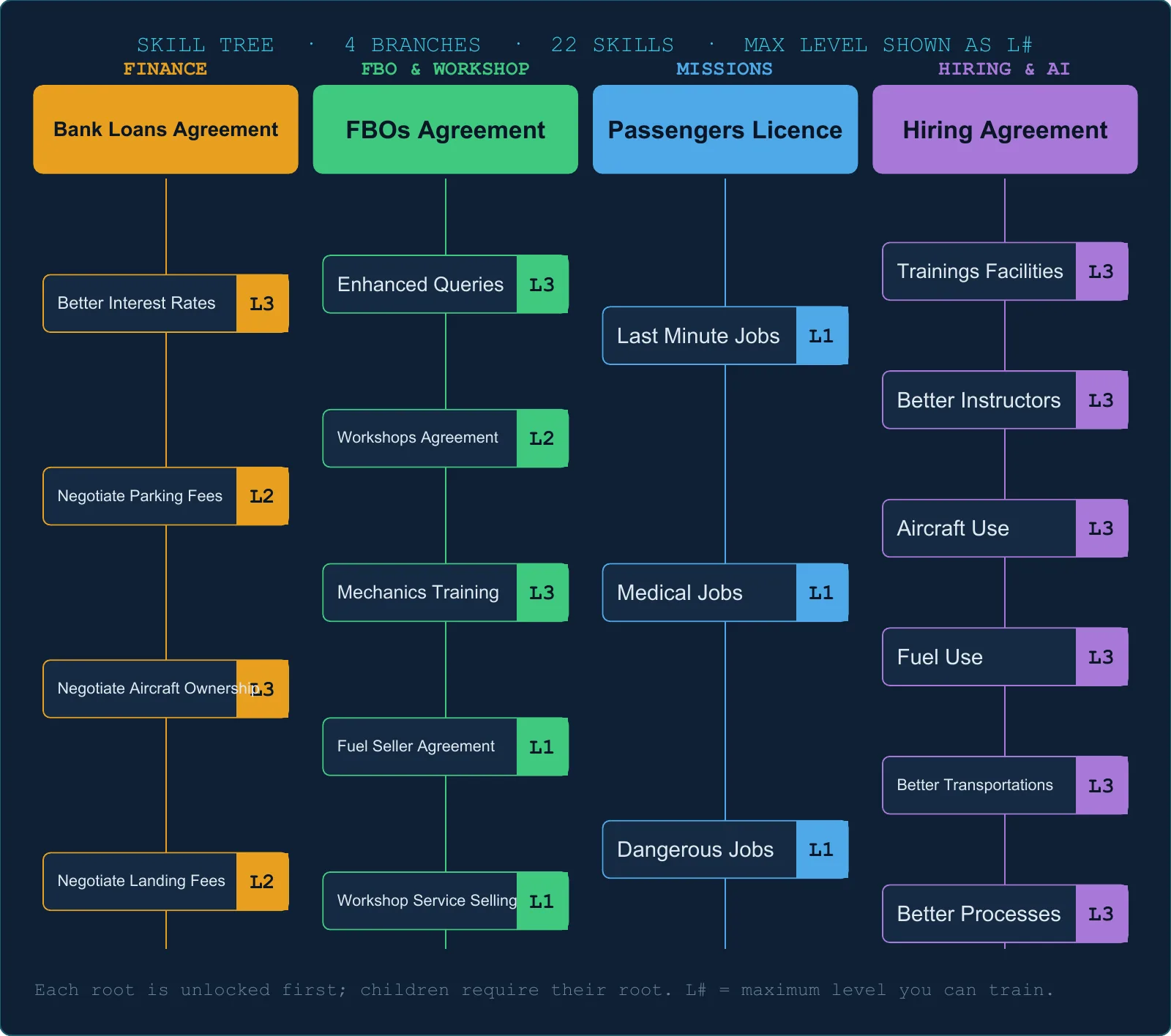
How many skill points will I need to max the FBO branch? Is the −10 % landing fee skill worth 3 points? Which skill hides a non-linear bonus? Everything about the 22-skill tree.
Going from level 9 to level 10 costs 9 000 XP. The cost rises linearly with the current level; it is not the same at every level.
5.2 The cost model
Every level within the same skill costs the same number of points:
Taking a 2-point-per-level skill to level 3 costs 6 points total — not 2+4+6.
Root skills (1 point each)
Four branch roots can be unlocked with your creation point:
Bank Loans Agreement — Finance branch
FBO Main Agreement — FBO branch
Passengers Licence — Mission branch
Hiring Agreement — AI/Employees branch
A fresh company with 1 point can pick exactly one root.
5.3 Respec — resetting the skill tree
Respec
Cost
First time, non-negative company value
Free
Negative company value, including first reset
1 000 Cr quoted
Each subsequent
1 % of company value × reset count (capped at 5 % of company value)
A respec wipes your current skill allocation. Your total earned skill points are preserved — you rebuild from scratch with everything you've accumulated so far.
Scenario note: companies started in certain scenarios have all skills at maximum by default.
5.4 All 22 skills
FINANCE branch
Skill
Max level
Cost / level
Prerequisite
Effect per level
Bank Loans Agreement
1
1 pt
—
Unlocks bank loans
Loan Interest Reduction
3
2 pts
Bank Loans
−1 / −2 / −3 % percentage points off the annual rate; see the live quote (§8.2)
Total to max everything: 98 points. Starting from 1 point at company creation + 2 per level, you need level 50 to fully max the tree (without counting VA, quest, or Airliner bonuses).
Deleted legacy skills: three old load-speed skills were removed from the game. They no longer exist and cannot be unlocked.
5.5 The fine print — skills with hidden behaviour
⚠ Weekly Ownership Reduction — the non-linear jump
The three levels do not reduce evenly:
Level
Reduction
1
−3 %
2
−5 %
3
−10 %
The jump from Level 2 to Level 3 is 2.5 times as large as Level 1 to Level 2. If you only have 6 points to spare, stopping at Level 2 misses half the total benefit. Push to Level 3.
Enhanced Queries — generation attempts and exceptions
Outside Challenge Mode, the server scales both bounds, but the random upper bound is excluded:
Skill level
Random generation attempts
0
1–2
1
2–5
2
3–8
3
4–11
In Challenge Mode those ranges are 1–2 / 2–3 / 3–4 / 4–5. Favourites are handled separately, and a generation attempt may fail to produce a usable mission. Do not treat the upper number as a guaranteed batch size.
XP Bonus — when the multiplier applies
The skill multiplies base XP and its percentage bonuses by 1.01 / 1.02 / 1.03 when the server's XP-impact list contains an entry. This is not strictly a test for a positive bonus: explanatory entries with 0% also count. Flat XP, such as a qualifying medical diversion, is added afterwards.
Realistic Sim Procedures enable the procedure and score bonuses, but are not required for all XP effects. Sim-failure, equipment and airport bonuses are processed separately (§6.8).
Mechanic Speed and Aircraft Condition — current limitation
These skills remain in the tree, with advertised speed and wear improvements. The current server calculations do not apply those advertised improvements: mechanic work power uses personal stats and elapsed time, while base wear returns the common wear constant. Do not budget a saving from these two effects. Aircraft Condition still gates the XP Bonus skill.
No rank gate — the only gates are the prerequisite skill and having enough points. Nothing like "requires Company Rank 5".
Binary vs. graduated skills — some skills simply unlock a feature (present/absent), others scale per level.
XP Bonus depends on the XP-impact calculation (§5.5); Realistic Sim Procedures are not its only possible trigger.
Enhanced Queries expands generation attempts; favourites and Challenge Mode need separate treatment.
Weekly Ownership Reduction Level 3 is where most of the value lives — don't stop at Level 2.
5.8 Recommended starter builds
The FBO magnate (25 pts)
Max the FBO branch. Enable fuel and workshop resale. Max logistic queries and enhanced queries. Sell services to everyone.
The cost-cutter (16 pts)
Bank Loans → Loan Interest L3 → Weekly Ownership L3. The 16-point total includes the root. Reduce interest and recurring ownership costs.
The XP grinder (16 pts)
Hiring → Training Efficiency L3 → Aircraft Condition L3 → XP Bonus L3. The XP multiplier follows §5.5; the intermediate Aircraft Condition skill does not currently reduce wear.
The passenger operator (4 pts)
Hiring + Passengers Licence + one of Last-Minute / Medical / Dangerous. A low-cost path to specialized job markets.
5.9 TL;DR
22 skills, four branches, 98 points to max the tree: level 50 from the initial point plus level-ups alone.
First respec is free at non-negative company value; a negative value produces a 1 000 Cr quote.
Enhanced Queries expands random attempts; see the exclusive upper bounds and Challenge Mode ranges in §5.5.
Weekly Ownership L3 reduces fees by 10%, compared with 5% at L2.
The XP skill multiplier uses the server's XP-impact list, not a blanket Realistic Sim Procedures requirement.
Advertised mechanic-speed and aircraft-wear skill savings are not applied in the current server calculations.
Chapter 06
Flight Scoring
What counts against my flight score? How do I land an "A"? Does a 98 % score pay me more money? Everything about how the server grades each flight.
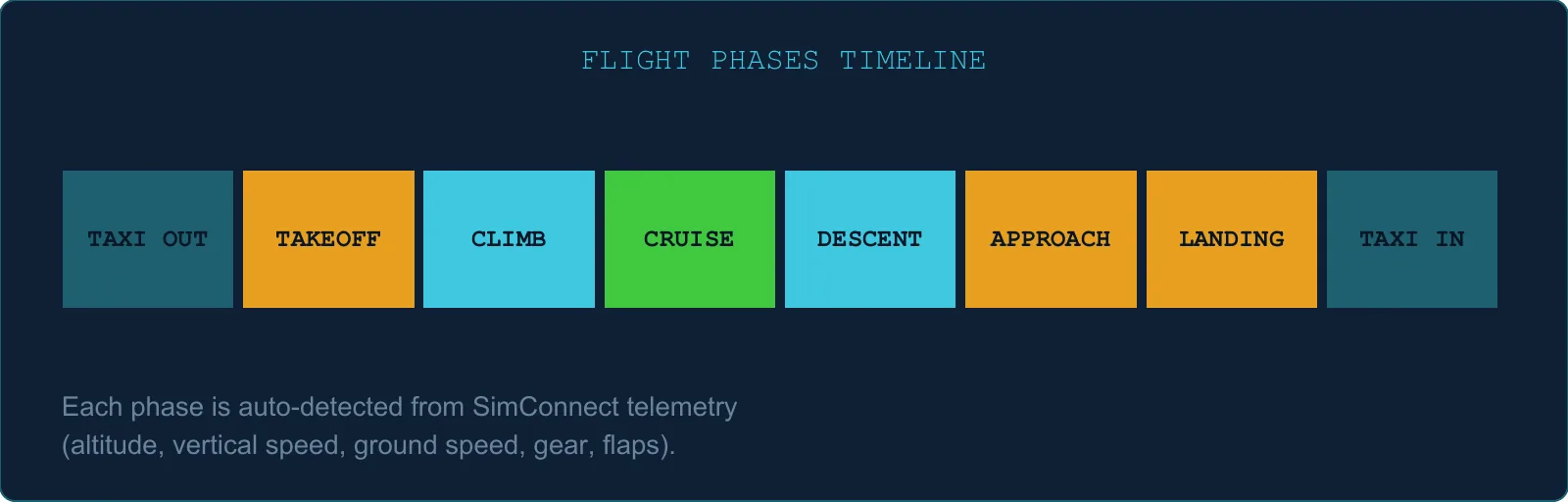
TL;DR — the key pointsFIG 6.01 — Eight main stages of a tracked flight; the tracker also distinguishes preparation and shutdown
6.1 The overall formula
Score % = total points earned ÷ total points possible
No phase weighting — a point earned during taxi counts the same as a point during cruise or landing.
The maximum possible points depend on which trackers apply to your aircraft class and company settings.
A typical jet flight has a maximum of around 80–90 points.
Score is stored as a number from 0 to 1. The interface displays it as a percentage.
6.2 Flight phases — when each starts and what to fly
The engine moves through these phases automatically, based on your aircraft's state. The table below is your phase-by-phase checklist: when each phase begins, and the lighting and procedures OnAir expects while you are in it. The point value of each check is broken down in §6.4 (always-on) and §6.5 (per-phase).
Phase
When it starts
Lighting & procedures to fly
Aircraft Preparation
Before engines are running
Start tracking before the engines — engines already running at tracking start costs 3 points, unrecoverable. Beacon (or strobe) ON.
Engine On
Engines running, not yet moving
Taxi ON, Nav ON, Landing OFF.
Departure Taxi
Any ground movement
Taxi ON, Nav ON, Landing OFF. Taxi speed below 40 kts.
Takeoff
Accelerating on the ground, above 40 kts
When you start the take-off roll: Taxi OFF, Landing ON. Jets: flaps set for take-off.
Initial Climb
First 3 min after liftoff, or IAS > 240 kts (jets)
Landing ON — keep them on through the initial climb. Taxi OFF within 60 s. Gear up.
Enroute — Climb / Level / Descent
Sustained climb, level or descent (beyond ±200 ft/min for 30 s)
Landing OFF above FL180 / ON below. Nav ON, Taxi OFF. Flaps up until short final. Speed ≤ 250 kts below 10 000 ft.
Approach
Near the destination (30 NM for jets, else 2 + airport-size × 2 NM) and below the altitude gate
Landing ON. Nav ON. Extend gear and flaps on schedule — mind the max extension speeds.
Landing
On the ground, decelerating below 40 kts
Rated once at touchdown (vertical speed, G-force, airspeed). Gear down, flaps deployed, no bounce.
Arrival Taxi
After touchdown
When you vacate the runway: Taxi ON, Landing OFF. Nav ON. Flaps up. Taxi speed below 40 kts.
Engine Off
All engines shut down
Landing OFF, all lights off except beacon/strobe until the engines stop. Fuel reserve ≥ 30 min of cruise flow.
Always-on limits. Some checks run in every phase, not just the one you are in: the bank, pitch and G-force envelopes, the 250 kt limit below 10 000 ft, stall and overspeed warnings, flap and gear overspeed, beacon-or-strobe while any engine runs, and taxi-light discipline (on while rolling, off once airborne). Their point values are in §6.4 and the exact thresholds in §6.7.
Aircraft-type exceptions. Gliders skip the G-force, pitch, bank, engines-off-at-start and fuel-reserve checks. Fighters skip pitch, bank and the 250 kt limit. Helicopters skip every flap check. Only jets are graded on take-off flaps. Everything else follows the table above.
Live guidance in the Companion. During tracking, the Score tab walks you through this table live. The phase you are in expands automatically and shows the exact instruction for that moment (for example, "When accelerating for take-off: Taxi OFF, Landing ON"). When a light check is being missed, a red countdown shows how many seconds remain before the point is actually lost, and your current bank, pitch, G-force and speed are displayed next to each check as you fly.
This phase guide is intentionally generic — it covers every aircraft type OnAir tracks, from GA and ultralights up to heavy jets, and is limited to lighting and the items OnAir actually scores. For everything else, follow your aircraft's own normal procedures.
6.3 How scoring works
Each tracker starts at full points.
Each violation removes a fixed number of points.
A minimum delay between penalties prevents you from being docked twice for a single brief event.
Some trackers give you a grace period to correct before the first point is removed.
Score floor = 0 — trackers cannot go negative.
6.4 General trackers (active throughout the entire flight)
Tracker
Max pts
Points lost / violation
Notes
Max G-force
3
1
G < −1.0 or G > 2.5
Max Pitch
3
1
Pitch below −25° or above +25°
Max Bank angle
3
1
Above 35° (jets) or 45° (all others)
Beacon + Strobe lights
3
1
Both lights off while engines are running
Speed below FL100
3
1
Above 265 kts below 10 000 ft (20 s grace)
Overspeed (VNE)
6
2
Simulator overspeed warning active
Stall warning
6
2
Stall warning active above 150 ft AGL
Flap overspeed
6
2
Flaps extended above maximum flap speed
Gear overspeed
6
2
Gear extended above maximum gear speed
Taxi lights
3
1
Taxi lights off on the ground or on in flight, at ≥7 kts with engines running; 60 s warning
Bank angle is a single threshold — not tiered. There are no partial penalties at 30° or 40°. Once you exceed 35° (jets) or 45° (others), the tracker fires.
A separate flat XP award, added after percentage calculations
There is no overall +61% cap. The server adds the applicable percentage bonuses, then applies the XP skill multiplier when its XP-impact list contains an entry (including a zero-percent explanation). Flat XP is added last. An entry's presence is not the same as earning a positive bonus.
✅ Reputation
For flights with Realistic Sim Procedures enabled, your score affects reputation gain:
Score
Reputation result
100 %
Double the base reputation gain
50 %
Normal base gain only
0 %
Zero gain (never negative)
Without Realistic Sim Procedures, your score has no reputation effect.
Checkride flights
Checkrides use a separate evaluation. The flight scoring still runs, but:
No reputation gain or loss.
Passing sets base XP to 100; applicable bonuses are processed afterwards, so the total need not equal 100.
AI-flown flights
No XP earned at all.
Reputation is based on crew stats, not flight score.
6.9 Flying without Realistic Sim Procedures
The procedure and score bonuses in §6.8 are inactive, and score-based reputation is disabled. Sim-failure, equipment, airport and qualifying flat XP effects can still apply, as can the XP skill multiplier under its own condition. Choose the setting for the procedure rules you want to fly, not as a supposed requirement for every XP bonus.
6.10 Top 5 score killers
Landing ratings (up to 30 points total). A single D-rated landing costs 6 points on that rating alone.
Fuel reserve below 30 min at shutdown — 5 points lost, plus the Safety bonus is blocked.
Stall, overspeed, flap/gear overspeed — 2 points per violation on each affected tracker, up to 6 total per tracker after repeats.
Starting with engines already running — 3 points lost immediately, no way to recover.
Bank angle above threshold — 1 point per violation, up to 3 total; a violation also blocks the Comfort XP bonus.
6.11 TL;DR
Score = total points earned ÷ total points possible. No phase weighting.
Score does NOT affect cash — only XP bonuses and reputation.
Landing is worth up to 30 points, rated via 3 independent checks (V/S, G, speed). The worst grade is displayed.
Fuel reserve below 30 min = 5 pts lost + Safety bonus blocked.
Procedure/score bonuses require Realistic Sim Procedures; equipment, airport, sim-failure and qualifying flat XP effects are separate. There is no +61% global cap.
The XP Bonus skill uses the server's XP-impact list (§5.5); an entry need not carry a positive percentage.
Chapter 07
Freelance & Missions
Why does a 20-minute hop pay more per NM than a long-haul? What's the real formula behind freelance charter fares? Which multipliers stack? Everything about missions, freelance, regular routes, and the money they produce.
TL;DR — the key pointsFIG 7.01 — Pay multiplier vs. longest-leg distance (short legs win)FIG 7.02 — Mission type grid
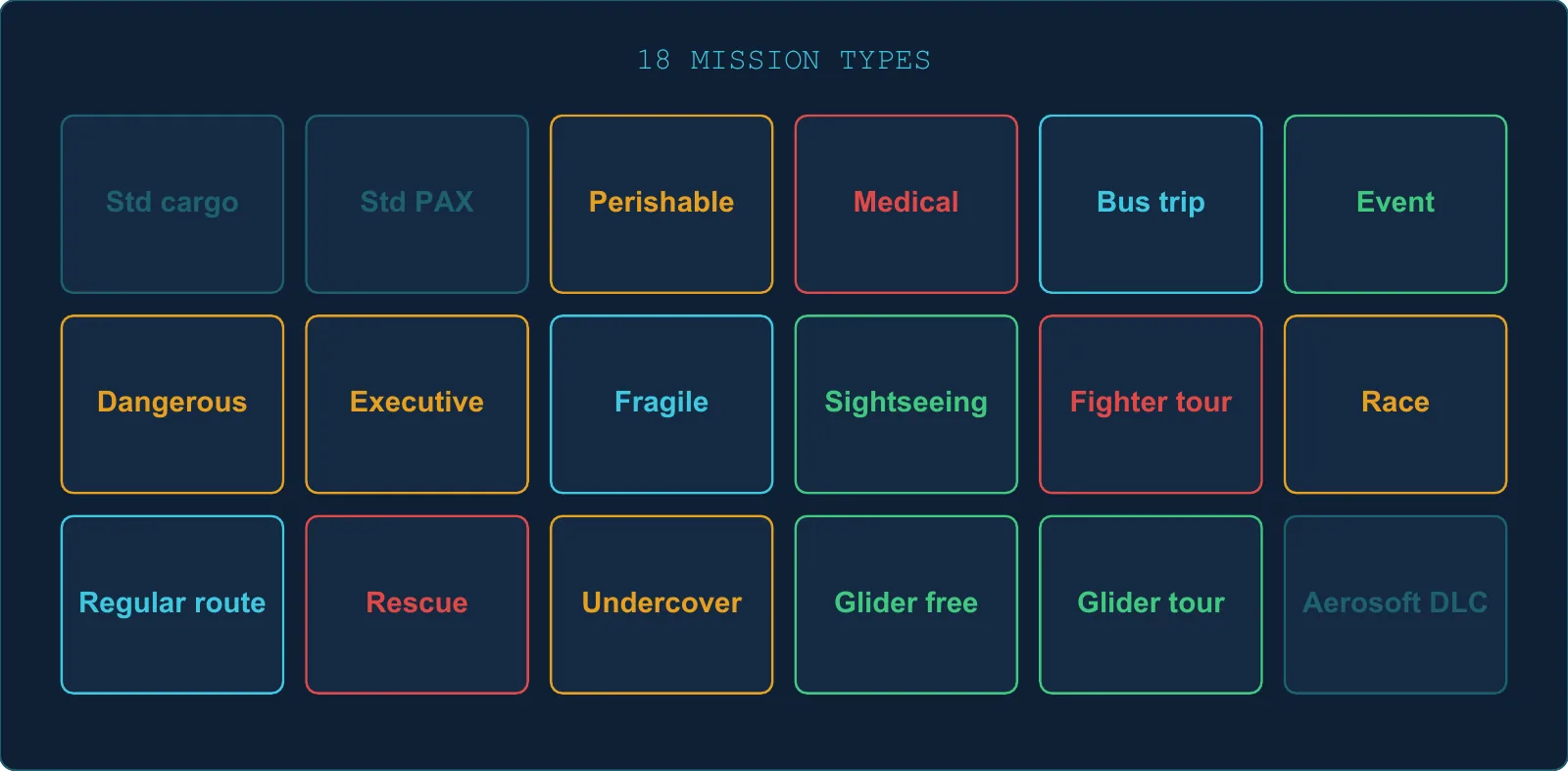
7.1 The 21 mission types
Missions have two classifications — a type (what kind of job it is) and a category (where it comes from).
OnAir uses two separate pay logics depending on whether the job is freelance or grind. Understanding the difference is essential.
Engine A — Grind (job board, logistic center, regular routes)
Grind pay is freight-style: you are paid for what you carry and how far you carry it. Cargo weight and passenger count both contribute, with passengers worth more per pound than cargo and premium classes (Business, First) worth more than Economy.
A series of bonuses then stack on top — short legs, special mission types, time-pressure cargo, multi-leg routes. A small random variation is added, a flat minimum is guaranteed, and the result is rounded.
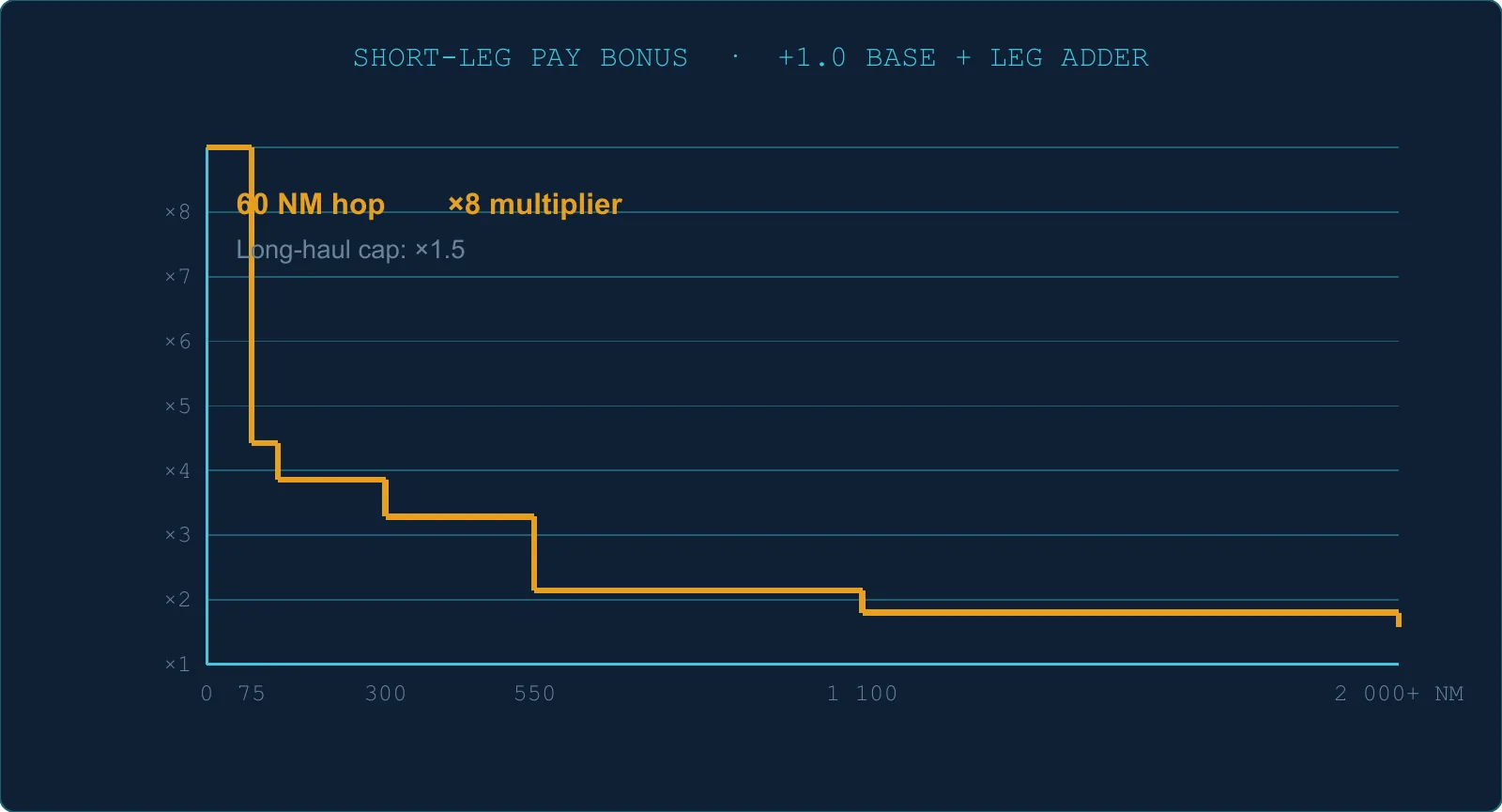
The shorter the leg, the higher the per-mile rate. A 60 NM hop earns far more per mile than a 2 000 NM long-haul (see §7.3 for the full bonus ladder).
Engine B — Freelance charter
In freelance mode you fly for the employer, which provides the aircraft and crew. The aircraft is created when you accept the contract, with 20-40% fuel on handover, and removed when all its missions are complete. Refuelling at an external supplier is not charged to your company; no aircraft rental, landing or parking fees are charged, and mandatory maintenance does not apply. If you use your own FBO, its fuel stock is consumed and the stock cost is recorded in its accounts, without a cash purchase. Fuel is provided, but you still need to prepare enough for the flight.
Freelance pay is time-based, like an executive charter quote: the customer pays for the estimated flight time at an hourly rate, plus a fixed dispatch fee.
Two things drive your rate:
The provided aircraft's speed — faster cruise speed reduces estimated flight time, but the hourly rate is generous enough that even slow aircraft are paid fairly.
Your company reputation — higher reputation means a higher hourly rate. Reputation directly grows your freelance income.
A freelance charter is priced like a time-and-materials contract, not a per-lb-per-mile job.
Practical takeaway: grind missions reward picking the right cargo for the right route. Freelance rewards building a reputation and flying steadily. Both can be profitable — they just optimize for different play styles.
7.3 The grind pay formula — block by block
Base rates
Base rates come from the reference economy (anchored to a Cessna 172 equivalent). Passenger missions pay roughly 33 % more per lb per NM than cargo.
A world-level "pay bonus" setting can increase these rates — different worlds may pay different amounts.
Seat class factors
How much each passenger class multiplies the base rate:
Class
Factor (under 130 seats)
Factor (130+ seats)
Economy
1.0
1.0
Business
1.3
2.0
First
1.5
3.0
In practice, the server evaluates at a high seat count, so Business always pays ×2.0 and First always pays ×3.0.
The bonus factor ladder — what really drives your pay
The base freight rate is multiplied by a bonus factor that stacks several conditions together. The exact numbers are kept under the hood — what matters is the shape of the curve and which factors push it up.
Short legs win — by a wide margin. Trips under ~75 NM earn dramatically more per mile than long-haul flights. The bonus tapers as distance grows, flattening out for transcontinental routes (see FIG 7.01 for the trend).
Things that nudge your bonus upward:
Distance — the single biggest lever. A 60-mile hop pays several times more per mile than a 2 000 NM trip.
Special mission types — rescue (especially when the location is unknown), fighter tours, sightseeing, and medical/dangerous-goods runs all carry meaningful premiums.
Time-constrained cargo — perishables and rush jobs pay noticeably better, but miss the deadline and the penalty bites just as hard.
Human-only cargo or passengers — a small but reliable bump.
Multi-leg routes — each extra airport in the route adds a small bonus (capped at five legs).
Things that barely move the needle:
Dangerous goods and fragile cargo only add a marginal premium on top of the certification gate.
Adding more legs is a minor optimisation — useful but not transformative.
Practical heuristic. When you're hunting for high-value missions, scan the board for short routes, rescue/medical jobs, and time-pressured cargo before anything else. Distance is by far the most powerful factor — the curve is steep at the short end and gentle at the long end.
Finalisation
pay × bonus factor
pay × random jitter (±3 %)
pay + 300 Cr flat floor
pay rounded up to nearest 10 Cr
Penalty is calculated through the same pipeline.
Company & airport boost on top
Extra
Value
Company pay bonus
Applied to all grind missions (except logistic-center missions)
Logistic Center boost
+2 % to +30 % depending on airport Size and boost level
Freelance Route boost
+50 % / +100 % / +150 % by level
Logistic-center boost by level and airport Size
Boost level
Size 0
Size 1
Size 2
Size 3
Size 4
Size 5
1
+10 %
+10 %
+5 %
+4 %
+3 %
+2 %
2
+20 %
+15 %
+10 %
+7 %
+4 %
+3 %
3
+30 %
+20 %
+15 %
+10 %
+5 %
+4 %
Small airports get the most aggressive boosts.
Last-minute bonus
When a mission is within 2 days of expiry:
Up to +15 % bonus (reaches max ~24 h after the ramp begins)
Requires the Last-Minute Jobs skill to accept these missions.
7.4 How freelance charters are priced
Base pay
A freelance charter is quoted like a private-jet contract: the customer pays a dispatch fee plus an hourly rate for the planned flight time. Two factors set what you actually earn:
Aircraft cruise speed — the planned time is estimated from your aircraft's published cruise speed, with a comfortable margin to absorb taxi, climb and descent. Faster jets bill fewer hours; slower aircraft compensate via the hourly rate.
Company reputation — your hourly rate scales with your reputation. A well-regarded operator commands a noticeably higher rate than a new company. Reputation is the single biggest lever on freelance income.
A small fixed bonus is added for fighter aircraft, reflecting their specialised nature.
Fare boosts on top of the base quote:
A multi-leg route that passes through your home base roughly doubles the pay — the engine intentionally rewards using your base airport as a hub.
A charter tied to an incident at an unknown location carries a meaningful premium for the risk.
No penalty. Freelance charters never charge you a penalty if you cancel or fail. Worst case, the contract simply expires.
Reputation and XP from a freelance charter
Each freelance charter pays out reputation based on the route — a base reward plus a small bump per airport visited along the way. Pilot certification roughly doubles both reputation and XP gains.
XP scales with the distance flown, with the same certification bonus.
Hard cap
Server maximum: 5 concurrent freelance charters per company. A 6th is refused. The Companion workflow allows one active charter and redirects a second acceptance to the existing job. This interface limit is distinct from the server ceiling.
7.5 Logistic-center missions (FBO queries)
Missions generated from your FBO's logistic queries behave as standard grind missions with these specifics:
Range comes from your configured query parameters.
Airport boost is baked in at generation (not added when you accept).
Company pay bonus is NOT applied to logistic-center missions.
Passenger seat split: pure-class if fewer than 14 passengers (all economy, or all business, or all first); mixed split otherwise.
7.6 Regular routes — weekly recurring
What Regular Routes are
Regular Routes are your company's recurring scheduled services, operated with company aircraft and assigned crew. You set the ticket and cargo prices and manage the schedule, capacity and reliability. They are separate from Freelance Routes.
Your company pays operating costs, including fuel. For AI-flown regular routes, the server buys fuel at departure and charges the company operating the aircraft. It requires one FBO with enough stock for the whole purchase, preferring your own FBO, then your VA's, then the cheapest eligible supplier. If none can supply it, no fuel is bought. The flight can only start if its onboard fuel covers the destination, alternate and 30 minutes of cruise; otherwise it shows Not started, with the reason in the flight journal. See §3.7 for the full rules and the different work-order behavior.
For Fly in Simulator routes, prepare fuel yourself through dispatch; the automatic route purchase does not run.
The calendar
Routes are rebuilt every Sunday at 00:00 UTC.
One mission is spawned per route flight.
Mission expires: 7 days after creation.
Reliability mechanic
Event
Change to reliability
New route
0.50 (default)
Completed on time
+0.05
Skipped
−0.05
Completed late
−0.01
How a route is priced
A regular route is paid like a scheduled airline service: each filled economy, business or first-class seat earns its own ticket price, plus a per-pound rate for cargo on board. You set the prices yourself when you create the route, and the system tracks how many of those seats are actually filled at departure time.
Skipping or cancelling a flight on a regular route triggers a fixed penalty proportional to the route's expected revenue.
Fill rates fluctuate with time of day and day of week — peak hours and weekday demand patterns mean a 7 am Monday departure usually books closer to capacity than a 2 am Sunday one.
Slot fees (at arrival and departure)
Rule
Fee
Airport Size 0 or 1
Free
You own the airport
Free
All other cases
max(50 Cr, route max pay × 2.5 %) per hour slot
Route rank levels
XP earned
Level
0
0
200
1
500
2
1 000
3
2 000
4
There is no hard cap on how many regular routes a company can hold.
7.7 Expiration, decline, and penalties
Unclaimed missions (on the board)
About 3 % of generated missions are "last-minute" (100 min to ~2 days to expiry).
Otherwise, normal expiry: 2 days to several days depending on type.
Expired unclaimed missions are deleted automatically every 5 minutes (up to 500 at a time).
After you accept
Moment
Penalty
First 15 min after acceptance
No penalty
Before expiration
Penalty × elapsed proportion
Past expiration
Full penalty (capped at 95 % of pay)
Daily auto-decline
Missions that are more than 15 days past their expiry date and not yet paid are automatically declined at 05:45 UTC each day, with the computed penalty charged.
Voluntary decline
Impact
Value
Reputation
−0.1 % per decline (if a penalty applies)
Cash
Penalty charged (capped at 95 % of pay)
7.8 Skill requirements for missions
Skill
Requirement
Passengers Licence
Required to accept PAX charters (except tours and freelance)
Last-Minute Jobs
Required to accept last-minute missions
Medical Transport
Required for medical missions
Dangerous Goods
Required for dangerous-goods missions
Enhanced Queries changes the random generation range for FBO missions (§5.5); mission licences unlock particular job types. Other revenue boosts come from: world pay bonus, airport boosts, company pay bonus, and (for freelance) reputation.
7.9 Cargo categories (14 types)
Category
Common use
Standard goods
Default cargo
Medical
Medical missions
Time-constrained
Perishables
Dangerous goods
Hazmat missions
Quest items
Story missions
Containers
Fuel containers (100LL and Jet-A — see the Fuel chapter)
Special
Events, tours
Fragile
Max G-force tracked
Secret
Undercover missions
Racing
Race missions
Scheduled route
Regular route cargo
Rescue
Rescue operations
Undercover
Hidden-location missions
Glider
Glider missions
Food Rations are an industry merchandise type, not a cargo type — they are used by factory workers and weigh 3 lbs per unit.
7.10 Concurrent mission caps
Scope
Cap
Freelance charters, server
5
Freelance charters, Companion workflow
1 active
Total missions (solo company)
100 + Company Level × 5
Total missions (VA)
Members × 50
7.11 TL;DR
Two pay engines: Grind (per-lb-per-NM) and Freelance (per-hour with reputation multiplier).
Short legs pay far more: legs under 75 NM → ×7 bonus factor on top of base rate.
PAX class matters significantly: Business = ×2.0 pay, First = ×3.0 pay.
Logistic-center boost favors small airports (up to +30 % at Size 0, Level 3 boost).
Freelance server cap = 5; the Companion allows one active charter in its acceptance workflow.
Default mission cap = 100 + Level × 5 total.
Auto-decline at 05:45 UTC for missions more than 15 days past expiry.
Chapter 08
Economy & Global Constants
Landing fee at a major hub? Loan interest rates? When does my company auto-pause? How much is a Business class seat worth? A single reference chapter for every recurring number not covered in previous chapters.
Same formula as the FBO & Hangar chapter — reproduced here for convenience:
Airport Size
Fixed / h
Per 1 000 lbs above 200 k lbs / h
0
4.375 Cr
0.0625 Cr
1
5.250 Cr
0.0750 Cr
2
6.125 Cr
0.0875 Cr
3
7.000 Cr
0.1000 Cr
4
7.875 Cr
0.1125 Cr
5
8.750 Cr
0.1250 Cr
Your own FBO covers aircraft within its combined hangar/tie-down capacity, most expensive first. Overflow is chargeable. Basecamps and paused companies are exempt; skills and custom airport-owner tariffs can reduce the charge (§2.7).
8.2 Bank loans
Access requirement: Bank Loans Agreement. Loan Interest Reduction improves the rate but is not needed to unlock borrowing.
How much you can borrow
Available capacity = (min(10 000 000 Cr, share capital × 3 + company value) − outstanding principals) × (1 + reputation) × difficulty factor
Reputation is a fraction (50% = 0.5). The 10 M ceiling applies before the reputation and difficulty multipliers, so it is not a final loan cap. Existing unpaid principal reduces capacity first.
Read the quoted rate: the current calculation only substitutes 5% if the adjusted rate is negative. A non-negative rate below 5% is retained; there is no general 5% floor.
Loan terms offered
Durations: 48 / 96 / 144 / 192 weeks (12 / 24 / 36 / 48 periods of four weeks).
Up to 17 proposals across six amount fractions and selected durations; non-positive amounts are filtered out. Read the actual list rather than assuming a complete rectangular set of offers.
Repayment
Deducted automatically every 7 days during the daily finance check at 04:45 UTC.
Early repayment penalty: 10 % of the remaining principal.
8.3 Weekly management fee — Challenge Mode only
This fee (charged every Wednesday at 06:00 UTC) applies only to companies in Challenge Mode. Standard career companies never pay this fee.
Fleet portion (if you own or rent more than 5 aircraft)
The fee increases with fleet size, up to a cap:
Fleet size
Fee rate per aircraft
6 aircraft
~0.02 % of base price
20 aircraft
~0.29 % of base price
35+ aircraft
~0.585 % of base price (cap)
FBO portion (if you own more than 3 FBOs)
A surcharge is added on top of your regular FBO weekly fees based on how many FBOs you own beyond 3.
8.4 Company auto-pause
Trigger: no login for 7 consecutive days.
VAs are excluded. Already-paused or deleted companies are excluded.
What changes when paused
System
Behaviour when paused
Loan deductions
Skipped
Salaries
Skipped
Management fee (Challenge Mode)
Skipped
Your FBO visibility to others
Hidden
How to unpause
The server resumes an eligible company when you return to it; there is no need to wait for the next daily cycle. Freelance mode has separate rules and does not itself resume Advanced company management. Individual scheduled activities still follow their next processing pass.
8.5 Employee salaries
Paid every day at 05:00 UTC. A salary fires when 7 or more days have passed since the last payment.
Eligible employees: non-player characters, not on a freelance contract, and from a company that has been active in the past 15 days.
The guaranteed minimum is prorated if fewer than 7 days have elapsed.
Freelance employees:
salary = max(3 hours of wages, hours_flown × hourly rate)
Guaranteed minimum = 3 hours of wages per payment (not a weekly prorated amount).
8.6 Account codes — your financial statements
Understanding these codes helps you read your company's income statement and balance sheet.
Revenue
Account
What it tracks
PAX revenue
Passenger transport earnings
Cargo revenue
Cargo transport earnings
Rental income
Renting your aircraft to others
FBO services
Workshop markup earned from other players
FBO fuel sales
Fuel resold at your FBO
Scenario revenue
Campaign/story mission rewards
VA revenue
Virtual Airline related income
Financial adjustments
Refunds and asset adjustments
Industry revenue
Factory production sales
Airport ownership
Landing/parking fee income as airport owner
Expenses
Account
What it tracks
Fuel costs
Fuel burned on your flights
Staff salaries
Regular employee wages
Freelance salaries
Freelance employee wages
Outsourcing
Costs of outsourced jobs
Landing & parking
Fees you pay at other airports
Maintenance
Aircraft maintenance and inspections
Rental costs
Cost of renting aircraft from the market
Financial costs
Loan interest + weekly management fees
Training
Employee training expenses
FBO ownership
Weekly FBO ownership fees
Penalties
Mission penalty charges
Cargo storage
Hangar storage fees
Aircraft ownership
Weekly aircraft ownership fees
Industry expenses
Factory operating costs
FBO fuel stock is an asset, not an operating expense. When you buy fuel for your FBO tank, that money becomes the value of your fuel inventory. It is shown on the balance sheet under assets — not as a cost in your income statement.
The three statements — what each one answers
OnAir keeps a real chart of accounts with the same four categories real accountants use (Revenues, Expenses, Assets, Liabilities), and derives three complementary reports from it. Each answers a different question:
Statement
Time basis
Question it answers
An aircraft purchase...
Balance Sheet
Snapshot (a date)
What is my company worth right now?
Shows — cash down, fleet assets up
Income Statement
Flow (a period)
Did my operations make a profit?
Never shows — it is not an expense
Cash Flow
Flow (a period)
Where did my cash physically go?
Shows — a large investing outflow
FIG 8.02 — One purchase, three statements
Why buying an aircraft never appears on the Income Statement
Buying an aircraft is an asset swap: cash becomes a flyable asset you still own. Nothing was consumed, so nothing is expensed — the Income Statement keeps measuring pure operating performance (revenues earned minus costs consumed). Real-world accounting works exactly the same way: a capital purchase is capitalised on the balance sheet (IAS 16), and the cash paid out is classified as an investing activity on the cash flow statement (IAS 7). A real airline's income statement has no "bought 15 aircraft" line either.
Worked example — you earn 300 000 Cr from charters this week, spend 80 000 Cr on fuel, fees and wages, and buy a light jet for 2 000 000 Cr:
Event
Income Statement
Cash Flow
Balance Sheet
Charter revenue
+300 000
+300 000 in
Cash +300 000
Fuel, fees, wages
−80 000
−80 000 out
Cash −80 000
Aircraft purchase
—
−2 000 000 out
Cash −2 000 000 · Fleet +≈2 000 000
Bottom line
Net income +220 000
Net cash −1 780 000
Company value ≈ +220 000
You were profitable that week even though your cash collapsed — profitability and cash position are different questions, which is exactly why separate statements exist. What does hit the Income Statement is the cost of owning and operating the aircraft: weekly ownership fees, maintenance, fuel, crew, landing fees. The wear itself reaches your books through the Balance Sheet, whose fleet line tracks each airframe's market value (§9.3) — OnAir's equivalent of depreciation.
Paid above book value? A brand-new aircraft costs 1.2 × base price but enters your assets at market value — Company Value dips by the premium at purchase, like a new car losing value as it leaves the dealership.
Official references:
SEC — Beginners' Guide to Financial Statements — sec.gov/about/reports-publications/beginners-guide-financial-statements
IAS 1 (Presentation of Financial Statements), IAS 7 (Statement of Cash Flows), IAS 16 (Property, Plant and Equipment) — ifrs.org/issued-standards/list-of-standards/
8.7 Company level
XP to level up:level × 1 000 (linear — not exponential).
On level up: +2 skill points granted.
Level-gated features
Feature
Formula
Max simultaneous missions
100 + level × 5
Max pilots (standard company)
2 + 2 × level × reputation
Max pilots (VA)
20 + 5 × level × reputation
Max airport ownerships
3 + level
Max AI routes
20 + level
Max basecamps
level × 2
Max factories
Base count + level
8.8 Passenger class economics
Class
Factor (under 130 seats)
Factor (130+ seats)
Economy
1.0
1.0
Business
1.3
2.0
First
1.5
3.0
Standard passenger weight: 190 lbs. Seat weight: 63 lbs.
8.9 Rescue mission ranges
Detail
Value
Maximum search range
100 NM
Range tiers available
5 / 10 / 25 / 100 NM
Locations per tier
10
8.10 Starting bonus — Advanced Management unlock
When you upgrade from Freelance (Onboarding) mode to Advanced Career:
Difficulty
World type
Starting bonus
Easy
Any
470 000 Cr
Classic
Any
170 000 Cr
Realistic
Survival world
10 000 Cr
Realistic
Standard world
70 000 Cr
Your existing freelance cash is also doubled at unlock.
There is no creation fee when starting a company from scratch.
What the difficulty level sets. On Cumulus you choose Easy, Classic or Realistic when you create a company. Stratus and Thunder companies are created as Realistic, with no choice. It sets the starting equity above, the starting reputation (70 % / 50 % / 30 %, which then evolves with your flights) and a loan capacity multiplier (×1.5 / ×1.0 / ×0.7) that stays for the life of the company. A lower reputation also lowers the hourly rate used for freelance job pay (700 + 500 × reputation, in Cr per hour), and a lower capacity or reputation can raise loan interest rates.
It does not decide whether you can use AI pilots: AI flights depend on the world, and Thunder forbids them. It is also separate from the Challenge Mode economy, which the world sets when the company is created and which can be changed afterwards.
8.11 Aircraft wear constants
Constant
Value
Condition loss per 100 flight hours
−12 %
No idle condition decay. Your aircraft's condition only drops from flight hours and specific events — not from sitting on the ramp.
8.12 Flight duty caps
Limit
Value
Maximum flight duty period
14 hours
Maximum single flight duration
14 hours
Mandatory rest after a duty period
8 hours
Relocation (Change base)
instant — and it moves the home airport only, not the employee
8.13 Leasing vs. owning
Detail
Value
Weekly leasing cost
Base weekly ownership fee × 1.2, then the selected term adjustment; three weeks paid upfront
Owned aircraft efficiency advantage
2 % cheaper per hour vs. rented
Accounting view: lease and rental payments are operating expenses — they hit your Income Statement every week. A purchase is an investment and never does (see §8.6).
8.14 Industry fuel supply
Detail
Value
Fuel per factory shipment
5 500 gallons
FBO Refueling: free transport range
250 NM from the FBO
FBO Refueling: factory owner's transport cost
10 Cr per tank per NM beyond 250 NM
Auto-sell to system discount
−40 % (you receive 60 % of base price)
System supply suppression range
200 NM around a player factory
Local Dealer is separate from FBO Refueling: eligible player factories within 250 NM sell whole fuel tanks to the server, nearest first, at the local dealer price when an FBO orders fuel or system restocking runs. There is no Local Dealer purchase outside that radius and no change to the FBO customer's order price. See §3.10.
8.15 Airport ownership
Detail
Value
Maximum airport Size that can be owned
5
Maximum missed weekly payments
1
Advance payment required
2 weeks upfront
Free kits at acquisition
10
Maximum ownerships per company
3 + company level
Weekly kit cost by airport Size
Size
Kits needed per week
0
1
1
2
2
3
3
5
4
25
5
50
Basecamp
0 (free)
Revenue per flight as airport owner
Size
Per human flight
Per AI flight
0
1 000 Cr
50 Cr
1
1 200 Cr
60 Cr
2
1 400 Cr
70 Cr
3
1 600 Cr
80 Cr
4
1 800 Cr
90 Cr
5
2 000 Cr
100 Cr
Human-only world: human-flight payout is doubled.
AI flights earn 1/20th of the human rate.
The kits must be sitting at that airport on the due date. Kits held in another warehouse, or still flying toward the field, do not count — the payment simply fails as if you had none. Plan the delivery, not just the production.
Falling behind. One missed week is tolerated: the airport is flagged
At risk and the arrears roll into the next bill. Miss a second time and the airport is taken back. Flying the kits in before that second deadline costs you nothing but the trip.
What the traffic actually pays. Only flights pay the subsidy. The passengers and cargo that transited are counted and displayed, but they are worth nothing — they are there to tell you how busy the field is, not to earn. Every counter resets at each payout.
8.16 Airport boosts
Owning an airport unlocks a Boosts tab on it. A boost is a renewable benefit attached to that field, and it applies to everyone's activity there — including yours. There are six, each with three levels:
Boost
What it multiplies
Level 1
Level 2
Level 3
Company Jobs
pay on generated FBO jobs; depends on airport Size
+2 to +10 %
+3 to +20 %
+4 to +30 %
XP Boost
XP earned on flights there
+10 %
+20 %
+30 %
Company Routes
Regular Route pay
+10 %
+20 %
+30 %
Freelance Boost
freelance route pay
+50 %
+100 %
+150 %
Industry Boost
points added to positive global machine efficiency
The price is not in credits. A boost costs its own level in Airport Ownership Kits, every week — level 1 costs 1 kit a week, level 2 costs 2, level 3 costs 3. All six types cost the same; only the level moves the number.
The same rule as the rent applies, and it is the one that catches people:
The kits must be sitting at that airport. Kits in another warehouse, or in transit, do not count. The first week is debited the moment you buy, and again every seven days for as long as auto-renew is on.
And the constraint that decides whether any of this is reachable at all:
Kits are not sold by the system. No amount of money buys one. They come from another player on the Trading Hall, or from your own Airport Ownership Kit Facility (§10.4). A boost you cannot feed simply lapses.
Reading the value
Three of the six pay you back in credits (Company Jobs, Company Routes, Freelance), one pays in progression (XP), one in goods (Industry) and one in time (FBO Workshop). The Freelance credit boost reaches +150% at level 3. Company Jobs instead uses the airport-Size table in §7.3.6. Industry adds efficiency points before the production-time formula; it does not promise the same percentage of extra goods, and does not shorten an already minimum-length cycle.
Remember the boost helps every pilot who flies there, not only you. On a field other companies use, you are subsidising their queries and their XP as well as your own.
8.17 Internal balance constants (for reference)
Constant
Value
Purpose
Standard pilot cost
80 Cr/h
Economy baseline
Repositioning pilot (no crew)
120 Cr/h
Rental return without assigned crew
Weekly ownership amortisation
24 weekly payments
How long a new aircraft is expected to pay itself off
Rental return missing-fuel penalty
×2.0 on missing gallons' value
Lease return condition shortfall penalty
×1.25 on repair cost delta
8.18 TL;DR
Landing fee: MTOW × 0.007 Cr/lb. No airport-size variation.
Loans: Bank Loans Agreement unlocks access; read the adjusted quote, which can be below 5%. Early repayment adds 10% to remaining principal.
Weekly management fee:Challenge Mode only — standard companies never pay it.
Auto-pause: after 7 days of inactivity. Unpause by simply logging in.
Salaries: paid every 7 days at 05:00 UTC; higher of guaranteed minimum or hours × rate.
Airport ownership scales steeply with size — Size 5 costs 50 kits/week but earns 2 000 Cr per human flight.
Starting bonus at Advanced Management unlock: 470 k Cr (Easy) → 10 k Cr (Realistic, survival world).
Aircraft purchases never hit the Income Statement — they are asset swaps (cash → fleet), visible on the Cash Flow and Balance Sheet only (§8.6).
Chapter 09
Fleet & Aircraft
How much is my 10-year-old Caravan worth today? What's the penalty for returning a rental with half-empty tanks? How does aircraft pricing actually work? Everything about aircraft lifecycle, pricing, rental, and leasing.
TL;DR — the key pointsFIG 9.01 — Three ways to operate an aircraft, side-by-side comparison
×1.2New-aircraft surcharge
24 wkAmortisation period
4–48 wkLease terms
−17%System sell haircut
9.1 Three ways to have an aircraft
Mode
Upfront cost
Recurring cost
When it ends
Maintenance
Buy new
Base price × 1.2
Weekly ownership fee
Never
You pay
Buy used (market)
Roughly market value (with small random jitter)
Weekly ownership fee
Never
You pay
Rent
Security bond (10 × hourly rate)
Hourly on flight time + daily if below minimum hours
The server calculates each aircraft type's price from scratch using its real performance data:
Total workload = how much the aircraft can carry at cruise speed — combining cargo capacity, seat count, and cruise speed.
Hourly operating cost = derived from workload using a smooth curve anchored between a Cessna 172 (baseline) and a B747 (high end).
Weekly ownership fee = hourly operating cost minus fuel and pilot, multiplied by expected weekly hours:
Aircraft class
Expected hours per week
SEP, MEP, TurboProp, Helicopter
14 h
Glider
7 h
Jet
21 h
Heavy Jet
28 h
4. Base price = weekly ownership fee × 24 (amortized over 24 weeks), rounded down to nearest 100 Cr.
New aircraft surcharge
Default new-aircraft multiplier: Base price × 1.2 (+20%). This is a configurable server setting; use the purchase quote for the active price.
When prices are recalculated
After any aircraft-type update by the moderation team.
Every Monday around 05:15 UTC as part of the weekly maintenance cycle.
The 10 % update threshold
If a price recalculation would change an existing aircraft's value by less than 10 %, the update is skipped. If the change is 10 % or more, existing aircraft owners receive a credit or debit for the difference, and the aircraft's "for rent" and "for sale" flags are reset.
9.3 Market value and how it depreciates
How value is calculated
Market value = Base price − cost of all deferred repairs
There is no age-based depreciation. An aircraft does not lose value just from being old. Value drops only as condition drops — age matters only because more hours mean more wear.
Hightime impact
Hightime increases subsequent wear, indirectly increasing deferred repair costs. The current market-value calculation adds no separate hightime percentage discount. After subtracting deferred repairs, the result is truncated to hundreds of Credits and floored at 1 000 Cr.
Selling to the system
Market value × 0.83 (−17 % haircut)
Where this value lives in your books: the fleet line of your Balance Sheet tracks this market value. Buying an aircraft never touches the Income Statement — it is an asset swap, cash for aircraft (see §8.6) — and wear reaches your books as declining fleet value here.
9.4 Used aircraft from the market
When a used aircraft is generated for the market:
Field
Range
Airframe hours
0 to 1.5× hightime threshold
Engine hours
0 to just below Time Between Overhaul
Price jitter
×0.98 to ×1.08
Time Between Overhaul defaults (before any moderation)
Class
Default TBO
SEP
1 200 h
MEP
3 000 h
Helicopter
1 000 h
Jet
2 200 h
Heavy Jet
2 500 h
Freshly spawned new aircraft
A new aircraft has 1–5 flight hours (near zero), 100 % condition on all parts, and full performance specs.
9.5 Rental mechanics
Hourly rate
The rental rate is calculated from the aircraft's maintenance cost portion plus a margin above operating cost. There is a floor of 50 Cr/h.
Security bond
Bond = hourly rate × 10
Charged when you sign the rental agreement. Returned (minus penalties) when you return the aircraft.
Daily minimum flight hours
Rentals require a minimum number of hours flown per day:
Class
Min hours per day (Realistic setting)
SEP, MEP, TurboProp, Helicopter, Glider
1 h
Jet
2 h
Heavy Jet
4 h
Human-only world
0 h (no minimum)
Your rental intensity setting reduces this requirement:
Setting
Hours required
Realistic
Full minimum
Medium
50 % of minimum
Low
25 % of minimum
If you fall short of the daily minimum, the shortfall is charged at 05:15 UTC each day.
Auto-termination
A rental is automatically cancelled if:
7 days pass without a registered flight.
The aircraft requires mandatory maintenance.
Maintenance during a rental
System rentals and rentals from another player do not have identical maintenance permissions. The server can refuse configuration of an aircraft while a player-to-player rental is active. An accepted maintenance order is charged to the company placing it; do not assume that all rental maintenance is free or always available to the renter. Leasing separately makes maintenance your responsibility. Read the workshop or return quotation for the aircraft concerned.
Upfront: three weeks of the selected weekly rent. Later weekly deductions begin after that prepaid period.
Base weekly rent: weekly ownership fee × 1.2. The longer terms divide that base by 1.05 / 1.10 / 1.15 / 1.20 for 12 / 24 / 36 / 48 weeks. The resulting reductions are approximately 4.76 / 9.09 / 13.04 / 16.67%; 4 and 8 weeks use the base rate.
Maintenance: not included — you pay separately.
Payments are deducted automatically each week. On expiry the aircraft returns to its owner.
After the lease ends, the aircraft is cleaned up automatically within 15 days.
Early termination
25 % of the unused contractual weeks, with any unused prepaid whole weeks refunded separately. The started week counts as consumed; the live return quote shows both amounts.
End-of-lease condition penalty
If the aircraft is returned in worse condition than when you received it:
Penalty = condition shortfall × full repair cost × 1.25
If you own a third-party aircraft addon that isn't yet in the OnAir database, you can submit it through a test-flight process.
What your simulator provides automatically
Cruise speed, stall speeds, empty weight, max takeoff weight, fuel capacity, fuel type, engine type, cruise fuel flow, seat count, max payload, display name, and a unique addon hash.
What you can optionally supply
Field
Rule
Addon download URL
Must be a valid http(s):// URL or the word "default"
Data sheet URL
Optional
Proposed seat count
Used if you supply a number greater than 0
Proposed max payload
Used if you supply a number greater than 0
Test-flight aircraft conditions
The test aircraft is generated with 1–5 hours on the airframe, 100 % condition everywhere, and 50 % fuel.
Fly at least 20 minutes airborne and include a detected cruise phase before registering. Gliders are exempt from the cruise-phase condition, but still need twenty minutes. No separate minimum distance is imposed by this test.
After the test flight
Once you complete the test flight, your addon enters the moderation queue. A moderator reviews it and either approves it, marks it banned (with a reason), or asks you to redo the test flight.
9.8 Aircraft cargo capacity
For every aircraft type, the server calculates how much payload is realistically available:
Maximum payload = aircraft total capacity minus half-fuel weight, minus standard pilot weight, minus copilot weight if applicable.
Fighters have slightly different rules — their cargo limit is calculated directly from the max takeoff weight.
Short-range aircraft
Short-range aircraft (under ~500 NM) are limited to using only 60 % of their theoretical maximum payload. This scales up toward ~97 % for longer-range aircraft. It is a balance design decision.
9.9 Parking — no condition impact
Your aircraft's condition does not decay while parked. Indoor hangar, outdoor tie-down, or apron — it makes no difference.
Condition only changes from flight hours and specific in-flight events. A grounded aircraft stays at exactly the same condition indefinitely.
9.10 Reference constants
Constant
Value
Standard passenger weight
190 lbs
Standard seat weight
63 lbs
New aircraft price multiplier
×1.2
Weekly ownership amortisation
24 payments
System sell haircut
−17 %
Rental bond
10 × hourly rate
Rental floor rate
50 Cr/h
Owned vs rented cost advantage
2 % per hour
Rental missing-fuel penalty
×2.0 on gallons' value
Lease weekly premium
×1.2 over ownership
Lease early termination penalty
25 % of remaining payments
Lease condition shortfall multiplier
×1.25
9.11 TL;DR
New aircraft = Base price × 1.2. Used aircraft start lower depending on condition and hours.
No age-based depreciation — value = base price minus accumulated repair backlog.
Hightime affects future wear; the current market-value calculation has no separate −25% discount.
Rental bond = 10 × hourly rate. Return with missing fuel → ×2.0 penalty on the missing gallons' value.
Lease = 4–48 weeks, with three weeks paid upfront and a term-dependent weekly quote. Early return fees and unused advance refunds are itemised in the quote.
No condition penalty for parking — not indoors, not outdoors, not at any airport.
A test flight requires 20 minutes airborne and a detected cruise phase (cruise exempt for gliders).
Chapter 10
Industries
How do I turn an airport into a production hub? Why is my hunting camp underperforming? When can I drill for crude oil? Everything about factories, machines, production, supply & demand, and the Industry Points economy.
OnAir Industries is a production sub-game layered on top of running an airline. You build a factory at an airport, place machines on a grid, connect input and output storage, hire work teams, and run recipes. What your factory produces can go to:
Your own storage
Your FBO's fuel tanks
The Trading Hall (global marketplace)
Other factories via truck transport
Contracts signed against existing demand
Two separate economies run in parallel:
Credits (Cr.) — the main game currency.
Industry Points (IP) — a soft currency earned and spent only inside the industry system. No cash equivalent, no accounting line.
The airport ownership connection
The most important link between industries and the rest of the game: Airport Ownership Kits can only be produced by factories. You receive 10 free kits when you acquire an airport, but every weekly maintenance payment requires more — and only factories can make them. See the Economy chapter for airport ownership costs.
10.2 Building a factory
What unlocks factories
No skill tree investment required. Access is based purely on your company level.
Maximum factories per company: 20 + company level.
Maximum factories per airport: max(1, airport Size), so Size 0 and 1 each allow one, and Size 5 allows five. Basecamps allow five. This limit is shared by the non-archived factories of all companies in that world at that airport.
You cannot build at someone else's basecamp.
Cost
Zero credits to create an empty factory. All costs come as you build, paid in IP and materials per machine and storage container.
Factory tiers and grid size
The tier determines how large your production floor is:
Tier
Grid size
Upgrade cost
Weekly maintenance
1
12 × 6 tiles
—
Free
2
13 × 7 tiles
10 Factory Extension Kits
1 kit / week
3
14 × 8 tiles
35 kits
2 kits / week
4
15 × 9 tiles
100 kits
3 kits / week
Tier 4 is the maximum. A Tier 5 tier does not exist.
Tier upgrades require Factory Extension Kits — a merchandise item that your own factories can produce (see §10.4). If you run out of kits, your Tier 2+ factory is frozen and all production stops.
Surface type restrictions
Each machine type requires a specific terrain: land, water, or forest. If your airport's surface doesn't match a machine's requirement, that machine is not available in the build menu.
10.3 Five factory categories
Category
Terrain
What it specializes in
Wilderness
Forest
Hunting, fishing, fish processing — raw nature outputs
Mining
Land
Ore extraction (results depend on location — see §10.10)
Food
Land
Meat, fish, canning, mixed food, food rations
Manufactured Goods
Land
Plastics, electronics, batteries, kits
Dispatch Hub
Land
Special — wider input/output capacity, no production, pure logistics throughput. No tier upgrades, no worker teams.
The Dispatch Hub is the warehouse pattern: route large volumes of goods through a central point. Use it to consolidate production from multiple remote factories before sending to the Trading Hall or other destinations.
10.4 The 28 machine types
Machine
Category
Notes
Hunting Camp
Wilderness
Output depends on how remote the location is (see §10.10)
Large Hunting Camp
Wilderness
Higher output, same location rules
Fishing Camp
Wilderness
Location-sensitive
Logging Camp
Wilderness
Forest only — produces logs
Meat Smoker
Food
Raw meat → smoked meat
Tannery
Food
Fur → leather / pelt
Fish Smoker
Food
Fish → smoked fish
Fish Oil Extractor
Food
Fish → fish oil
Food Mixer
Food
Ingredients → mixed food / rations
Canning Platform
Food
Preserved / canned outputs
Mining Facility
Mining
Location-sensitive (ore deposits)
Small Mining Facility
Mining
Lower output, easier to start
Oil Well
Mining
Restricted to 18 geographic zones only (see §10.10)
Small Oil Well
Mining
Same zone restriction
Sawmill
Manufactured Goods
Logs → lumber
Ore Refinery
Manufactured Goods
Ore → bars / plates
Blast Furnace
Manufactured Goods
Iron ore → iron bars
Oil Refinery
Manufactured Goods
Crude oil → 100LL / Jet-A / asphalt
Metal Cutting Machinery
Manufactured Goods
Metal plates → parts
Electronics Facility
Manufactured Goods
Electronic components
Batteries Facility
Manufactured Goods
Lithium parts → batteries
Optics Facility
Manufactured Goods
Glass → optical components
Gear Facility
Manufactured Goods
Hunting / mining / fishing / oil-well gear
Training Center
Manufactured Goods
Trainers + training gear for worker upgrades
Travel Tokens Facility
Manufactured Goods
Crew transport currency
Factory Extension Facility
Manufactured Goods
Produces the kits needed to upgrade and maintain Tier 2+ factories
Airport Ownership Kit Facility
Manufactured Goods
Produces the kits required for airport ownership
10.5 Six ways production can leave your factory
When a container is an output container, you choose where its goods go:
Mode
What happens
You configure
Storage
Goods stay in the container. Production stalls when it's full.
Nothing — goods wait
Transport
Auto-sends a truck when the container reaches a threshold.
Threshold + destination airport
Trading Hall
Listed on the global market at your set price. Can auto-sell to the system at 60 % of base price.
Price + auto-sell toggle
Internal Transport
Routes goods to another factory you own.
Destination factory
FBO Refueling
Pipes fuel directly into one of your FBO tanks.
Target FBO
Local Dealer
Publishes fuel into the airport's dealer supply at your price.
Price per gallon
Changing a container's merchandise type at any time moves the existing stock to your goods inventory — nothing is destroyed.
Container creation cost
Container level
IP cost
Standard
Free
Large container
70 IP
Deleting a container refunds its IP cost.
10.6 The production cycle
When your factory ticks
The server processes factories every 3 minutes. A factory gets a processing tick if:
A machine just finished construction or production, or
It has been more than 6 hours since the last tick.
Up to 10 ticks happen per factory per processing pass.
When a machine starts producing
An idle machine starts a new cycle only after the following checks pass:
Every machine input buffer is full. Stock elsewhere in the chain must first reach those inputs.
Every machine output buffer is empty. Clear the previous batch before expecting the next to start; these are the machine's buffers, not every connected warehouse.
Work groups are present, and at least one has efficiency of 20% or more.
At least one work group is nourished. This is a separate check from the efficiency check.
Enough Industry Points are available if the recipe spends IP.
How global efficiency affects production time
The server multiplies location efficiency by weighted staff efficiency, then adds any Industry boost to a positive result. This global efficiency, not staff efficiency alone, controls cycle duration:
Global efficiency
Production time multiplier
80 % or above
×1.0 (normal speed)
60 %
×1.5
40 %
×2.0
20 %
×2.5
0 %
×3.0 (3× as slow)
The duration formula reaches normal speed at 80% global efficiency. An Industry boost adds 10/20/30 efficiency points; it is not a direct goods multiplier. Zero-efficiency duration is a formula reference, not a promise that an unstaffed, unfed or fully exhausted machine can start.
What happens when a cycle completes
Output merchandise is added to the connected output containers.
Industry Points are credited if the recipe generates them.
Each work team's efficiency drops slightly based on how long the cycle took.
10.7 Work teams and food rations
A "work team" is one staffing slot on a machine. Each machine type has specific required team types (hunters, miners, fishermen, builders, etc.).
Every day, each work team consumes food rations equal to the team size. If there aren't enough rations at the airport:
The team is not fed → production halts for that team's machines.
The client alerts you when you have less than 3 days of rations remaining.
Food rations are produced by your own factories (via the Food Mixer or Canning Platform) or can be purchased as cargo from the market.
Efficiency vs. being fed — two different states
State
What it affects
Fed / Not fed
Fed → can produce. Not fed → halt.
Fatigue (0–100 %)
High → production is slower. 100% → production is 3× slower.
A work team can be fed but exhausted (produces slowly), or rested but starving (produces nothing).
Replacing tired work teams
When a team's efficiency drops below ~60 %, the client alerts you. You can replace them with fresh workers drawn from the airport's worker supply. If none are available locally, the system can arrange a bus or boat transfer from a nearby airport — costed in Credits and IP.
The "Bulk Relieve" feature lets you replace all teams below a threshold at once.
10.8 Industry Points — the soft currency
Action
Effect on IP
Recipe that generates IP (on cycle complete)
+IP
Recipe that costs IP (on cycle start)
−IP
Creating a large container
−70 IP
Worker bus/boat transfer
−IP (varies by distance)
Deleting a container
+IP refund
Deleting a factory
+IP refund for all machines and containers
IP is shown in the interface as a colored pill — orange when positive, red when negative.
IP is not tracked in your financial accounts. It does not appear anywhere on your income statement or balance sheet. It is exclusively an industry resource.
10.9 Trading Hall — market, supply, and contracts
System supplies
The server automatically generates supply listings on the Trading Hall to ensure goods are available before players have factories. Key behaviors:
System supplies last 7 to 22 days.
Price varies ±30 % from the base price for each merchandise type.
If you have a player factory selling the same merchandise within 200 NM of a system supply, the system supply is automatically disabled in that area. The system gets out of your way when you set up shop.
Some common goods have unlimited supply available at any airport of sufficient size at base price.
Demand listings (buy orders)
Both the system and other players can post demand listings. Player demands are paid upfront at creation; the system refunds any unfilled portion if cancelled.
Contracts
You can sign a contract against an existing demand listing. Rules:
Rule
Value
Contract duration
7 days from signing
Auto-fulfillment
When matching merchandise arrives at the demand airport, stock transfers and Credits are credited automatically
Self-signing
Not allowed — you cannot fulfill your own demand
Auto-sell to the system
If you enable auto-sell on an output container set to Trading Hall mode:
You receive 60 % of the merchandise's base price (40 % discount).
The benefit: zero market management, guaranteed income. The cost: you leave 40 % of potential revenue on the table.
10.10 Geography — where location matters
Some machines are location-sensitive. What's under the ground affects what they can produce.
Ore deposits
Each ore type has a "hotspot" radius. Smaller radius = rarer, you need to scout. Larger radius = easier to find a working location.
Ore
Hotspot size
Lithium
Smallest (very narrow deposits)
Copper
Small
Bauxite / Graphite / Iron
Medium
Coal / Limestone / Crude Oil
Largest (most forgiving)
Practical: if you're not near an ore deposit, your Mining Facility produces nothing useful. Check the in-game map tools before committing to a location.
Crude oil — 18 geographic zones only
FIG 10.02 — World distribution of the 18 Oil Well-eligible zones
Oil Wells only function inside one of 18 hardcoded geographic rectangles. Key regions include:
Zone
Real-world equivalent
Alaska / Canada / US East Coast
North America west and east
Texas / Gulf of Mexico / Caribbean
Southern North America
Venezuela / Colombia
Northern South America
Brazil
Eastern South America
Arctic Russia / Norwegian Sea
High north
North Sea (UK and Norwegian sides)
Northwestern Europe
North Africa / Sahara
Africa north
West Africa (Nigeria area)
Africa west
Southwest Africa (Angola)
Africa southwest
Siberia
Russia interior
Caspian / Kazakhstan
Central Asia
Middle East (Saudi Arabia, Iraq, Iran)
Middle East
India / Bangladesh
South Asia
Northeast China
East Asia
Indonesia / Southeast Asia
Southeast Asia
Australia
Oceania
If your airport falls outside all 18 zones, an Oil Well has 0 efficiency — it produces nothing. Plan before building.
Hunting camps — the proximity penalty
Hunting Camps and Large Hunting Camps are penalized by nearby airports. Civilization scares the wildlife:
Every airport within 30 NM applies a penalty weighted by its Size.
Your home airport itself also applies a penalty.
Practical: hunting works best at remote basecamps deep in wilderness. A Hunting Camp at a large hub airport loses most of its efficiency before you even start.
10.11 Truck transport — moving goods between airports
When a container set to Transport mode reaches its threshold, an automatic truck delivery fires.
Travel time
Hours = (distance in NM × 1.5) ÷ 27 kts
Distance
Approximate time
50 NM
~2.8 h
100 NM
~5.6 h
250 NM
~14 h
500 NM
~28 h
1 000 NM
~56 h
The 1.5× multiplier accounts for roads not being straight lines.
Cost (Credits)
500 Cr (fixed) + 2 × base rate × distance × total weight
Fuel output set to FBO Refueling has no transport charge within 250 NM; beyond that, the factory owner pays 10 Cr per tank per NM beyond 250 NM. This is separate from Local Dealer sales: the server buys whole 5,500-gal tanks from eligible player factories within 250 NM of an FBO, nearest first, when fuel is ordered or system restocking runs. Factories outside that radius are not used for Local Dealer purchases. See §3.10.
Cost (IP)
1 IP per unit shipped (free if the destination is the same airport).
On arrival
The transport delivers to the destination, attempts to fulfill any matching contracts automatically, and triggers worker replacement if the delivery included staff.
Industry goods can also be shipped as regular cargo missions. Workers travel as charter passengers; raw and refined goods travel as cargo. Your factory creates demand on the job board for nearby pilots.
10.12 Fees and factory lifecycle
Weekly maintenance fees (Tier 2+ only)
Tier
Kits required per week
1
0 (free)
2
1 Factory Extension Kit
3
2 kits
4
3 kits
If kits are not available at the factory's airport when fees are due:
Factory enters Frozen state — all production stops.
Retry happens automatically after 1 day.
The implication: a Tier 4 factory burns 3 kits per week — 156 per year. You need a dedicated Factory Extension Kit production line, or a reliable import contract, to keep high-tier factories running.
Inactivity archiving
A factory that has had no activity for 6 months is automatically archived:
All IP spent on machines and containers is refunded.
Construction materials are not refunded — they are lost.
The archive is permanent. Unlike a paused-company archive (below), a factory archived for inactivity is never brought back — you rebuild from scratch.
The 6-month window is counted per factory, not per machine. Any activity anywhere inside the factory resets the clock for the whole site: a machine starting a production cycle, a machine completing one, a machine finishing construction, or goods moving from one container to the next.
The implication: a single machine still producing keeps the entire factory alive, idle machines included. Conversely, a factory where nothing at all happens ages as one block — there is no per-machine countdown to watch.
Paused company
If your company is paused (see the Economy chapter), all your factories are also archived. They can be revived when the company unpauses.
Manual deletion
Deleting a factory refunds all IP but does not refund construction materials.
10.13 How industries connect to the rest of the game
→ FBO fuel supply
A factory producing fuel (100LL or Jet-A) with output mode set to FBO Refueling pipes fuel directly into your FBO's tank. This is the only way to have fuel in your FBO that is cheaper than the world dealer price — and the only practical path to undercutting prices in Survival mode.
→ Airport ownership
Airport Ownership Kits are produced only by the Airport Ownership Kit Facility. The weekly kit consumption ramps steeply with airport size (up to 50 kits per week at Size 5). Without an industry production line, owning a large airport is unsustainable long-term.
→ Cargo and charter missions
Industry workers and goods use the same mission system as regular jobs:
Workers and specialized staff → travel as charter passengers.
All raw and refined goods → shipped as cargo.
Every time you expand a remote factory, you generate a wave of cargo and charter demand for nearby pilots.
Required to upgrade and maintain every Tier 2+ factory. Without this, your upgrade path stops.
Airport Ownership Kit
The only way to sustain long-term ownership of large airports.
Construction Kit
Used to install a basecamp at a new location.
10.15 Strategic patterns
Self-sustaining Tier 2+ factories
Above Tier 1, every factory needs Extension Kits weekly. Build a Factory Extension Facility early to produce your own, or maintain a steady contract supply from another player. Going Tier 3 or 4 without a kit pipeline is how factories freeze.
The remote wilderness pattern
Hunting and ore-mining machines reward isolation. A basecamp deep in forest with no nearby airports is the best location for a Hunting Camp. Every airport within 30 NM drains efficiency. A large hub is the worst possible spot for a Hunting Camp.
The spoke-and-wheel pattern with a Dispatch Hub
Build a Dispatch Hub at a large airport (Size 4–5) and raw extraction facilities at remote basecamps. The basecamps feed the hub via truck transport. The hub routes to the Trading Hall, FBOs, or refinement factories.
Auto-sell vs. Trading Hall trade-off
Strategy
Pros
Cons
Auto-sell to system (60 % of base)
Zero management, predictable cash flow
40 % revenue loss on every unit
Trading Hall pricing
Full margin potential
Requires managing demand; inventory piles up if demand is slow
For high-demand goods (Food Rations, Lumber), the Trading Hall pays. For slow-moving specialty items, auto-sell is safer.
The airport ownership pipeline
If you target Size 4–5 airport ownership, plan a dedicated production line:
Iron / Copper / Lithium ore → refined plates → parts → Electronics → Airport Ownership Kits
For example, 50 human flights × 2 000 Cr = 100 000 Cr at a Size 5 airport, before the human-only-world doubling. That revenue depends on traffic, not a guaranteed boost-level income. Kit production must still cover the 50 kits/week ownership cost and any active boosts.
10.16 What industries are NOT
❌ No skill tree required — only company level gates access.
❌ No upfront credit cost to create a factory — only IP and materials as you build.
❌ No system-owned factories — all factories are player-owned. The system only posts supply and demand listings.
❌ No condition decay on idle machines — machines do not degrade from sitting unused.
10.17 TL;DR
Factories cost zero Credits to create — only IP and materials as you build.
Production time uses global efficiency, including location and boosts. Starting a cycle also requires full inputs, empty outputs and eligible staff.
Workers need Food Rations daily. No food → no production.
Six output modes: Storage, Transport, Trading Hall, Internal Transport, FBO Refueling, Local Dealer.
Auto-sell to system = 60 % of base price — a 40 % discount for zero management.
System supplies pause within 200 NM of a player factory selling the same merchandise.
Crude oil works only in 18 hardcoded zones (Texas, North Sea, Middle East, Indonesia, Australia, etc.).
Hunting Camps are penalized by every airport within 30 NM — go remote.
Factory Extension Kits are your Tier 2+ lifeline — produce them or import them.
Airport Ownership Kits can only come from factories — there is no other source.
Inactive factory = archived after 6 months (IP refunded, materials lost) — counted per factory, so one producing machine keeps the whole site alive.
Chapter 11
Server Clock & Schedules
When do salaries get paid? When is FBO fuel restocked? When are weekly fees charged? This chapter lists every recurring event that affects your company, in plain language.
All times in this chapter are UTC. The OnAir server always runs on UTC.
Converting to your local time: New York (winter, UTC−5) → subtract 5 h · Paris (winter, UTC+1) → add 1 h · Sydney (summer, UTC+11) → add 11 h
FIG 11.01 — Daily UTC timeline of key recurring server eventsFIG 11.02 — Weekly schedule, Sunday-to-Sunday cycle
11.1 How the scheduler works
The server runs automated tasks continuously in the background. Two types exist:
Type
How it fires
Example
Recurring
Every few minutes or hours, non-stop
"Maintenance progresses every 15 min"
Scheduled
Once a day or once a week at a fixed UTC time
"Salaries paid every day at 05:00 UTC"
These tasks run regardless of whether you are online.
11.2 The 5 questions players ask most
Question
Answer
When are salaries paid?
Every day at 05:00 UTC
When are aircraft ownership & parking fees charged?
Every day at 05:15 UTC
When are FBOs restocked and FBO ownership fees charged?
Monday at 04:45 UTC (same restock Friday at 04:45 UTC)
When are loans checked for missed payments?
Every day at 04:45 UTC
When are overdue missions auto-declined?
Every day at 05:45 UTC
11.3 Short-interval tasks (minutes)
These run throughout the day. After any of these intervals, a page refresh will show updated results.
Every…
What you see change
1 min
Aircraft in transit, warp or tarmac work progress. Warped flights get registered.
1 min
Outsourced cargo/charters you missed are marked expired.
1 min
FBO constructions finish; fuel orders are delivered.
1 min
Expired outsource listings are removed from the market.
1 min
Old completed missions are purged from your history.
2 min
One pending aircraft-type moderation request is processed.
3 min
Employee and mechanic states update (training done, fatigue recovered, freelance availability).
3 min
Factories produce goods; inactive factories are archived.
5 min
Pending work orders execute; expired ones are deleted.
5 min
The multiplayer map refreshes.
5 min
Expired unclaimed missions are deleted.
5 min
Recurring hangar storage fees are charged.
5 min
Airport ownership rankings refresh; expired boosts are removed.
5 min
Industry merchandise transports arrive at destination.
10 min
Stuck flights are automatically repaired.
10 min
Rolling 1-month company reports are regenerated.
10 min
Weekly factory maintenance fees are calculated.
15 min
Maintenance progresses — mechanics advance on aircraft in the workshop.
20 min
Weather (METAR) refreshes for all airports.
60 min
Aircraft lease payments are processed.
60 min
Industry supply & demand levels are recalculated; stale contracts expire.
Maintenance note: Mechanics advance every 15 minutes. If your mechanic appears to be working but nothing has changed, wait 15 min before worrying.
11.4 Daily tasks (UTC)
All daily tasks fire in the 04:45–07:00 UTC window — late night in the Americas, early morning in Europe.
Time (UTC)
What happens
04:45
Loans are checked for missed payments; inactive companies are auto-paused.
05:00
Eligible employee salaries are checked and paid when their payment interval is due (§8.5).
05:15
Aircraft ownership fees, parking fees are charged; overdue rentals are terminated.
05:45
Unpaid missions more than 15 days past expiry are automatically declined.
06:00
Aircraft-type statistics are regenerated.
07:00
Tour completion stats are recomputed.
Budget tip. The three fee tasks fire back-to-back: 04:45 → 05:00 → 05:15 UTC. Make sure your cash balance at 04:45 UTC can absorb loan check + salaries + aircraft fees within a 30-minute window.
11.5 Weekly tasks (UTC)
Day
Time (UTC)
What happens
Sunday
00:00
Next week's Regular Route block is scheduled. This is the start of the "routes week".
Monday
04:45
System FBOs are restocked with fuel; FBO owners are charged the weekly ownership fee.
Monday
05:00
All leaderboards are rebuilt.
Monday
05:15
System aircraft go to maintenance; aircraft asset values refresh.
Monday
06:00
VA member salary distribution is paid.
Wednesday
03:30
Historical flight data is consolidated onto each aircraft (stats refresh).
Wednesday
04:30
VA shareholder asset values are updated.
Wednesday
06:00
Weekly company management fee is charged (Challenge Mode only — see the Economy chapter).
Friday
04:45
Same system-FBO restock as Monday: stock below half capacity is refilled to 50-100 %; other stock is unchanged.
Monday schedule. These tasks have staggered start times. That timetable does not guarantee that one has finished before the next starts; check the relevant account or page for completion.
Routes week = Sunday → Sunday. If you edit a Regular Route, the change takes effect the following Sunday at 00:00 UTC when the weekly block is rebuilt.
11.6 Network ports — technical reference
The server is three separate processes that communicate with each other. Useful if you are troubleshooting a connectivity issue.
Service
Protocol
Port
Role
World (real-time)
TCP
11000
Live broadcasts (aircraft positions, chat, etc.)
World (sim bridge)
WebSocket
11001
Live SimConnect data channel
In production, game server and auth use HTTPS on server1.onair.company and auth.onair.company — no raw port is exposed.
11.7 TL;DR — the dates to remember
Every day at 05:00 UTC → salaries checked; eligible payments are made when due.
Every day at 05:15 UTC → aircraft ownership & parking fees.
Monday 04:45 UTC → FBO weekly fee + fuel restock.
Wednesday 06:00 UTC → company weekly management fee (Challenge Mode only).
Friday 04:45 UTC → system FBO fuel restock (below half capacity only).
Sunday 00:00 UTC → regular routes rebuilt for the coming week.
Maintenance progresses every 15 min — not instantly.
What's next
You know the rules. Now see them in action.
Find every screen in the OnAir Reference, follow a walkthrough in the OnAir Academy, or ask the 6,000+ pilots on Discord.