
Establish Your First FBO
An FBO is a facility at a particular airport. It can support fuel storage, parking, crew accommodation, workshops and recurring job queries, according to the assets and skills you acquire. Build it where you have a practical operating reason to return.
Step 1. Choose the airport and purpose
Our tutorial aircraft and hired pilot are at EDHL, so this exercise creates a small FBO there. We are not claiming EDHL is the most profitable base. Check airport suitability, nearby work, fuel and workshop availability, then compare those benefits with the recurring cost.
The Cessna keeps the first exercise modest. A larger-aircraft network can use the same approach with different airports, facilities and capacities. Airport size affects the cost and time of development; do not copy the small example's budget into a hub plan.
Step 2. Open a new configuration
In My FBOs, use Build a new FBO at, select the exact airport suggestion and choose Build an FBO. Read the airport confirmation before Proceed. If the FBO agreement skill is missing, resolve the skill requirement first. Workshop and selling rights are separate capabilities.
You can have only one of your company's FBOs at a given airport. If one already exists, configure it instead of trying to create another.
Step 3. Specify useful capacities
In Assets & Selling, read the current, changes and updated columns. We requested 500 lbs cargo capacity, a 100-gallon 100LL tank, two crew rooms and one tiedown. We left Jet fuel capacity, aircraft hangars and workshops at zero.
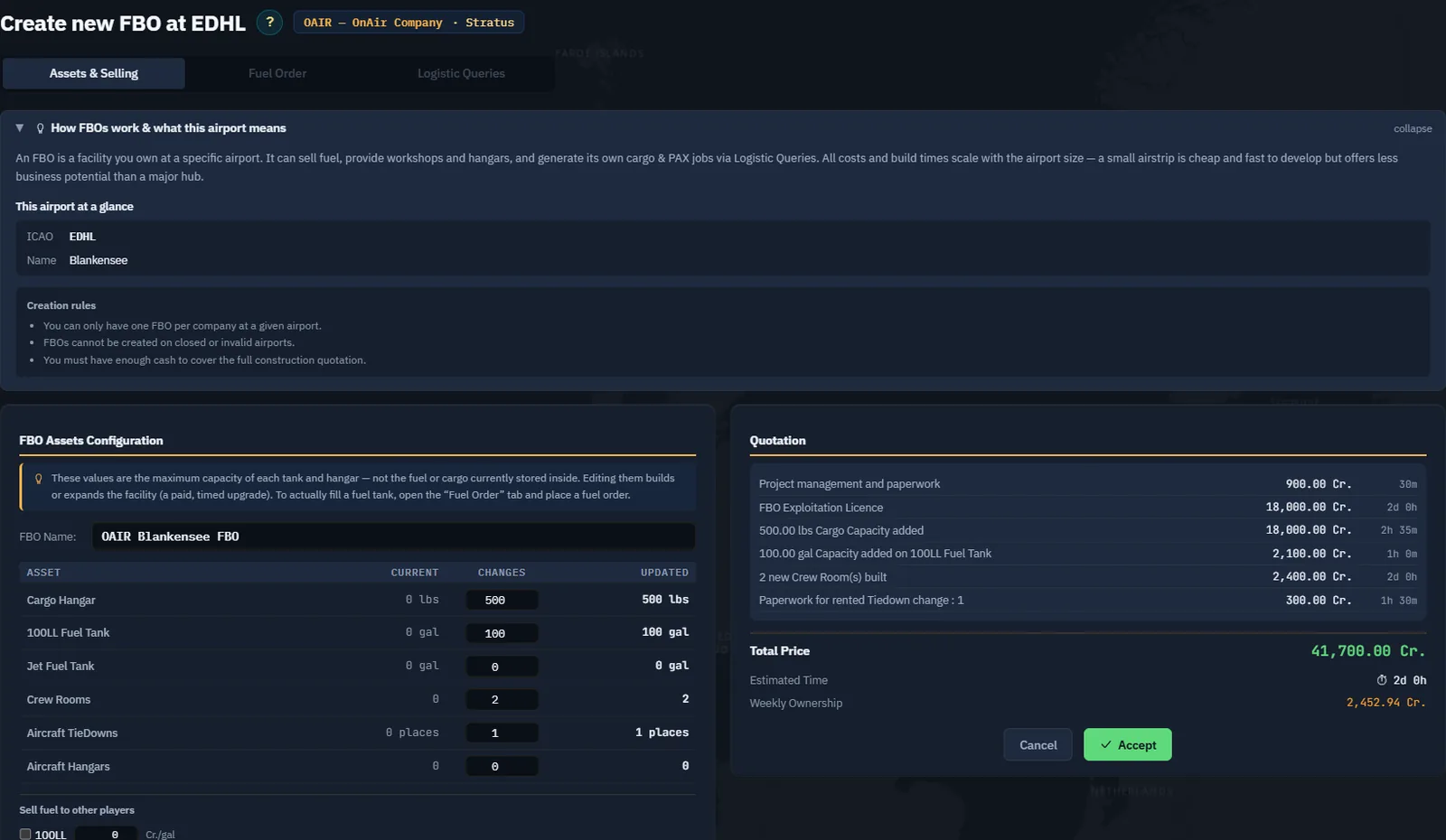
Match the fuel type to the aircraft. Do not pay for every asset category by default. Read skill requirements before planning to sell workshop services; this company's Workshops skill is not unlocked in the example.
Step 4. Quote both the investment and weekly cost
Choose Get a Quotation and review each line. Our real quote totals 41,700 Cr., with an estimated two days and 2,452.94 Cr. weekly ownership. This includes the licence, capacity additions and paperwork; the recurring cost continues beyond the initial construction.
Recheck Chapter 11's cash reserve with the FBO added. Only use Accept when the complete proposal is suitable. After acceptance, wait for the server response rather than clicking again while the button says Applying.
Step 5. Read the construction breakdown
We accepted the quotation and retained OAIR Blankensee FBO. The resulting configuration shows BUILDING and a separate ETA for each asset.
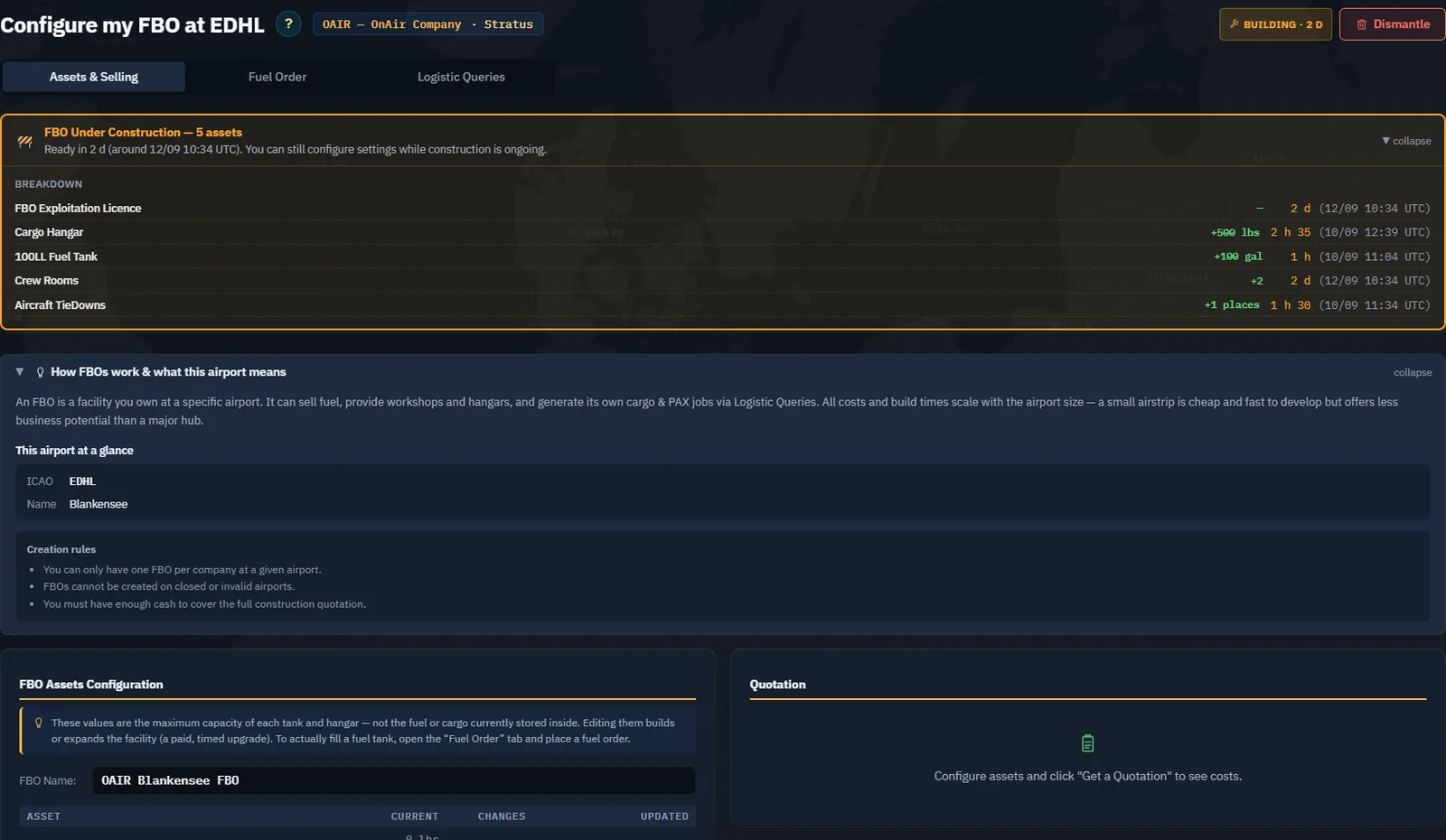
An asset with a shorter build time does not mean the whole facility is ready. Read the specific gate shown for the operation you want. In particular, job generation is unavailable while the required licence or workshop construction blocks it.
Step 6. Order fuel after the tank exists
Open Fuel Order. Our 100LL tank is still being built, so ordering is disabled. The Jet row correctly shows no tank.
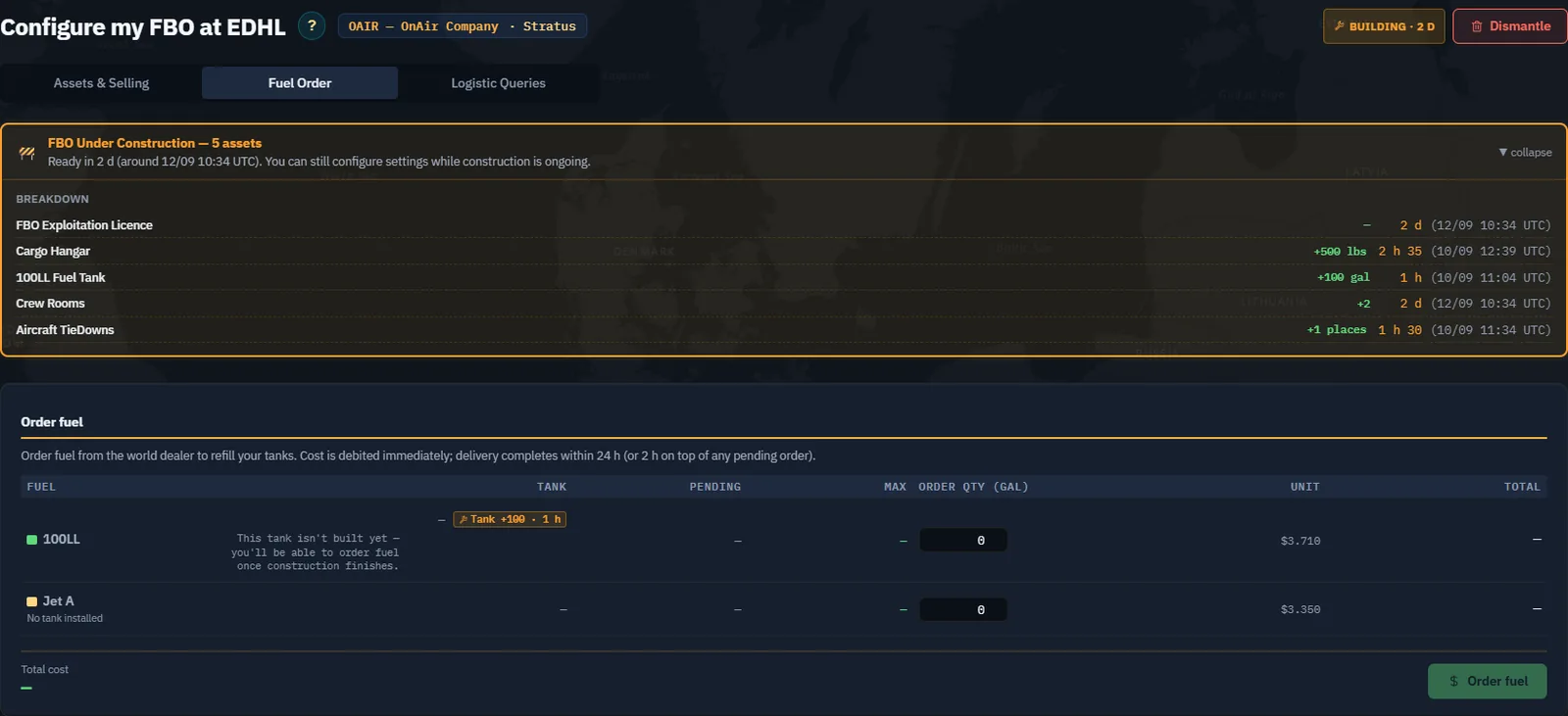
After completion, enter the quantity you need, account for any pending delivery, and review the total before ordering. The order spends cash and has a delivery delay; a pending order is not usable stock. When it arrives, verify the actual tank level before depending on it for dispatch.
Screenshot placeholder FB06 — first fuel delivery. After the EDHL tank is complete, capture a modest 100LL order, its cost and pending ETA, then the delivered stock. Show the actual quantity chosen; do not imply that constructing capacity filled it automatically.
Step 7. Review the operating facility
Return to My FBOs and check the base, stock, capacity and workshop coverage. A facility without a workshop still requires outside maintenance. If adding a workshop later, verify the relevant class agreement, annual capability and staff/capacity information as well as the new quote.
Screenshot placeholder FB07 — completed base. After the licence finishes, capture the same EDHL FBO without its construction gate and the resulting capacities. Keep the before/after captions dated.
For the next lesson we use the company's already established EGPO base to demonstrate Logistic Queries while EDHL is under construction. This is a change of example location, not an instant completion of this build.
Plan fuel supply before relying on an airport
Your own FBO is supplied by its owner; it does not receive the system's scheduled restocks. System FBOs are checked on Monday and Friday at about 04:45 UTC, using the same rule on both days: stock below half capacity is refilled to a random level between 50 % and 100 %. At or above half capacity, nothing is added. The next pass is whichever day comes first, and a busy FBO can run dry between passes.
Check actual stock before scheduling flights. For a base you rely on, plan your own FBO deliveries or carry a fuel container. When an automatic purchase is needed, one FBO must hold the whole required amount; several small stocks are not combined.