
Understand Cash, Costs and Borrowing
Before adding an FBO or another aircraft, establish what the company can afford to operate. A job's advertised payment is revenue, not the profit left after flying it. This exercise follows the actual Cessna purchase and crew contract from the previous chapters.
Step 1. Find the acquisition in Cash Flow
Open Cash Flow Statement, refresh, and read Current Cash and the report date. Locate the aircraft purchase in the transaction list. Our example records 143,640 Cr. for N5454S and a current cash balance of 414,022.87 Cr. at capture time.
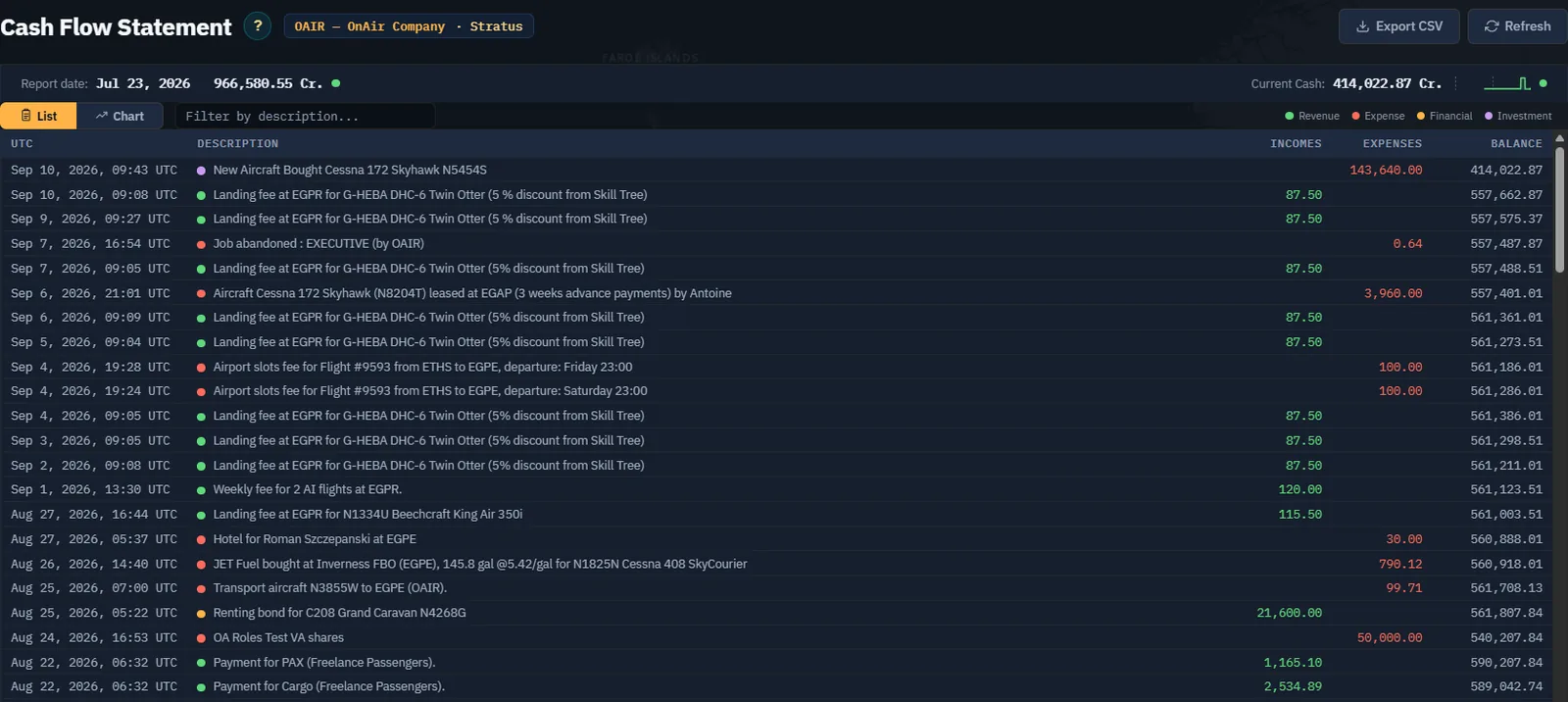
Use the description filter to isolate an aircraft, fuel purchase or fee. Filtering hides rows; it does not redefine the full-company balance. Read the timestamp in UTC and the income/expense column before interpreting an entry. A returned bond, for example, is not a payment for completing a flight.
Step 2. Separate cash movements from operating performance
The legend distinguishes Revenue, Expense, Financial and Investment. The aircraft purchase is an investment: cash has become an aircraft the company still owns. Fuel, wages and maintenance explain a different part of the operation.
Open Income Statement, choose the date interval and use Display. Compare revenues and expenses for that period, then read net income. Do not look for the entire aircraft purchase price as an operating expense on this page. Use the same dates when comparing periods and check report availability if activity appears missing.
Use Balance Sheet for assets, liabilities and company value at the last financial report. Its report date matters: refreshing that page does not turn an old report into a live cash ledger. Use Current Cash for the immediate spending check.
Step 3. Build a budget for the next flight
Start with the accepted job's expected payment. List the fuel still to buy, applicable aircraft rental or lease charges, crew cost, airport charges and a maintenance allowance. Include repositioning if the return leg has no paying work. Use current quotes and the actual contracts rather than copying another aircraft's hourly cost.
The Chapter 8 job pays 570 Cr. for one passenger. That figure alone does not establish profit. Its short distance is useful for a first flying exercise, but the company still needs to cover its wider commitments.
The hired pilot's contract shows 115.50 Cr. per flight hour and 1,695 Cr. weekly guaranteed. Read the game's actual wage entries when reconciling the guarantee and flight activity; do not mechanically assume every displayed contract number is an additional immediate debit.
Step 4. Look for recurring drains
Switch Cash Flow to Chart to see the trend, then return to the list to identify the transactions behind a movement.
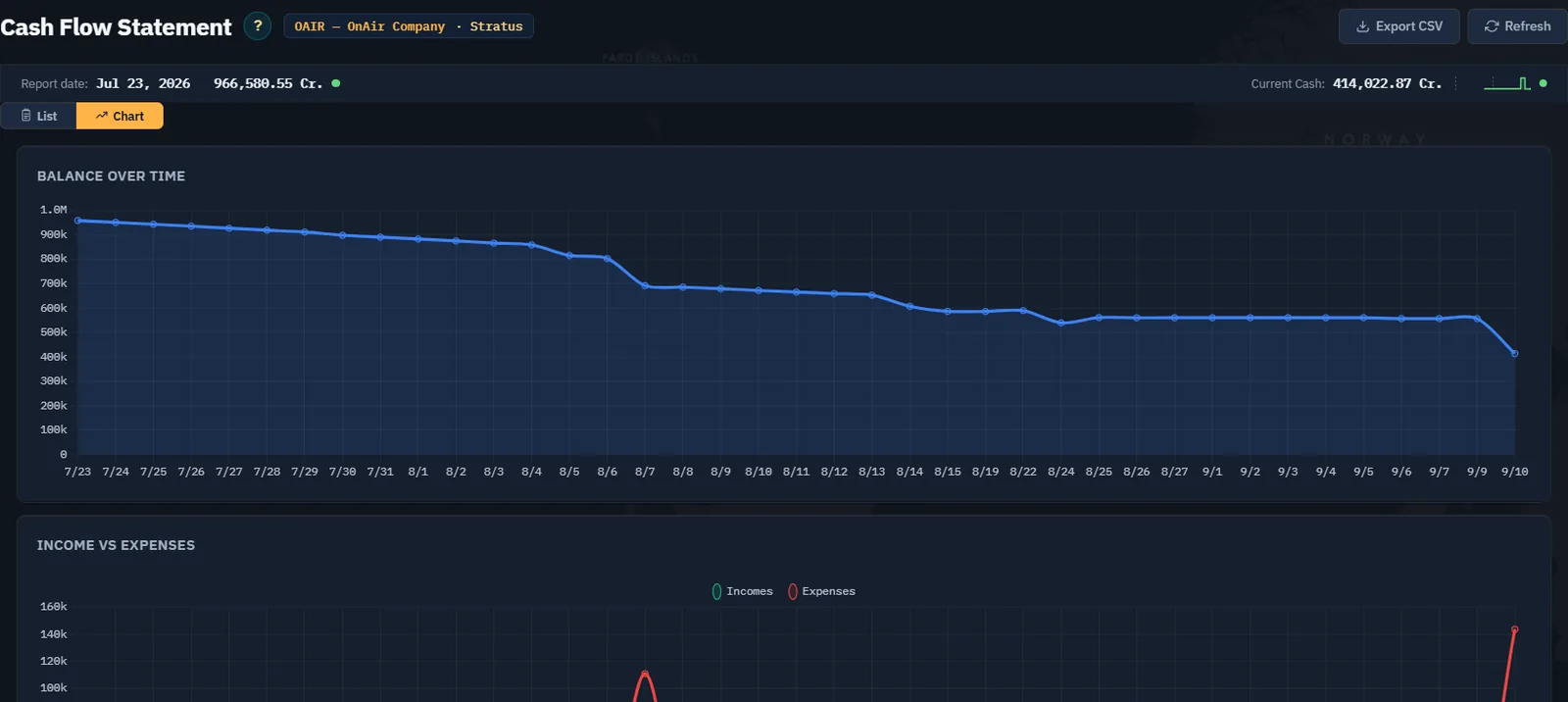
Check recurring wages, rentals, leases, loans and FBO ownership. An idle rental can still incur contract charges. Aircraft, fuel stocks and buildings may have value while the company lacks enough cash for the next payment. Leave a reserve for those commitments before spending the displayed balance on expansion.
Step 5. Read a loan before accepting one
Open Loans. Compare current commitments with any proposals. Read principal, first payment, duration, remaining weeks, weekly payment, rate and amount due. A skill gate, a loading error and an empty proposal list are different states and call for different responses.
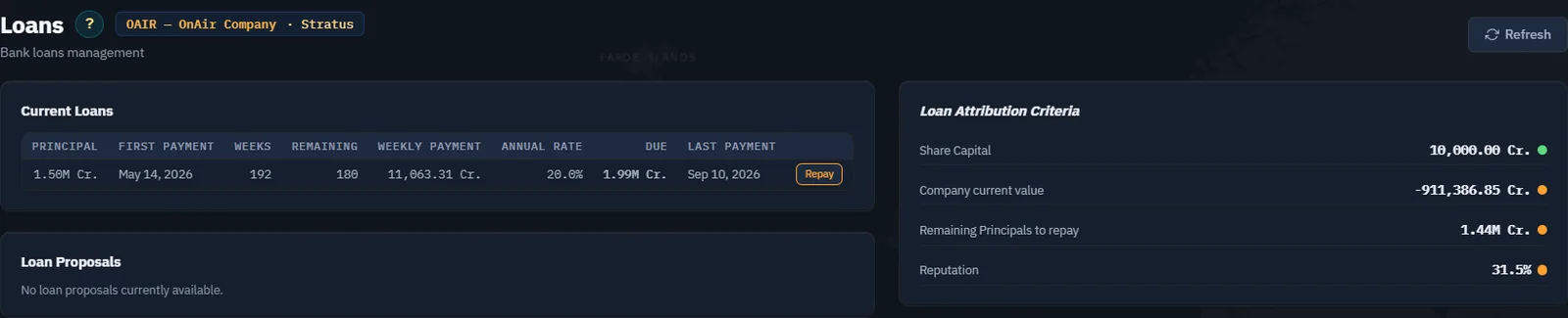
The existing loan displays a 11,063.31 Cr. weekly payment. Include it in the company-wide review even though it was not created for N5454S. If considering early repayment, read the actual quotation and penalty before confirming. If considering new borrowing, estimate how the intended activity will cover the weekly commitment, including a period of poor utilisation.
Step 6. Reconcile after a completed flight
After the simulator flight is registered, return to the ledger and locate the mission payment and associated charges. Separate earlier company transactions by time, description and aircraft. Compare the result with the pre-flight estimate and record why it differs.
Screenshot placeholder CF06 — realised first-job result. After completing and registering Chapter 8's actual flight, capture the job payment and relevant fuel, airport and aircraft/crew charges. Add a short reconciliation with the flight reference and date. Do not use an older company's payment as proof that this mission was delivered.
Step 7. Make the expansion decision
Continue only when you know the available cash, recurring commitments, cost of the next operation and reserve left after the proposed investment. If the plan depends on every flight earning the maximum immediately, reduce its scale first. The next chapter uses this check before configuring the first FBO.