
Acquire and Prepare Your First Company Aircraft
Choose an aircraft for an achievable first operation, not merely because you can afford its asking price. Your pilot's qualification, simulator add-on, departure airport, condition and operating reserve all matter. A returning company should inspect its existing fleet before acquiring anything else.
Step 1. Define the requirement
For this exercise we choose a Cessna 172 Skyhawk, single-engine piston land, for a short flight from EDHL. The player pilot is already there. Its small capacity makes the first load and weight checks manageable. It is intentionally a training example: larger services will need larger aircraft, different qualifications and more crew.
Check the aircraft class you may fly in Advanced. Select a type that matches an installed simulator aircraft if you will fly yourself. An AI pilot can only substitute when the world and mission allow it and the employee has the necessary qualifications.
Step 2. Compare aircraft types
Open Aircraft Market, enter Cessna 172 in Keyword, and compare the returned types. Use the class and simulator filters if needed. Do not confuse the landplane, amphibian and other variants simply because their names contain the same model number.
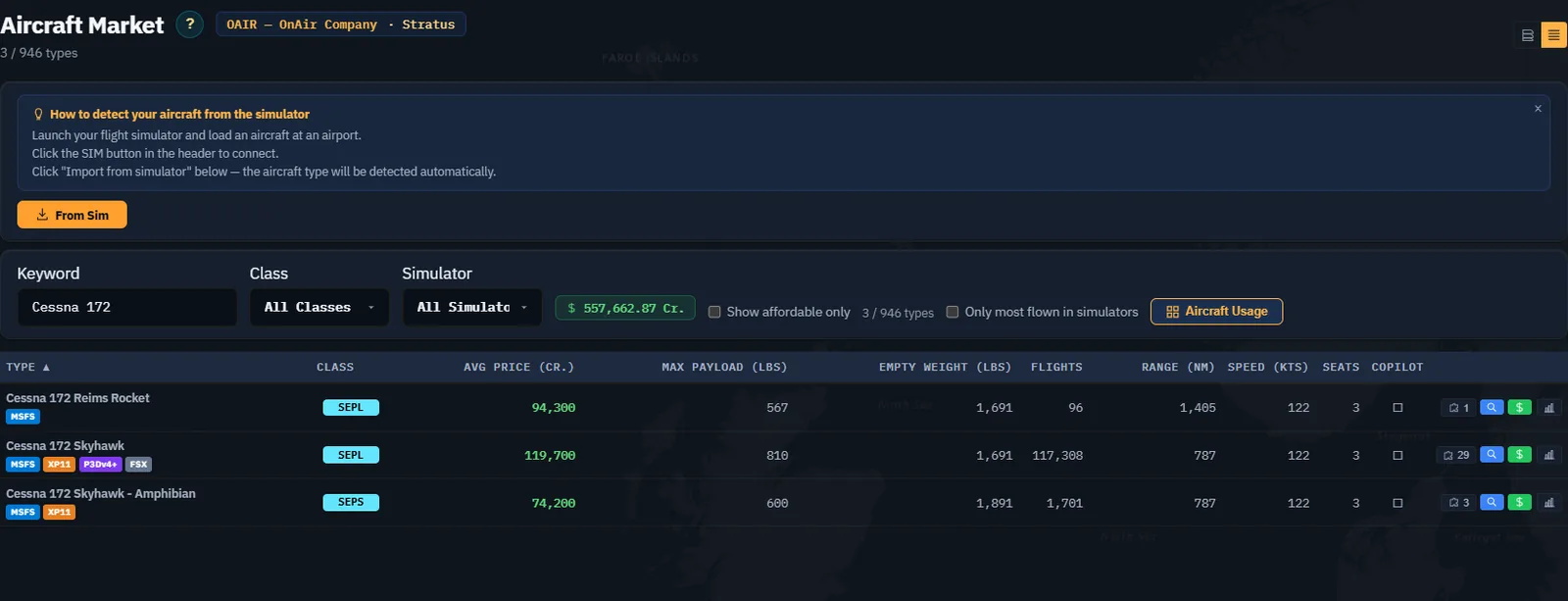
Inspect the compatible add-ons if needed. Use the action whose tooltip says Buy, rent or lease this aircraft to open offers for the chosen type. Aircraft Lookup and Economic Details serve other purposes; opening specifications does not acquire an aircraft.
Step 3. Search where you intend to operate
In the type detail, verify Search Airport and the search range. Use Search Aircraft Database after changing them. The returned aircraft may be near the search airport rather than at it: compare the actual Airport and Dist columns.
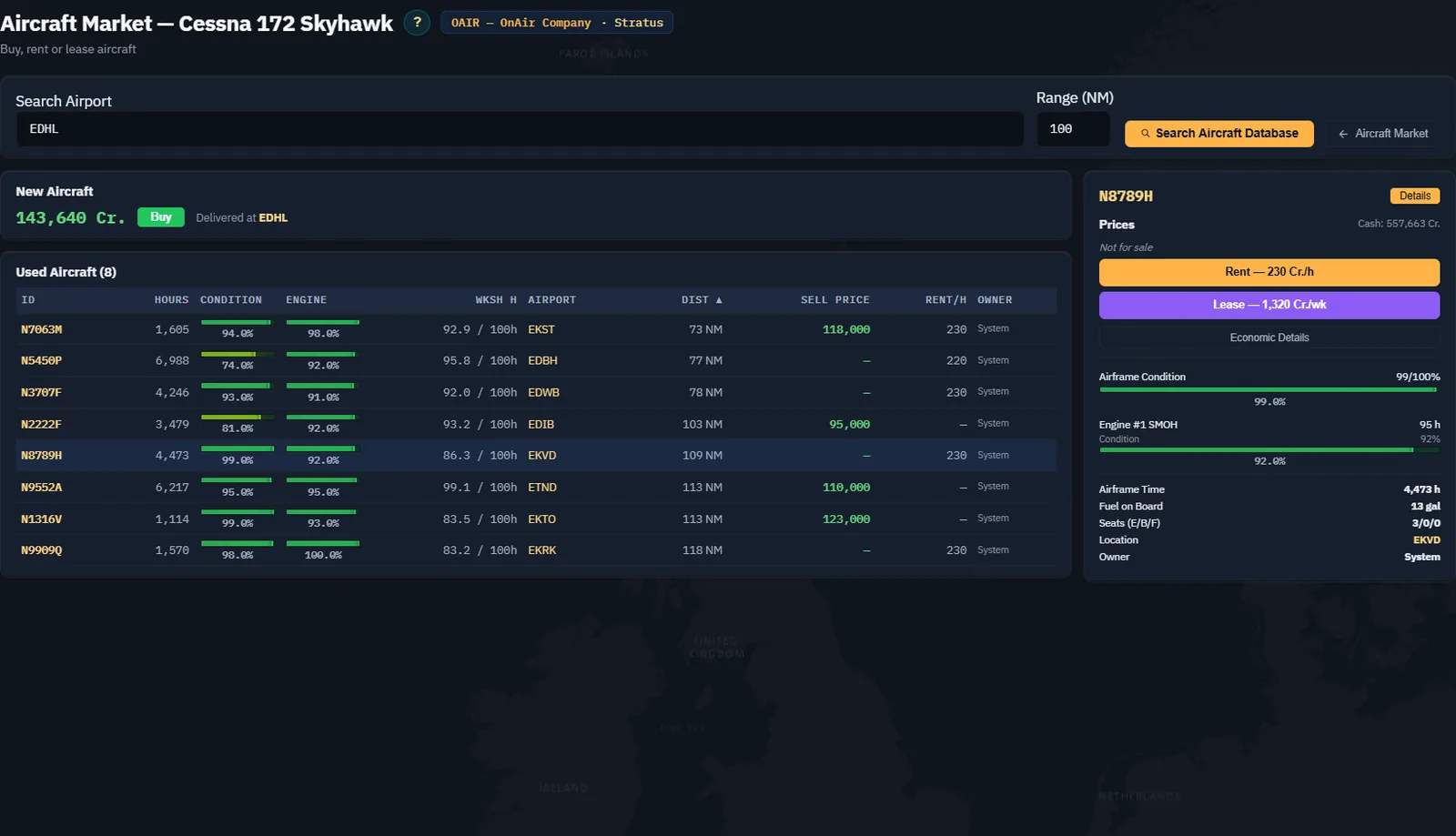
For each candidate, inspect airframe condition, engine condition, workshop/inspection information, price and location together. A cheaper aircraft can require collection and work before your intended first flight.
Step 4. Compare the acquisition methods
| Method | What to assess before confirming |
|---|---|
| Buy | Immediate price, ownership, location and subsequent operating costs. |
| Rent | Hourly charge, immediate bond and the displayed return conditions, including base and fuel. |
| Lease | Weekly rate, duration and the maintenance responsibility shown by the lease terms. |
Read the actual confirmation for the selected offer. A blank price or unavailable action means that method is not offered for that airframe. Do not treat a lease as a cost-free way to avoid an acquisition budget.
Our example purchases a new aircraft for 143,640 Cr. at EDHL. The company had 557,662.87 Cr. at the confirmation, leaving about 414,000 Cr. after the purchase. We chose immediate local availability over collecting a used aircraft from another airport. This is an explained teaching choice, not a universal recommendation to buy new.
Step 5. Confirm the exact purchase
Click Buy on the new-aircraft offer, then read the type, delivery airport, price and available cash in the confirmation. Confirm only when these match the plan.
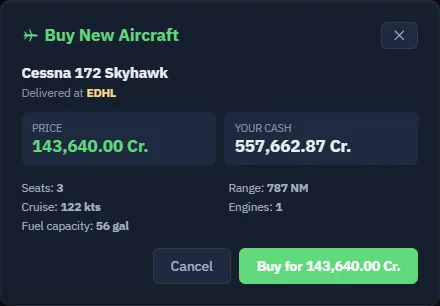
Wait for the result. If the action reports an error, refresh and verify the fleet and balance before attempting another purchase. Do not assume a second click is needed because the first response is slow.
Step 6. Verify delivery in Fleet
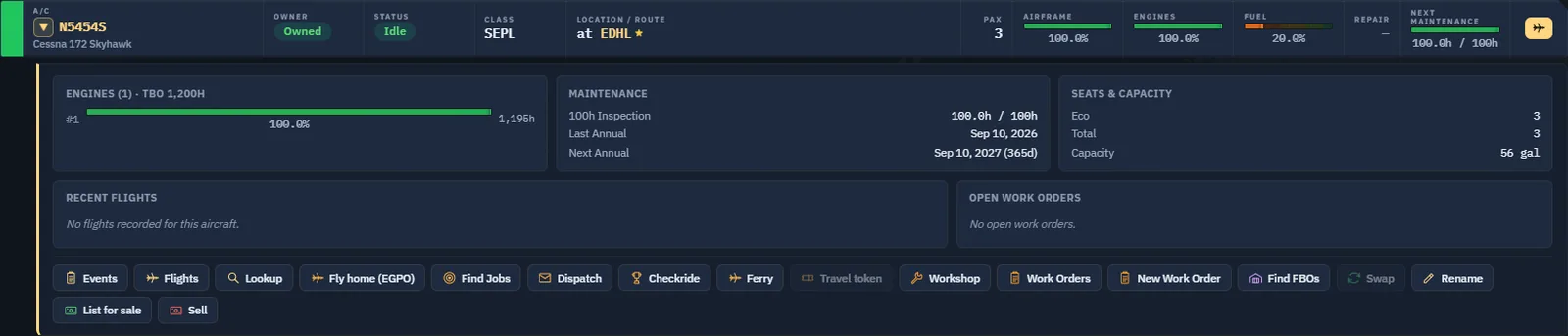
Open Fleet and find the resulting registration. Check ownership, type, status and location. In this exercise the new aircraft is N5454S, Owned, Idle, at EDHL, with the displayed airframe and engine conditions at 100%.

Expand the aircraft and inspect its maintenance and capacity information.
Step 7. Position the pilot and prepare the next action
If the aircraft is elsewhere, plan collection or positioning before accepting time-sensitive work. Read transport costs and timing before confirming a pilot transfer. Do not confuse moving a pilot with moving an aircraft.
In this example both pilot and aircraft are at EDHL, so no positioning flight is needed. The aircraft starts with fuel aboard, but that quantity must still be checked against the selected mission, alternate and reserve.
Use Find Jobs on the aircraft to prospect from its location. Verify the aircraft filter and the limits applied to the search: the next chapter turns one of those offers into the first company flight.
CAPTURE TO COMPLETE — only if using a remote aircraft, AC-07. If you choose a used aircraft away from the starting airport, capture its location and your positioning plan. Where a real collection flight is required, fly and register it, then capture the new fleet location. Do not replace a ferry flight with a fabricated arrival screenshot. The local-delivery exercise above needs no such flight.
Ready for the first job
You should be able to name the aircraft, ownership method, location, pilot qualification, seats, current fuel and remaining operating funds. Keep the acquired aircraft: selling it to reset the tutorial would remove the asset needed by the following chapters.