
Airports
Why is this airport Size 3 and that one Size 5? Why does one airport open at 06:30 and another at 04:00? Why did two nearby airports merge into one in OnAir?
TL;DR — the key points1.1 Airport Size (0–5) — how it is calculated
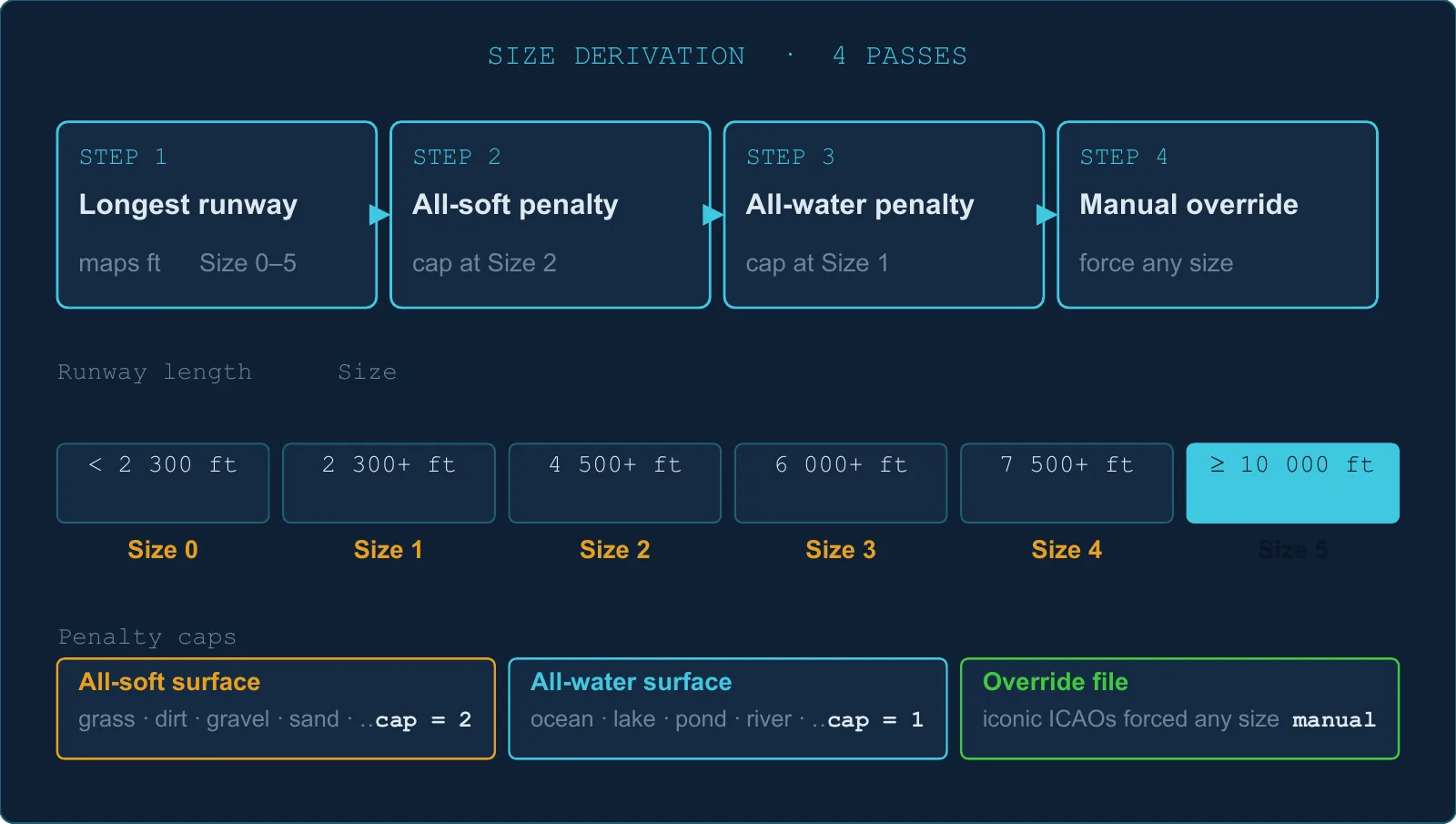
Size is determined by the longest runway, with two possible caps on top.
Step 1 — Longest runway decides the base size
| Longest runway | Base Size |
|---|---|
| ≥ 10 000 ft | 5 |
| ≥ 7 500 ft | 4 |
| ≥ 6 000 ft | 3 |
| ≥ 4 500 ft | 2 |
| ≥ 2 300 ft | 1 |
| < 2 300 ft, or no runway | 0 |
Step 2 — All-grass cap (max Size 2)
If every single runway at the airport is a soft surface (grass, dirt, gravel, sand, etc.), the size is capped at 2 — no matter how long the runway is.
Example: a 12 000 ft grass strip would be Size 5 by length, but is capped to Size 2.
Step 3 — All-water cap (max Size 1)
If every single runway is a water surface, the size is capped at 1. Pure seaplane bases ultimately land at Size 0.
Step 4 — Manual overrides
A handful of iconic airports are force-set to a specific size by the development team, overriding the formula.
Heliports
An airport with only helipads and no runway gets Size 0 and is treated separately from regular airports (it is excluded from merge rules).
1.2 Where your airports are synchronized from
OnAir supports MSFS 2024 and 2020, X-Plane 12 and 11, Prepar3D v4 to v6, and FSX. Airport synchronization uses the source datasets below; this table is not a list of supported simulator versions. When multiple source datasets contain the same airport, MSFS 2020 takes priority.
| Source | Priority |
|---|---|
| MSFS 2020 | Highest |
| Prepar3D v4 | 2nd |
| FSX | 3rd |
| X-Plane 11 | 4th |
"Addon required" flags
Every airport carries four independent flags, one per simulator, indicating whether it exists in that simulator's standard install:
| Flag | What it means |
|---|---|
| Not in standard MSFS 2020 | You need a scenery addon to see this airport in MSFS |
| Not in standard P3D | Missing from Prepar3D v4 stock |
| Not in standard FSX | Missing from FSX stock |
| Not in standard X-Plane | Missing from X-Plane 11 stock |
If you fly MSFS and your destination is marked "not in standard MSFS", you will need the matching scenery addon to land there.
1.3 Runway surface types
Surfaces that trigger the all-soft cap (max Size 2): coral, dirt, grass, gravel, planks, bumpy grass, short grass, long grass, hard turf, forest, sand, shale, and any unknown/undefined surface.
Surfaces that trigger the all-water cap (max Size 1): ocean, lake, pond, river, waste water, and water variants.
Standard hard surfaces (concrete, asphalt, tarmac, macadam, etc.) have no cap.
1.4 Parking & ramp types
| Type | Category |
|---|---|
| General Aviation ramps (small / medium / large / extra) | GA |
| Cargo ramp | Cargo / commercial |
| Military cargo / combat ramp | Military |
| Airline gates (small / medium / heavy / extra) | Airline |
| Seaplane dock | Seaplane |
| Fuel point | Fuel |
The "extra" GA and airline gate types only appear at airports imported from MSFS 2020.
1.5 Military airports
An airport is flagged as military if:
- Its name ends in "AB", "MIL", "AIR BASE", or contains "AFB", or
- Its ICAO code is on a hardcoded list of ~80+ bases (NATO fields, US Army/USAF, several Dutch, Japanese, and Italian military fields).
1.6 The airport data version
The game client caches airport data locally. Every time airport data is updated on the server, the version number increments by 1. When the client detects a new version, it downloads the updated data. You do not need to manage this manually.
1.7 Basecamp airports
Airports flagged as basecamps are permanent community fixtures:
- Never modified by any import cycle.
- Not subject to the proximity merge rules.
- Cannot be overridden by simulator addons.
1.8 How your arrival airport is recorded
When you file a flight you enter up to three airports. OnAir keeps all three, but it does not blindly trust your filed destination when it closes the flight — it checks where you actually shut the engines down and records the arrival from that position.
| Field | What it is | How it is used |
|---|---|---|
| Planned destination (intended) | The airport you filed as your destination at dispatch. | Compared against your shutdown position to decide your arrival. |
| Alternate | The fallback airport you filed at dispatch. | Informational only — recorded for your planning, never selected automatically as your arrival. |
| Actual arrival | The airport OnAir logs once the flight is registered. | This is what appears in your logbook. |
The selection runs at registration, in this order:
- OnAir measures the distance between your engine-shutdown position and your planned destination.
- If that distance is under 5 NM, your planned destination is logged as the arrival.
- Otherwise, OnAir finds the nearest suitable open airport: valid, not closed, and meeting the aircraft's minimum airport Size. Heliport-only fields are excluded for fixed-wing aircraft; helicopters may use them.
- If that suitable open airport is more than 5 NM away, the search also considers closed airports, with the same aircraft-compatibility filters.
- Only if no suitable airport can be found does the server fall back to the nearest airport without those compatibility filters, so registration can complete.
Diversions: if you land somewhere other than your filed destination, your logbook shows where you really stopped, not where you intended to go. In the Companion, the flight log marks this with a small DIV badge and shows your planned destination alongside the actual arrival; the alternate is shown too, with an info tip explaining this exact rule.
Two things worth remembering: the 5 NM radius is measured from where you stop, not from a runway threshold, and the alternate is never chosen for you — it is stored purely as planning information.
1.9 TL;DR
- Size is based on the longest runway length, but all-grass → cap 2, all-water → cap 1.
- MSFS 2020 airport data always takes priority over other simulators.
- If your destination doesn't appear in OnAir, check whether it requires a simulator addon.
- Military airports are identified by name suffix or a hardcoded list of ICAO codes.
- Basecamp airports are permanent fixtures — never merged, never overridden.
- Your arrival is logged as your planned destination only if you stop within 5 NM of it; otherwise OnAir searches for the nearest suitable airport, with the fallback rules in §1.8. The alternate is informational and never auto-selected.