
Start in Onboarding Mode
Onboarding lets you learn to fly OnAir missions and build a cash reserve before running a company. After installing Companion and connecting your simulator, this chapter explains the starting phase, the one-time financial reward when you unlock Advanced, and the choices to review before leaving it. You can read it now and remain in Onboarding while completing the first Freelance lessons.
Step 1. Recognise your company's starting mode
Enter your company from the Lobby and check the sidebar badge. Onboarding Mode means that this company has not yet unlocked Advanced management. It uses the Freelance flying experience, with company management paused. Onboarding belongs to the company: another company on your account can already be in Advanced.
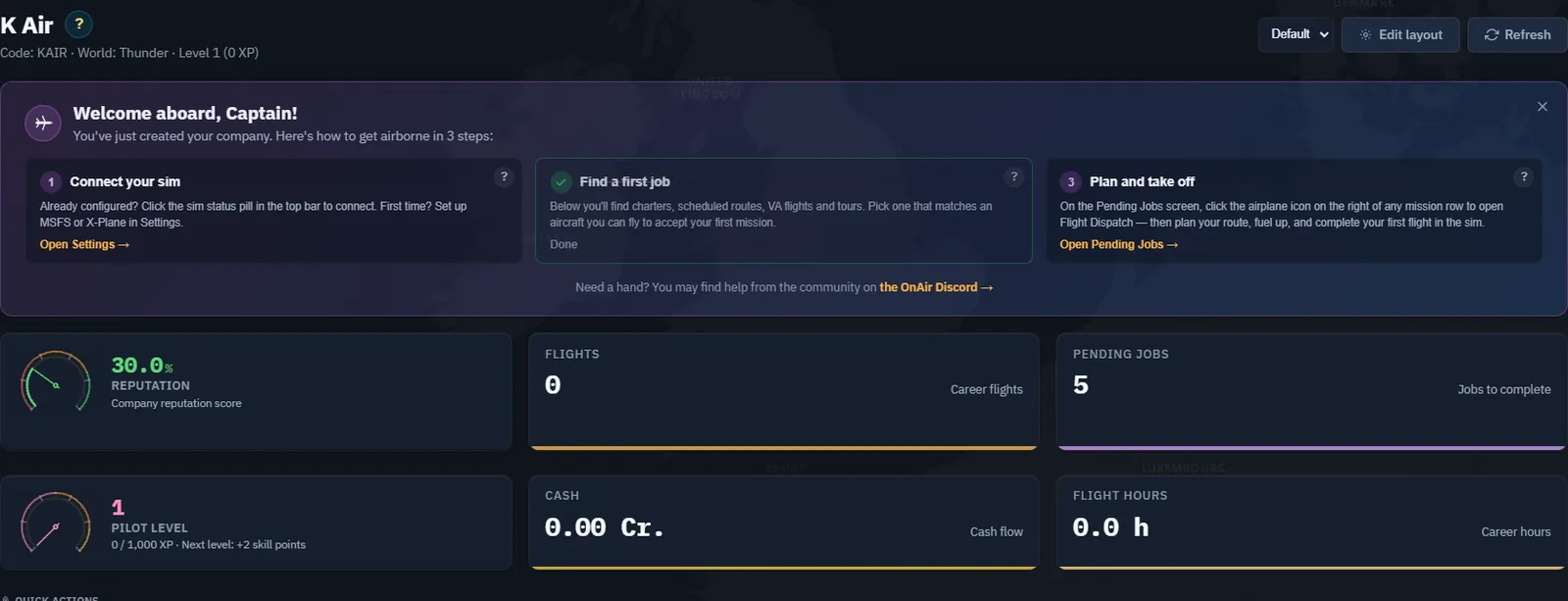
The welcome panel is a guide, not proof that a flight has been completed. Use Chapter 1 to check your simulator connection, then continue to Chapter 3 for your first charter. Opening a page or dismissing a welcome card does not earn flight revenue.
Step 2. Fly before taking on company overheads
Start with a Freelance charter suited to an aircraft you can actually fly. The job supplies the operational package; you do not first need to buy a company aircraft or hire a crew. Scheduled Freelance routes provide another learning path, with their own rank and completion rules. Tours and eligible VA jobs can also appear in the Freelance experience.
The onboarding phase keeps regular company overheads out of this first exercise: you are not running payroll, scheduling fleet maintenance or financing your own FBO network. Complete the mission, register the flight and inspect the actual payment. An accepted job's advertised reward is not yet cash in your account.
CAPTURE TO COMPLETE - OB02, real flight required. On a company still in Onboarding, capture the accepted charter and its reward, then the registered flight and corresponding Cash Flow entry after actually flying it. Record the opening and closing cash balance. Do not use an Advanced-company payment to illustrate an onboarding earning.
The small Cessna exercises in this volume deliberately keep the first operation manageable. They demonstrate a method, not the maximum size of aircraft or route supported by OnAir. The later company-route chapter includes an A380 example.
Step 3. Understand exactly what is doubled
The standard first-unlock calculation in the inspected server code is:
Cash after unlock = current cash + matching cash bonus + starting equity.
The matching bonus equals your current cash, so this is also 2 x current cash + starting equity. Your existing balance remains; the server credits one additional copy of it and the separate equity amount. It does not add twice the balance on top of the original balance.
| Component | Example on Realistic difficulty in a survival world |
|---|---|
| Current cash before unlocking | 25,000 Cr. |
| One-time matching cash bonus | 25,000 Cr. |
| Starting equity | 10,000 Cr. |
| Cash after standard unlock | 60,000 Cr. |
This is an arithmetic example, not a captured payment. If you earn another 5,000 Cr. before unlocking and nothing else changes the balance, the standard starting total rises by 10,000 Cr. The reward is calculated at the transition; there is no separate permanent x2 multiplier applied to every future Advanced job.
Use current cash, not lifetime revenue, company value, aircraft value or the sum of unfinished job rewards. No minimum cash balance is tested by the inspected first-unlock quotation: zero cash produces a zero matching bonus, with starting equity still added.
Step 4. Check the starting equity for your difficulty
The inspected starting-cash function returns the following amounts. Difficulty and the world's survival setting are separate inputs; read your own company settings and live quotation.
| Difficulty | World survival setting | Starting equity |
|---|---|---|
| Easy | Either | 470,000 Cr. |
| Classic | Either | 170,000 Cr. |
| Realistic | Off | 70,000 Cr. |
| Realistic | On | 10,000 Cr. |
Difficulty also sets the starting reputation (70% / 50% / 30%, which then evolves with your flights) and a loan capacity multiplier (×1.5 / ×1 / ×0.7) that stays for the life of the company. Stratus and Thunder companies are created as Realistic. It does not decide AI pilots: AI flights depend on the world, and Thunder forbids them.
These are the rules verified in source on 10 September 2026. The current server quotation remains the amount to review before confirming. The matching onboarding bonus, difficulty-based equity, individual job bonuses and optional Airliner financing are different components. Do not combine them into an assumed universal multiplier. The inspected implementation does not grant an additional fixed 100,000 Cr. for using Companion.
Step 5. Open the quotation without committing
- Open Settings, then Company Actions.
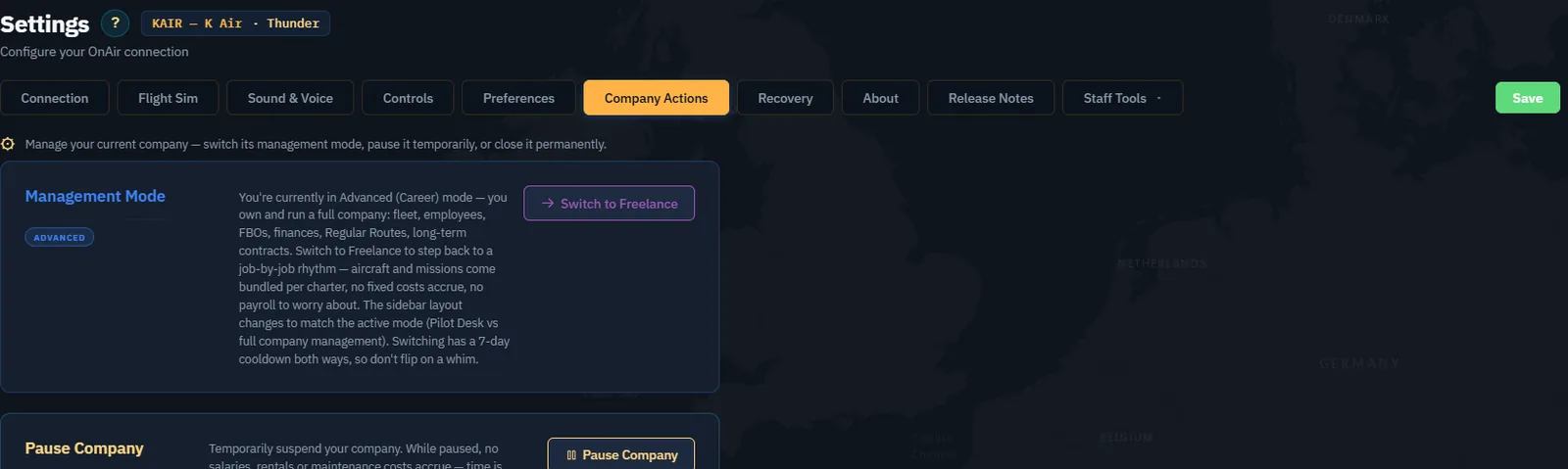
- Find Management Mode. It may say Freelance here while the sidebar says Onboarding Mode: the first describes the underlying mode, the second its first-time state.
- Select Unlock Advanced Mode.
- Read Your Starting Capital, including current earnings, additional equity and total.
- Choose Maybe later if you are still practising or only checking the proposal.
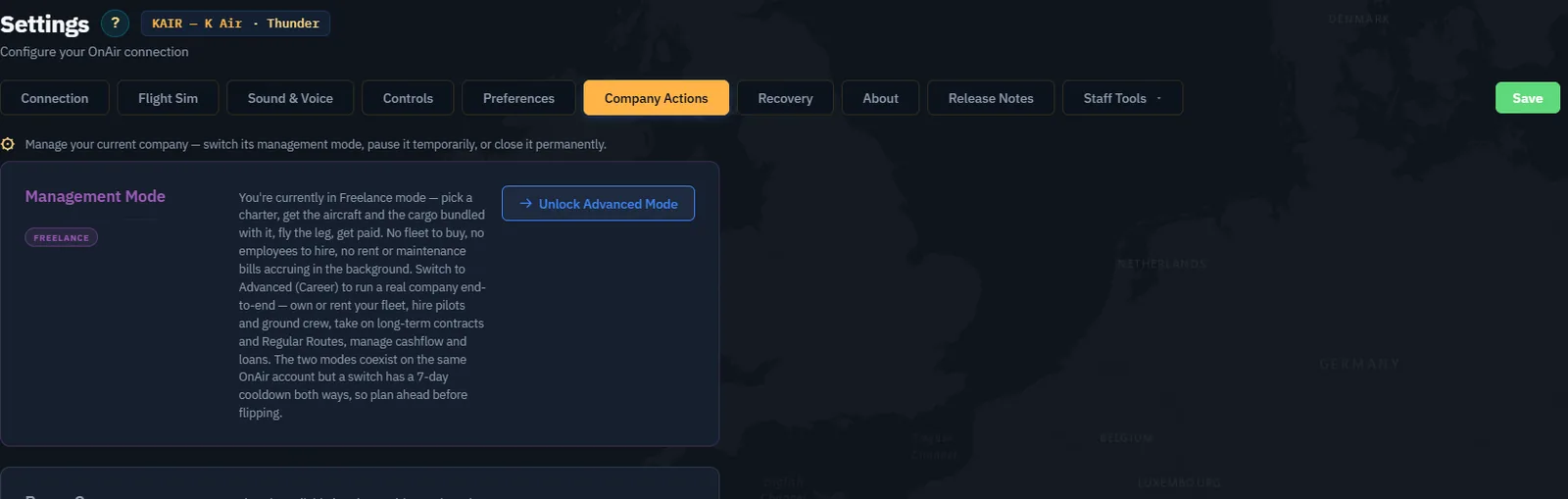
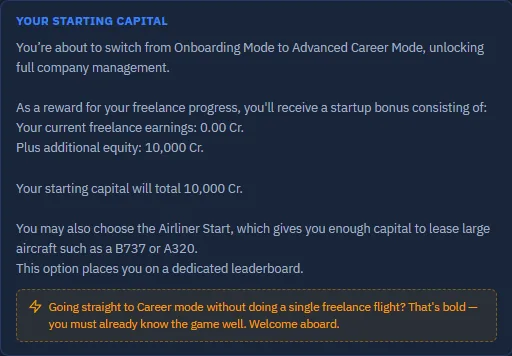
This is a genuine first-unlock proposal. The returning-company confirmation shown in Chapter 6 has a different purpose and does not offer the onboarding bonus again.
Step 6. Decide whether Airliner Start fits your plan
The optional Start as an Airliner Company choice adds a different starting package. The inspected server setup takes a 1,500,000 Cr. loan, establishes a home-airport FBO, hires one pilot and two cabin crew, grants jet certifications to the player and starter crew, brings a company below level 3 up to level 3, and grants initial finance, FBO, passenger and hiring skills. The interface also identifies a dedicated leaderboard.
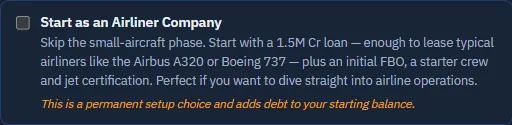
Loan proceeds add cash and debt. They are not part of the matching onboarding reward and should not be counted as earned profit. This package helps finance leasing an airliner; it does not give you ownership of an A320 or B737. Check the actual loan schedule, fleet terms, staffing and operating reserve before proceeding.
For this volume's small-company exercise, leave the option unchecked. Standard Advanced flying requires the appropriate aircraft-class certification; Freelance flights alone do not earn these ratings. The Airliner package's explicit jet-certification grant is a separate provision.
Step 7. Leave onboarding when you are ready
You do not need to unlock Advanced merely to continue this book. First practise connection, dispatch, tracking and flight registration, then build a reserve and choose a realistic first company operation. Chapter 6 walks through that operating decision.
When ready, reopen the quotation, review its current amounts and confirm the first unlock. Inspect the Advanced badge and Cash Flow afterwards. For a standard start, reconcile the original cash, the owner's equity entry and the special transition-bonus entry. For an Airliner start, reconcile loan proceeds and setup transactions separately as well.
On 10 September 2026 at 16:10 UTC, we confirmed KAIR's standard first unlock with the owner's permission. Cash Flow then showed 10,000 Cr. current cash, an Owner's equity receipt of 10,000 Cr., and the special transition-bonus row with no income amount because the starting balance was zero.
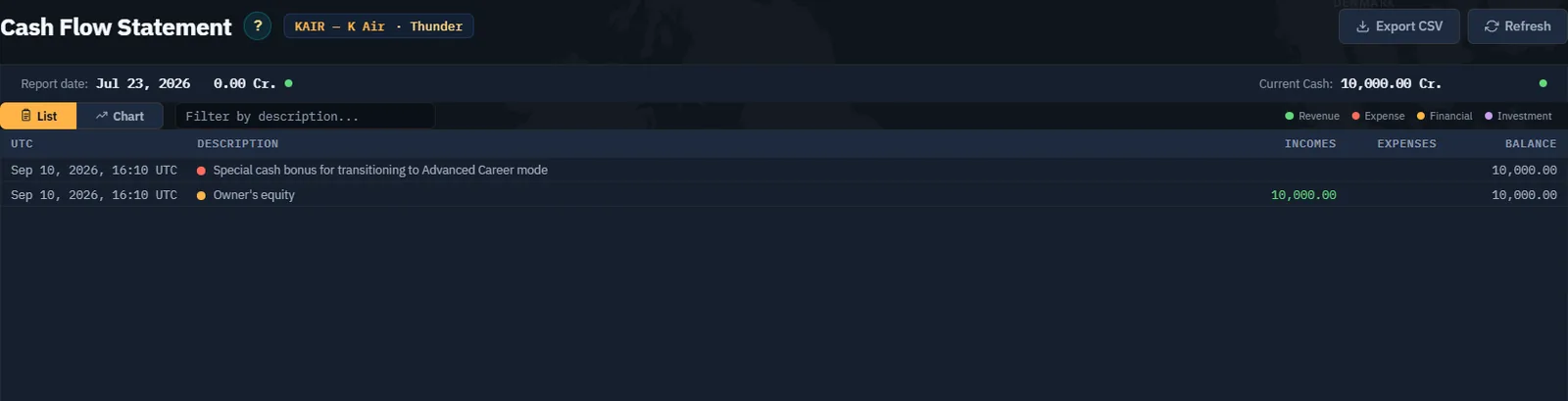
CAPTURE TO COMPLETE - OB08, non-zero onboarding balance required. On another authorised company still in onboarding, complete real Freelance flights, then record a non-zero balance, the unlock quotation and the actual bonus credited after an authorised first transition. KAIR verifies the zero-balance case; the 25,000 Cr. calculation earlier is a source-checked example, not a second live test.
The bonus is a one-time opportunity for that company. After Advanced is unlocked, ordinary switches between Advanced and Freelance do not repeat it or recreate onboarding. The normal production rule for later mode changes is a seven-day interval; read the date actually shown by the app. The first unlock uses a separate server operation, so do not infer an exact first return date from an old screenshot.
Before a later return to Freelance, inspect the confirmation and outstanding commitments. The inspected mode-change code pauses the company, ends rentals of aircraft owned by another company and removes accepted unpaid non-career missions. A return to Advanced is therefore not a promise that every rental or pending job is preserved.
Checkpoint: you can identify onboarding, explain 2 x current cash + equity, distinguish the optional loan from a bonus, and inspect the first-unlock proposal without accepting it. Continue with Complete Your First Freelance Charter.
Official reading and verification
Use the live quotation shown in the app for your company to verify the amounts before confirming the transition.